 Skip to content
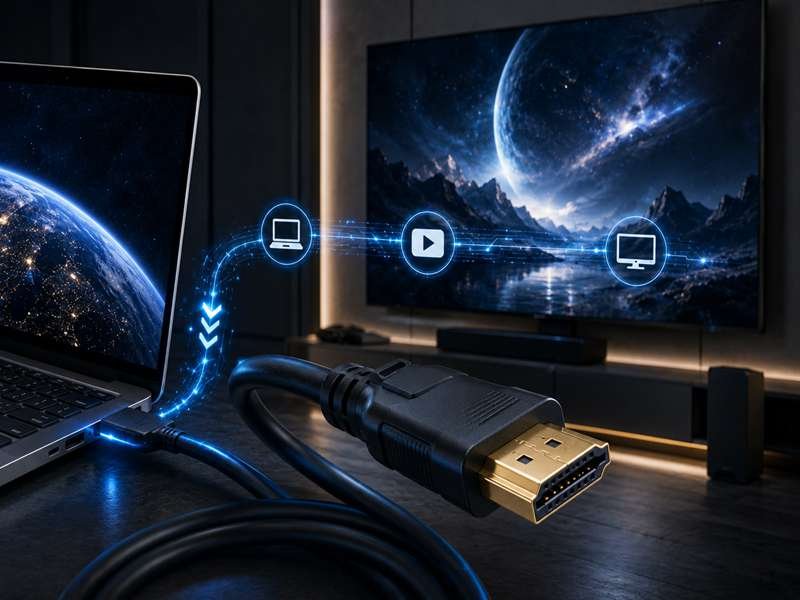
Most people notice an HDMI cable only when something goes wrong. The TV shows “No Signal.” The monitor flickers during a meeting. A gaming console does not reach 4K 120Hz. A projector works in the office but fails after the cable is routed through a wall. In many cases, the device is not the problem. The cable is.
An HDMI cable is a digital cable used to carry video, audio, and device control signals between HDMI-compatible equipment. It connects devices such as TVs, monitors, gaming consoles, computers, projectors, cameras, media players, medical displays, industrial screens, and commercial signage systems. A suitable HDMI cable can support Full HD, 4K, 8K, high refresh rates, and multi-channel audio, depending on its version, bandwidth, length, and build quality.
The mistake many customers make is treating HDMI as a simple accessory. For short home use, that may be fine. But for 4K/8K displays, gaming systems, conference rooms, medical equipment, industrial control panels, or OEM devices, cable length, shielding, connector strength, bending flexibility, and signal stability all matter.
At Sino-Conn, customers often send only a photo of an HDMI cable and ask, “Can you make this?” Sometimes they know the connector type and length. Sometimes they only know the cable must fit inside a machine, behind a screen, or inside a control cabinet. In these cases, HDMI cable selection becomes an engineering decision, not just a shopping decision.
What Is an HDMI Cable?
If you purchased a new TV, connected a gaming console, installed a conference room display, built a digital signage system, or designed an electronic device, chances are you have used an HDMI cable.

Despite being one of the most widely used cables in the world, HDMI is often misunderstood.
Many people think an HDMI cable is simply a wire that connects one screen to another. In reality, modern HDMI cables are high-speed digital transmission assemblies designed to carry massive amounts of data reliably and accurately.
As display technology continues to advance, HDMI cables are responsible for carrying increasingly complex signals. A modern 8K display running at 60Hz may require nearly ten times more bandwidth than an older Full HD television. Gaming systems, commercial displays, medical imaging equipment, machine vision systems, and industrial control panels all place different demands on HDMI performance.
This is why two HDMI cables that look nearly identical on the outside can perform very differently in actual use.
For many OEM manufacturers, the HDMI cable is no longer just an accessory. It becomes an essential part of the product itself.
What Does HDMI Mean?
HDMI stands for High-Definition Multimedia Interface.
The technology was developed to simplify audio and video connections by replacing multiple analog cables with a single digital interface.
Before HDMI became the industry standard, users often needed separate cables for:
- Video transmission
- Audio transmission
- Device control
- Signal synchronization
This increased installation time and created additional failure points.
HDMI changed that approach by integrating multiple functions into one compact connector system.
Today, HDMI is used in billions of devices worldwide.
Common HDMI-equipped products include:
| Product Category | Typical HDMI Application |
|---|---|
| Televisions | Audio and Video Input |
| Monitors | Computer Display |
| Gaming Consoles | High-Resolution Output |
| Projectors | Presentation Systems |
| Cameras | Video Monitoring |
| Medical Equipment | Diagnostic Displays |
| Industrial Systems | Human Machine Interface (HMI) |
| Digital Signage | Commercial Advertising Displays |
What makes HDMI particularly valuable is its ability to maintain digital signal integrity across a wide range of applications.
Unlike older analog interfaces, digital transmission helps preserve image quality and audio quality from source to destination.
How Does an HDMI Cable Work?
An HDMI cable transfers digital information between devices.
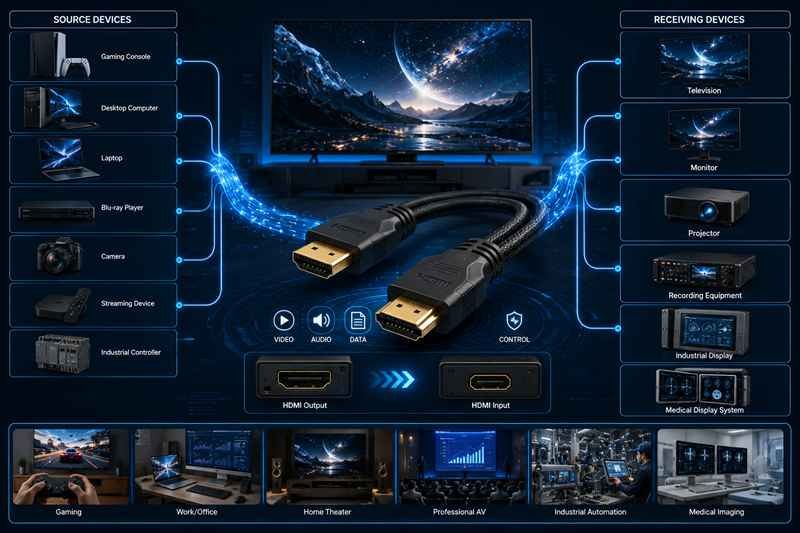
When a source device generates audio and video data, the HDMI cable transports that information to a receiving device where it is decoded and displayed.
A source device may include:
- Gaming console
- Desktop computer
- Laptop
- Blu-ray player
- Camera
- Streaming device
- Industrial controller
A receiving device may include:
- Television
- Monitor
- Projector
- Recording equipment
- Industrial display
- Medical display system
Inside an HDMI cable are multiple conductors arranged in carefully engineered signal pairs.
These conductors must transmit data at extremely high speeds while minimizing:
- Signal loss
- Electromagnetic interference
- Crosstalk
- Timing errors
The amount of data transmitted can be substantial.
| Display Format | Maximum Bandwidth Requirement |
|---|---|
| 1080p | Up to 4.95 Gbps |
| 4K 30Hz | Up to 10.2 Gbps |
| 4K 60Hz | Up to 18 Gbps |
| 4K 120Hz | Up to 48 Gbps |
| 8K 60Hz | Up to 48 Gbps |
This is one reason why cable construction becomes increasingly important as display performance increases.
A cable that performs perfectly at Full HD may struggle when transmitting 4K HDR content or 8K video.
What Is an HDMI Cable Used For?
Many people associate HDMI exclusively with televisions.
In reality, HDMI is used throughout consumer electronics, commercial systems, industrial equipment, transportation systems, and medical devices.
Home applications include:
- Smart TVs
- Streaming devices
- Home theater systems
- Gaming consoles
- Desktop monitors
- Laptop docking stations
Commercial applications include:
- Conference room displays
- Retail advertising screens
- Hotel entertainment systems
- Education technology
- Digital signage networks
Industrial applications include:
- Machine vision systems
- Factory automation displays
- Production monitoring stations
- Control room displays
- Security systems
Medical applications include:
- Endoscopy equipment
- Diagnostic imaging systems
- Surgical displays
- Medical workstations
At Sino-Conn, HDMI cable assembly projects often come from equipment manufacturers rather than individual consumers.
These customers may require:
- Custom cable lengths
- Right-angle connectors
- Panel-mount HDMI interfaces
- Enhanced EMI shielding
- Compact cable routing
- High-flex cable structures
In many cases, the HDMI cable must fit inside a product enclosure with only a few millimeters of available space.
This transforms the cable from a simple connection into a critical engineering component.
What Signals Can an HDMI Cable Carry?
One of HDMI’s greatest advantages is versatility.
An HDMI cable can carry multiple types of information simultaneously.
| Signal Type | Function |
|---|---|
| Video | Transfers images and graphics |
| Audio | Transfers sound |
| Device Control | Enables communication between devices |
| Ethernet Data | Supported in certain configurations |
| Audio Return | Sends audio back to receivers or soundbars |
| Enhanced Audio Return (eARC) | Supports advanced audio formats |
This capability eliminates the need for multiple separate cables in many installations.
For example, a modern home theater system may use a single HDMI cable to transmit:
- 4K HDR video
- Dolby Atmos audio
- Device control commands
The result is a cleaner installation and fewer connection points.
For OEM manufacturers, reducing connector count often improves reliability while simplifying assembly.
Why Is HDMI So Popular?
HDMI succeeded because it solved several problems simultaneously.
It provided:
✓ One cable for audio and video
✓ Higher image quality
✓ Digital transmission
✓ Broad compatibility
✓ Easy installation
✓ Ongoing support for newer technologies
The table below illustrates how HDMI compares with several older connection methods.
| Interface | Audio Support | Video Support | Maximum Quality |
|---|---|---|---|
| Composite Video | Separate | Yes | Standard Definition |
| VGA | No | Yes | Limited |
| DVI | Limited | Yes | High Definition |
| HDMI | Yes | Yes | Up to 8K and Beyond |
For users, HDMI offers convenience.
For installers, HDMI reduces complexity.
For manufacturers, HDMI provides a globally recognized interface that customers already understand.
However, widespread adoption has created a common misconception.
Many people assume all HDMI cables are identical because the connector shape looks the same.
That assumption often leads to compatibility problems.
An HDMI cable designed for a Full HD office monitor may not reliably support:
- 4K 120Hz gaming
- 8K displays
- Long-distance commercial installations
- Industrial environments with heavy EMI exposure
This is why professional engineers pay attention to specifications such as:
- HDMI version compatibility
- Bandwidth capability
- Shielding structure
- Conductor quality
- Connector construction
- Cable length
- Environmental requirements
Real Project Example
A European manufacturer of industrial display equipment contacted Sino-Conn while developing a new touchscreen control panel.
The original design used a standard retail HDMI cable.
Although the cable worked during laboratory testing, problems appeared once the display was installed inside the final enclosure.
The cable was:
- Too long
- Too stiff
- Difficult to route
- Vulnerable to EMI from nearby electrical components
The engineering team reviewed the installation layout and developed a custom HDMI cable assembly featuring:
- Reduced cable length
- Improved flexibility
- Enhanced shielding
- Optimized connector orientation
The revised assembly simplified installation and improved long-term reliability.
The display hardware never changed.
The cable design did.
This example highlights an important reality.
An HDMI cable is far more than a simple connection accessory. It is an integral part of the signal path, and in many applications, it can directly influence system performance, reliability, and user experience.
Understanding what an HDMI cable is—and how it is built—provides the foundation for choosing the right cable type, HDMI version, and cable assembly design for your specific application.
Which HDMI Cable Is Best?
One of the biggest misconceptions about HDMI cables is the belief that there is a single “best” cable for every application.
In reality, the best HDMI cable depends entirely on what you are trying to connect, how far the signal must travel, and what performance level the system requires.
A homeowner connecting a streaming box to a television has very different requirements from a gaming enthusiast running 4K 120Hz content. An industrial equipment manufacturer building touchscreen control panels faces different challenges than a hotel installing hundreds of displays throughout a property.
The truth is that most HDMI cable problems occur not because the cable is defective, but because the wrong cable was selected for the application.
Before choosing an HDMI cable, it helps to think about the project from three perspectives:
- What performance is required today?
- What upgrades may happen in the future?
- What environment will the cable operate in?
The answers often determine which HDMI cable is truly the best choice.
Which HDMI Cable Is Best for 4K?
4K has become the new standard for televisions, monitors, projectors, conference room displays, and digital signage systems.
However, not all 4K signals are the same.
Many customers see “4K” on a product specification and assume every HDMI cable will perform equally well.
The reality is more complicated.
A 4K video running at 30Hz requires much less bandwidth than a 4K display running at 60Hz with HDR enabled.
The table below illustrates the difference:
| Video Format | Recommended HDMI Cable |
|---|---|
| 1080p 60Hz | High Speed HDMI |
| 4K 30Hz | High Speed HDMI |
| 4K 60Hz | Premium High Speed HDMI |
| 4K HDR | Premium High Speed HDMI |
| 4K 120Hz | Ultra High Speed HDMI |
For most modern 4K televisions, a Premium High Speed HDMI Cable provides the safest long-term solution.
Many customers replace televisions every five to seven years but keep the same HDMI cable much longer. Investing in a cable with sufficient bandwidth today can help avoid compatibility issues later.
At Sino-Conn, many OEM display manufacturers now specify 4K capability as a baseline requirement, even for products that may initially ship with lower-resolution displays. This approach helps future-proof the equipment and reduces redesign costs later.
Which HDMI Cable Is Best for 8K?
8K pushes HDMI technology much further.
Compared with Full HD, the amount of information being transmitted increases dramatically.
An 8K display contains four times the pixels of a 4K display and sixteen times the pixels of a 1080p display.
That increase places significant demands on the cable.
For most 8K applications, an Ultra High Speed HDMI Cable is recommended.
Key requirements include:
- 48 Gbps bandwidth capability
- HDMI 2.1 support
- Dynamic HDR compatibility
- eARC support
- Stable signal transmission
Common 8K applications include:
- Professional content creation
- Medical imaging
- Broadcast production
- Engineering workstations
- High-end home theaters
- Digital simulation systems
While 8K displays are still less common than 4K, many commercial and industrial customers are already designing systems capable of supporting higher resolutions in the future.
Engineers often select higher-performance HDMI solutions not because they need 8K today, but because they want to avoid costly redesigns later.
Which HDMI Cable Is Best for Gaming?
Gaming introduces requirements that many standard office or home entertainment systems never encounter.
Gamers care about:
- Refresh rate
- Input responsiveness
- HDR performance
- VRR compatibility
- Signal stability
For modern gaming systems such as:
- PlayStation 5
- Xbox Series X
- High-performance gaming PCs
an Ultra High Speed HDMI Cable is often the preferred choice.
Gaming performance requirements can vary considerably:
| Gaming Setup | Recommended Cable |
|---|---|
| 1080p 60Hz | High Speed HDMI |
| 1440p 120Hz | Premium High Speed HDMI |
| 4K 60Hz | Premium High Speed HDMI |
| 4K 120Hz | Ultra High Speed HDMI |
A common issue occurs when gamers purchase a new console and expect 4K 120Hz performance, only to discover that the display menu does not allow the desired refresh rate.
In many cases, the console and display are fully capable.
The HDMI cable is the limiting factor.
Replacing the cable often resolves the issue immediately.
Which HDMI Cable Is Best for TVs?
Televisions remain the most common HDMI application.
For most households, cable selection should be based on the television’s capabilities rather than simply buying the least expensive option available.
The following guide can help:
| TV Type | Recommended HDMI Cable |
|---|---|
| Full HD TV | High Speed HDMI |
| 4K TV | Premium High Speed HDMI |
| 4K 120Hz TV | Ultra High Speed HDMI |
| 8K TV | Ultra High Speed HDMI |
Many televisions now include advanced features such as:
- HDR
- Dolby Vision
- eARC
- High refresh rates
- Variable Refresh Rate
Using an older HDMI cable may prevent some of these features from functioning properly.
This is especially common when customers upgrade the television but continue using cables installed many years earlier.
Which HDMI Cable Is Best for Long Runs?
Distance is one of the most overlooked factors in HDMI cable selection.
A cable that performs perfectly at 2 meters may encounter difficulties at 15 meters.
As cable length increases, maintaining signal integrity becomes more challenging.
General recommendations include:
| Distance | Recommended Solution |
|---|---|
| Under 3 m | Standard HDMI Cable |
| 3–10 m | Premium HDMI Cable |
| 10–20 m | Active HDMI Cable |
| Over 20 m | Active Optical HDMI Cable |
Long-distance installations are common in:
- Conference rooms
- Universities
- Hotels
- Airports
- Retail environments
- Industrial facilities
Common symptoms of distance-related problems include:
- Flickering images
- Black screens
- Handshake failures
- Resolution limitations
- Intermittent signal loss
One commercial customer approached Sino-Conn after replacing multiple displays in a conference center. The displays worked correctly during testing but became unstable after installation.
The issue was traced to the cable length and routing path. The actual signal distance was significantly longer than anticipated. A revised HDMI solution eliminated the problem without changing any display hardware.
What Do Most Professionals Choose?
When speaking with system integrators, display manufacturers, installers, and engineers, a clear pattern emerges.
Most professionals choose cables based on the application rather than the marketing description.
A simplified decision guide looks like this:
| Application | Recommended HDMI Solution |
|---|---|
| Home TV | Premium High Speed HDMI |
| 4K Entertainment System | Premium High Speed HDMI |
| 8K Display | Ultra High Speed HDMI |
| PS5 / Xbox Series X | Ultra High Speed HDMI |
| Conference Room | Active HDMI or Premium HDMI |
| Digital Signage | Commercial-Grade HDMI |
| Industrial Equipment | Custom HDMI Assembly |
| OEM Products | Custom HDMI Assembly |
Notice that the recommendation changes depending on the environment.
The best HDMI cable for a gaming console is not necessarily the best HDMI cable for a medical imaging system or an industrial touchscreen.
Why Do OEM Manufacturers Often Choose Custom HDMI Cables?
Many OEM projects have requirements that standard retail HDMI cables cannot satisfy.
Examples include:
- Exact cable lengths
- Right-angle connectors
- Compact routing spaces
- Panel-mount interfaces
- Enhanced EMI shielding
- High-flex cable structures
- Flame-retardant materials
- Custom labeling
At Sino-Conn, customers frequently provide:
- Drawings
- Product photos
- Existing cable samples
- Equipment layouts
Some customers only provide a photo and ask whether the cable can be reproduced or improved.
The engineering team then evaluates:
- Connector requirements
- Cable structure
- Shielding performance
- Installation constraints
- Manufacturing feasibility
This process often results in a cable assembly that performs better than the original design while simplifying installation and maintenance.
Final Thoughts
The best HDMI cable is not determined by price alone.
It is determined by how well the cable matches the application.
For most households, a Premium High Speed HDMI Cable provides excellent performance and future compatibility.
For gamers, Ultra High Speed HDMI often delivers the best experience.
For long-distance installations, active or optical HDMI solutions become increasingly important.
For industrial equipment, medical systems, commercial displays, and OEM products, custom HDMI cable assemblies frequently provide the most reliable and cost-effective solution.
The most successful projects usually begin with a simple question:
“What does the system actually need?”
Once that question is answered, choosing the right HDMI cable becomes much easier.
How Do HDMI Cables Compare?
Walk into an electronics store or browse an online marketplace and you will quickly notice something confusing.
Many HDMI cables look almost identical.
The connector shape is usually the same.
The cable color may be different.
The packaging may use different marketing terms.
Yet the prices can vary dramatically.
Some cables cost only a few dollars while others cost many times more.
This often leads customers to ask:
- What is the actual difference?
- Is HDMI 2.1 really better?
- Can an old HDMI cable support a new TV?
- Do I need to replace my existing cable?
The answer lies in understanding what HDMI cables are actually designed to carry.
The most important difference between HDMI cable generations is not appearance.
It is bandwidth.
As display technology evolves, the amount of data transmitted through the cable increases significantly.
Higher resolutions, faster refresh rates, HDR content, immersive audio formats, and gaming features all require more data capacity.
A cable that worked perfectly five years ago may still function today, but it may not support the newest features available on modern devices.
This is why comparing HDMI cables correctly starts with understanding HDMI versions.

What Is HDMI 1.4?
HDMI 1.4 was introduced when Full HD televisions dominated the market and 4K technology was still emerging.
At the time, HDMI 1.4 represented a major improvement over previous generations.
Key capabilities included:
- Full HD 1080p support
- Basic 4K support
- 3D video support
- Audio Return Channel (ARC)
- HDMI Ethernet Channel
Performance overview:
| Feature | HDMI 1.4 |
|---|---|
| Maximum Bandwidth | 10.2 Gbps |
| 1080p Support | Yes |
| 4K Support | Up to 30Hz |
| HDR Support | Limited |
| ARC | Yes |
| eARC | No |
Today, HDMI 1.4 is still found in:
- Older televisions
- Legacy monitors
- Basic projectors
- Existing commercial installations
- Educational equipment
For simple Full HD applications, HDMI 1.4 remains perfectly usable.
However, limitations become noticeable when using:
- 4K 60Hz displays
- HDR content
- Modern gaming consoles
- Advanced home theater systems
Many customers contacting Sino-Conn for replacement HDMI assemblies are surprised to discover that the issue is not device failure but an older cable specification limiting performance.
What Is HDMI 2.0?
HDMI 2.0 represented a significant leap forward.
As 4K displays became mainstream, HDMI 2.0 was designed to provide enough bandwidth for more demanding video formats.
Compared with HDMI 1.4, the available bandwidth increased substantially.
Key improvements included:
- 4K at 60Hz
- Improved HDR compatibility
- Expanded audio support
- Higher data throughput
Performance overview:
| Feature | HDMI 2.0 |
|---|---|
| Maximum Bandwidth | 18 Gbps |
| 1080p Support | Yes |
| 4K 60Hz | Yes |
| HDR Support | Yes |
| ARC | Yes |
| eARC | No |
For many applications, HDMI 2.0 remains more than adequate.
Common devices using HDMI 2.0 include:
- 4K televisions
- Streaming devices
- Office displays
- Digital signage systems
- Conference room equipment
In fact, a large percentage of commercial display systems currently deployed worldwide continue to operate successfully with HDMI 2.0.
Customers sometimes assume that HDMI 2.0 is obsolete simply because HDMI 2.1 exists.
That assumption is often incorrect.
If the application does not require advanced gaming features or 8K support, HDMI 2.0 may remain the most practical solution.
What Is HDMI 2.1?
HDMI 2.1 was developed to support the next generation of display technology.
The increase in bandwidth was dramatic.
Maximum throughput increased from 18 Gbps to 48 Gbps.
This additional capacity allows support for:
- 4K at 120Hz
- 8K at 60Hz
- Dynamic HDR
- Enhanced Audio Return Channel (eARC)
- Variable Refresh Rate (VRR)
- Auto Low Latency Mode (ALLM)
Performance overview:
| Feature | HDMI 2.1 |
|---|---|
| Maximum Bandwidth | 48 Gbps |
| 4K 120Hz | Yes |
| 8K 60Hz | Yes |
| Dynamic HDR | Yes |
| eARC | Yes |
| VRR | Yes |
| ALLM | Yes |
This version is particularly attractive for:
- High-end gaming
- Home theater enthusiasts
- Professional content creators
- Medical imaging systems
- Broadcast applications
- Engineering visualization systems
Many OEM customers working with Sino-Conn now specify HDMI 2.1 compatibility in new product development projects because they want equipment to remain competitive for years after launch.
Future-proofing has become a major design consideration.
Is HDMI 2.1 Better Than HDMI 2.0?
Technically, yes.
Practically, it depends.
Many customers see a higher version number and immediately assume they must upgrade.
In reality, the right choice depends on how the equipment is being used.
Consider the following examples:
| Application | HDMI 2.0 | HDMI 2.1 |
|---|---|---|
| Office Monitor | Excellent | Excellent |
| 4K TV Streaming | Excellent | Excellent |
| PS5 Gaming | Good | Better |
| Xbox Series X | Good | Better |
| 4K 120Hz Gaming | Limited | Excellent |
| 8K Display | No | Yes |
For a customer watching streaming video on a 4K television, the visual difference between HDMI 2.0 and HDMI 2.1 may be negligible.
For a gamer trying to achieve 4K 120Hz performance, HDMI 2.1 becomes much more important.
The lesson is simple:
Higher specifications are valuable only when the application actually uses them.
Do You Need a New HDMI Cable?
This is one of the most common questions customers ask after purchasing a new television, gaming console, graphics card, or display system.
The answer depends on several factors.
A new cable may be necessary if:
- You upgraded to a 4K 120Hz display
- You purchased an 8K television
- HDR is not functioning properly
- VRR features are unavailable
- Existing cables are very old
- Signal instability occurs
Common symptoms of insufficient cable performance include:
- Intermittent black screens
- Signal loss
- Reduced refresh rates
- HDR not available
- Device recognition issues
- Audio synchronization problems
One customer operating a multi-screen conference center contacted Sino-Conn after replacing several displays and media players without solving recurring signal interruptions.
The investigation revealed that the existing HDMI infrastructure had been installed years earlier and was not designed for the newer 4K content distribution system.
After replacing the HDMI assemblies with cables designed for the required bandwidth and installation distance, the system operated reliably.
The displays were never the problem.
The cabling infrastructure was.
Why Do OEM Manufacturers Compare HDMI Cables Differently?
Consumers often focus on:
- Resolution
- Price
- Brand
Engineers usually focus on different factors.
Typical engineering concerns include:
- Signal integrity
- Shielding performance
- Cable flexibility
- Connector durability
- Installation constraints
- Manufacturing consistency
- Long-term availability
This is why many OEM projects use custom HDMI cable assemblies rather than standard retail products.
At Sino-Conn, HDMI cable projects often require:
- Specific lengths
- Right-angle connectors
- Panel-mount configurations
- Enhanced EMI shielding
- High-flex constructions
- Flame-retardant materials
- UV-resistant materials
- Low-smoke halogen-free materials
The connector may look identical to a retail HDMI cable, but the internal structure is often completely different.
A Practical Comparison Guide
The table below provides a quick reference for most applications.
| Requirement | Recommended HDMI Version |
|---|---|
| Full HD Display | HDMI 1.4 or Higher |
| 4K 30Hz | HDMI 1.4 or Higher |
| 4K 60Hz | HDMI 2.0 or Higher |
| HDR Content | HDMI 2.0 or Higher |
| 4K 120Hz Gaming | HDMI 2.1 |
| 8K Display | HDMI 2.1 |
| Professional Content Creation | HDMI 2.1 |
| Future-Proof Installation | HDMI 2.1 |
Comparing HDMI cables correctly is not about finding the most expensive product.
It is about matching cable performance to the actual application.
For many users, HDMI 2.0 remains perfectly suitable.
For gamers, advanced home theaters, and future-focused installations, HDMI 2.1 offers meaningful advantages.
For OEM equipment, industrial systems, and commercial projects, the discussion often goes beyond HDMI versions and moves into custom cable design, shielding, connector orientation, and long-term reliability.
That is where engineering support becomes just as important as the cable itself.
How Do You Choose an HDMI Cable?
Choosing an HDMI cable seems simple until you start comparing products.
A quick online search can return hundreds of options.
Some claim to support 4K.
Others advertise 8K.
Some are labeled High Speed.
Others are Premium High Speed or Ultra High Speed.
Prices may range from a few dollars to hundreds of dollars.
Many buyers naturally ask:
“Which one do I actually need?”
The answer depends on the application.
The best HDMI cable is not necessarily the most expensive cable.
It is the cable that matches your equipment, installation environment, performance requirements, and future upgrade plans.
At Sino-Conn, we regularly receive inquiries from customers who initially focus on cable price but later discover that connector orientation, shielding, cable flexibility, installation space, or bandwidth requirements are actually far more important.
The most successful projects start by understanding the application first and the cable second.
Does HDMI Cable Length Matter?
Length is one of the most important factors in HDMI cable selection.
As cable length increases, signal quality becomes more difficult to maintain.
This becomes especially important when transmitting:
- 4K video
- 8K video
- HDR content
- High refresh rates
- Long-duration continuous operation
Many customers only measure the direct distance between two devices.
In real installations, the actual routing path is often much longer.
For example:
| Installation Type | Direct Distance | Actual Cable Length |
|---|---|---|
| TV Wall Mount | 2 m | 3–4 m |
| Conference Room | 6 m | 10–15 m |
| Digital Signage | 8 m | 15–20 m |
| Industrial Equipment | 1 m | 3–5 m |
Ignoring cable routing often results in cables that are too short or installations that require additional adapters.
General guidance:
| Cable Length | Recommended Solution |
|---|---|
| Under 3 m | Standard HDMI |
| 3–5 m | High Quality HDMI |
| 5–10 m | Premium HDMI |
| 10–20 m | Active HDMI |
| Over 20 m | Active Optical HDMI |
A customer operating a chain of retail stores once contacted Sino-Conn because display screens randomly lost signal.
The displays themselves tested normally.
The media players also worked correctly.
After reviewing the installation, the issue was traced to cable length and routing conditions.
The original HDMI cables were not suitable for the actual installation distance.
After upgrading the cable solution, the issue disappeared without replacing any displays.
Does HDMI Cable Quality Matter?
Many consumers assume all HDMI cables are identical because they use the same connector shape.
This is one of the most common misconceptions.
Two HDMI cables can look nearly identical externally while having completely different internal structures.
Important quality factors include:
- Conductor material
- Shielding coverage
- Connector construction
- Impedance control
- Manufacturing consistency
- Strain relief design
- Insulation quality
Higher-quality HDMI cables typically offer:
| Feature | Benefit |
|---|---|
| Better Conductors | Improved signal stability |
| Stronger Shielding | Reduced EMI interference |
| Better Connectors | Longer service life |
| Controlled Impedance | More reliable data transmission |
| Better Materials | Increased durability |
Common symptoms of poor-quality HDMI cables include:
- Random black screens
- Flickering
- Audio dropouts
- Resolution limitations
- Intermittent signal loss
Many users initially blame the television or graphics card.
The cable is often the actual cause.
What Makes a Good HDMI Cable?
A good HDMI cable is not defined by branding or packaging.
It is defined by performance.
Professional engineers generally evaluate HDMI cables based on several criteria.
Bandwidth Capability
The cable must support the required data rate.
Examples:
| Application | Required Capability |
|---|---|
| Full HD | Basic High Speed |
| 4K 60Hz | 18 Gbps |
| 4K 120Hz | 48 Gbps |
| 8K 60Hz | 48 Gbps |
Shielding Structure
Good shielding protects signals from interference.
Common structures include:
- Aluminum foil shielding
- Braided shielding
- Multi-layer shielding
- EMI-enhanced shielding
Connector Reliability
Connectors experience repeated insertion and removal.
Weak connector construction can cause failures long before the cable itself wears out.
Material Quality
The jacket material should match the operating environment.
| Environment | Common Material |
|---|---|
| Consumer Electronics | PVC |
| Industrial Equipment | TPU |
| Outdoor Equipment | UV-Resistant Jacket |
| Transportation | LSZH |
| Medical Equipment | Medical-Grade Materials |
At Sino-Conn, OEM customers often specify material requirements directly because the cable must meet environmental, regulatory, or durability requirements.
How Important Is HDMI Shielding?
Many buyers overlook shielding completely.
This is understandable because shielding is hidden inside the cable.
However, shielding becomes increasingly important as:
- Resolution increases
- Data rates increase
- Cable length increases
- Electrical noise increases
In a quiet living room, standard shielding may be sufficient.
In an industrial factory, the situation is very different.
Sources of interference can include:
- Servo motors
- Variable frequency drives
- Industrial power supplies
- Robotics equipment
- Wireless communication systems
- Production machinery
These sources generate electromagnetic interference that can affect signal transmission.
The table below shows typical shielding recommendations:
| Environment | Recommended Shielding |
|---|---|
| Home Entertainment | Standard Shielding |
| Office Environment | Dual Shielding |
| Commercial Display | Dual or Triple Shielding |
| Industrial Equipment | Enhanced Shielding |
| Medical Equipment | High-Performance Shielding |
One European industrial equipment manufacturer approached Sino-Conn after experiencing intermittent display failures inside a machine control cabinet.
The display hardware passed all testing.
The root cause was EMI generated by nearby power electronics.
A revised HDMI cable assembly with improved shielding solved the issue without changing the display system.
Which HDMI Cable Should You Avoid?
The goal is not to find the cheapest HDMI cable.
The goal is to avoid cables that create reliability problems later.
Warning signs include:
- No bandwidth specification
- No HDMI version information
- No certification information
- Poor connector construction
- Extremely thin cable for demanding applications
- Vague product descriptions
Examples of questions worth asking before purchasing:
- What bandwidth does the cable support?
- Is it suitable for 4K or 8K?
- What is the maximum recommended length?
- What shielding structure is used?
- Is it certified?
- What material is used for the jacket?
- Has it been tested for the intended application?
For OEM projects, additional questions often include:
- Can connector orientation be customized?
- Can the cable length be customized?
- Can shielding be upgraded?
- Can drawings be provided?
- Are compliance documents available?
These questions help identify whether the cable supplier understands the application rather than simply selling a product.
What Should OEM Manufacturers Consider?
OEM projects require a different approach than consumer purchases.
An OEM customer may need:
- Exact cable lengths
- Custom pin definitions
- Right-angle connectors
- Panel-mount configurations
- EMI optimization
- Custom labeling
- Mechanical integration support
The cable must fit the product design.
The product should not be redesigned to fit the cable.
This is one reason why many equipment manufacturers work directly with cable assembly suppliers.
At Sino-Conn, many HDMI projects begin with:
- A photo
- A CAD drawing
- A PDF drawing
- A sample cable
- A product enclosure design
The engineering team then evaluates:
- Connector requirements
- Signal requirements
- Routing constraints
- Material selection
- Manufacturing feasibility
Production drawings are created and confirmed before manufacturing begins, reducing the risk of costly design errors.
A Simple HDMI Cable Selection Guide
The table below provides a practical starting point.
| Application | Recommended HDMI Solution |
|---|---|
| Full HD TV | High Speed HDMI |
| 4K TV | Premium High Speed HDMI |
| PS5 / Xbox Series X | Ultra High Speed HDMI |
| 8K Display | Ultra High Speed HDMI |
| Conference Room | Active HDMI |
| Long-Distance Installation | Active Optical HDMI |
| Medical Equipment | Custom HDMI Assembly |
| Industrial Equipment | Custom HDMI Assembly |
| OEM Products | Custom HDMI Assembly |
Choosing an HDMI cable should not be based solely on appearance, marketing claims, or price.
A cable that performs reliably for years often costs only slightly more than one that causes repeated troubleshooting and replacement.
The best HDMI cable is the one that supports the required performance, fits the installation environment, and remains reliable throughout the life of the system.
For simple home installations, that may be a standard certified cable.
For commercial, industrial, medical, and OEM projects, a custom HDMI cable assembly is often the smarter long-term investment.
Is a Custom HDMI Cable Better?
For most home users, a standard HDMI cable purchased from a local store is usually sufficient.
If the cable only needs to connect a TV to a streaming box, gaming console, or media player, there is often no need for customization.
However, once a project moves into commercial equipment, industrial systems, medical devices, transportation equipment, embedded displays, digital signage, or OEM manufacturing, the situation changes completely.
This is where custom HDMI cable assemblies begin to offer significant advantages.
The question is not whether a custom HDMI cable is better.
The real question is:
“Is a standard HDMI cable designed for my application?”
In many OEM projects, the answer is no.
The cable may work electrically, but it may not fit mechanically, environmentally, or operationally.
This is why equipment manufacturers frequently choose custom HDMI cable assemblies rather than adapting their products around standard retail cables.
When Do You Need a Custom HDMI Cable?
A custom HDMI cable becomes valuable when standard cables create limitations.
Many engineers initially try to use off-the-shelf HDMI cables because they appear cheaper and easier to source.
The challenge often appears later during installation, assembly, or field deployment.
Common situations where custom cables are beneficial include:
- Limited installation space
- Non-standard cable lengths
- Special connector orientations
- Panel-mount requirements
- High-vibration environments
- Industrial EMI exposure
- Medical equipment integration
- Commercial display systems
- Transportation equipment
- OEM product development
A standard HDMI cable may be electrically functional while still creating production problems.
Examples include:
| Problem | Result |
|---|---|
| Cable Too Long | Difficult routing |
| Connector Too Large | Housing interference |
| Cable Too Stiff | Assembly difficulty |
| Insufficient Shielding | Signal instability |
| Incorrect Connector Direction | Increased installation time |
| Poor Strain Relief | Premature failure |
Many of these issues do not appear during laboratory testing.
They appear after the product enters production.
At that point, redesign costs can become substantial.
What Can Be Customized?
One of the biggest misconceptions is that customization simply means changing the cable length.
In reality, almost every aspect of an HDMI cable assembly can be customized.
Common customization options include:
| Custom Feature | Typical Request |
|---|---|
| Cable Length | 100 mm to 30 m+ |
| Connector Angle | Straight, Left, Right, Up, Down |
| Connector Type | Standard, Mini, Micro HDMI |
| Cable Diameter | Reduced OD Designs |
| Shielding Structure | Enhanced EMI Protection |
| Jacket Material | PVC, TPU, Silicone, LSZH |
| Connector Housing | Custom Mechanical Design |
| Labeling | Customer Logo and Part Number |
| Packaging | OEM Packaging |
| Pin Assignment | Application Specific |
For many equipment manufacturers, connector orientation is just as important as electrical performance.
A right-angle connector can sometimes eliminate the need to redesign an enclosure.
A custom cable length can reduce assembly time and improve airflow inside equipment.
These seemingly small changes often generate significant savings across hundreds or thousands of units.
How Do OEM Manufacturers Use Custom HDMI Cables?
OEM manufacturers evaluate cables differently than retail consumers.
The primary concern is usually not the cable itself.
The primary concern is how the cable affects the overall product.
Typical OEM priorities include:
- Production efficiency
- Assembly consistency
- Reliability
- Warranty reduction
- Inventory simplification
- Long-term supply stability
Consider the following example.
An equipment manufacturer producing 5,000 units annually uses a standard HDMI cable costing $1 less than a custom solution.
At first glance, the standard cable appears to save money.
However, if the cable:
- Increases assembly time by 30 seconds
- Requires an additional adapter
- Creates routing difficulties
- Increases warranty claims
the overall project cost can become much higher.
This is why engineers often evaluate total ownership cost rather than component price alone.
One customer developing a commercial display controller approached Sino-Conn after experiencing assembly issues.
The original cable was:
- Too long
- Difficult to route
- Stressing the HDMI connector inside the enclosure
A revised custom HDMI cable assembly reduced cable length by 40%, changed connector orientation, and improved internal cable management.
The result:
- Faster assembly
- Cleaner installation
- Reduced mechanical stress
- Improved production consistency
The display hardware remained unchanged.
The cable design solved the problem.
How Are Custom HDMI Cable Assemblies Designed?
Many customers assume they must provide complete engineering documentation before requesting a custom cable.
In practice, projects often start with much less information.
At Sino-Conn, most HDMI cable projects begin with one of four situations.
Situation 1: Full Engineering Package
Customer provides:
- CAD drawings
- PDF drawings
- Connector specifications
- Cable specifications
- Electrical requirements
This is the fastest route to quotation and sample production.
Situation 2: Existing Sample
Customer sends:
- Existing cable
- Product sample
- Physical assembly
The engineering team evaluates the design and proposes manufacturing solutions.
Situation 3: Product Drawings
Customer provides:
- Enclosure design
- Mechanical layout
- Internal space limitations
The cable is then designed to fit the product.
Situation 4: Photo Only
This is surprisingly common.
A customer sends a photo and asks:
“Can you make this?”
Many successful projects start this way.
The engineering team identifies:
- Connector type
- Cable structure
- Shielding requirements
- Manufacturing feasibility
and develops the specification from there.
Why Do Engineers Choose Custom HDMI Cables?
Engineers are often evaluated on reliability, manufacturability, and long-term product performance.
For this reason, they frequently choose custom assemblies because they offer greater control.
Advantages include:
Better Mechanical Fit
The cable is designed around the product rather than forcing the product to accommodate the cable.
Improved Reliability
Custom routing reduces:
- Excessive bending
- Connector stress
- Mechanical fatigue
Better Signal Integrity
Custom shielding and cable structures can improve performance in electrically noisy environments.
Faster Production
Optimized cable lengths and connector orientations reduce assembly time.
Simplified Inventory
A single purpose-built assembly can replace multiple adapters and cable combinations.
For products manufactured in volume, these advantages quickly become significant.
How Important Is EMI Shielding in Custom HDMI Projects?
For home entertainment systems, standard shielding is often sufficient.
Industrial and commercial systems frequently require more.
Sources of EMI include:
- Servo drives
- Industrial motors
- Switching power supplies
- Robotics systems
- Wireless communication equipment
- High-current power cables
These sources can affect high-speed digital transmission.
Typical shielding options include:
| Shielding Level | Application |
|---|---|
| Standard Shield | Consumer Electronics |
| Dual Shield | Office Equipment |
| Triple Shield | Commercial Displays |
| Enhanced Shield | Industrial Equipment |
| Custom EMI Shield | Critical Applications |
One industrial automation customer experienced intermittent display failures whenever nearby machinery started operating.
The display and controller passed all testing.
The problem was electromagnetic interference.
After upgrading the HDMI cable assembly with enhanced shielding, the issue was resolved without replacing any electronic hardware.
Why Do Companies Choose Sino-Conn for Custom HDMI Projects?
Many customers approach Sino-Conn because they need more than a cable supplier.
They need engineering support.
Key capabilities include:
Engineering Assistance
Support for:
- Connector selection
- Cable specification review
- Material recommendations
- Manufacturing feasibility evaluation
Drawing Support
Customers often need:
- CAD drawings
- PDF drawings
- Connector layouts
- Assembly drawings
Simple projects can sometimes be evaluated and quoted within a very short timeframe.
Flexible Production
Many projects begin with:
- One prototype
- Five validation samples
- Small pilot production runs
Sino-Conn supports projects from prototype stage through mass production.
Fast Sample Development
Typical lead times include:
| Project Stage | Lead Time |
|---|---|
| Urgent Sample | 2–3 Days |
| Standard Sample | Around 2 Weeks |
| Mass Production | 3–4 Weeks |
| Expedited Production | Around 2 Weeks |
Quality Control
Every cable assembly undergoes multiple inspections:
- Process inspection
- Final inspection
- Pre-shipment inspection
This three-stage inspection process helps ensure consistency between samples and production orders.
Certification Support
Available documentation may include:
- UL
- ISO 9001
- ISO 14001
- RoHS
- REACH
- PFAS
- COC
- COO
These certifications are especially important for international OEM projects.
Is a Custom HDMI Cable Worth the Cost?
For a simple TV connection, probably not.
For OEM products, industrial systems, medical devices, transportation equipment, commercial displays, and embedded electronics, the answer is often yes.
A custom HDMI cable assembly can:
- Improve product reliability
- Reduce assembly time
- Simplify installation
- Reduce warranty issues
- Improve signal stability
- Support unique product designs
- Reduce long-term costs
The cable itself may represent only a small percentage of the total product cost.
Yet it often has a direct impact on production efficiency, service life, customer satisfaction, and field reliability.
That is why experienced engineers rarely ask:
“What is the cheapest HDMI cable available?”
Instead, they ask:
“What HDMI cable will help this product perform reliably for the next five years?”
For many projects, that answer leads directly to a custom HDMI cable assembly.
Which HDMI Cable Should You Choose?
After comparing HDMI versions, cable types, bandwidth requirements, shielding structures, installation distances, and custom options, many people still have the same question:
“Which HDMI cable should I actually buy?”
The answer depends entirely on the application.
There is no universal HDMI cable that works best for every project.
A cable designed for a living room television may be completely unsuitable for a factory control panel.
A cable optimized for a gaming system may offer features that a conference room installation never uses.
An OEM manufacturer may require specifications that standard retail cables cannot provide.
The most successful projects begin with understanding the environment first and selecting the cable second.
The goal is not to buy the highest specification available.
The goal is to choose a cable that delivers reliable performance throughout the life of the system.
Best HDMI Cable for Home Use
Most home users do not need the most advanced HDMI cable on the market.
The majority of modern home entertainment systems consist of:
- Smart TVs
- Streaming devices
- Soundbars
- Gaming consoles
- Blu-ray players
For these applications, a Premium High Speed HDMI Cable is often the most practical choice.
Advantages include:
- Support for 4K 60Hz
- HDR compatibility
- Excellent compatibility
- Affordable pricing
- Broad device support
Recommended selection:
| Home Setup | Recommended HDMI Cable |
|---|---|
| Full HD TV | High Speed HDMI |
| 4K Smart TV | Premium High Speed HDMI |
| Home Theater | Premium High Speed HDMI |
| 4K HDR Content | Premium High Speed HDMI |
| Future Upgrade Plans | Ultra High Speed HDMI |
Many homeowners replace televisions every few years but leave cables installed for much longer.
Selecting a higher-performance cable during installation can help avoid future replacement costs.
Best HDMI Cable for Gaming
Gaming places greater demands on HDMI performance than most home entertainment systems.
Modern consoles and gaming PCs frequently require:
- 4K resolution
- 120Hz refresh rates
- HDR
- VRR
- ALLM
The recommended solution for most serious gamers is:
Ultra High Speed HDMI Cable
Gaming requirements comparison:
| Gaming Application | Recommended Cable |
|---|---|
| 1080p Gaming | High Speed HDMI |
| 1440p Gaming | Premium High Speed HDMI |
| 4K 60Hz Gaming | Premium High Speed HDMI |
| 4K 120Hz Gaming | Ultra High Speed HDMI |
| Future Gaming Systems | Ultra High Speed HDMI |
One common mistake occurs when users purchase a PlayStation 5 or Xbox Series X and continue using an older HDMI cable.
The result may include:
- Missing 120Hz option
- HDR unavailable
- Reduced refresh rate
- Display instability
Many customers replace displays or consoles before realizing the HDMI cable is the limiting component.
Best HDMI Cable for Business Environments
Commercial environments have priorities that differ from residential installations.
Reliability is often more important than cutting-edge performance.
Examples include:
- Conference rooms
- Meeting rooms
- Classrooms
- Hotels
- Retail stores
- Corporate offices
Important considerations include:
- Cable length
- Reliability
- Installation flexibility
- Maintenance requirements
Recommended solutions:
| Commercial Application | Recommended Solution |
|---|---|
| Conference Room | Premium HDMI |
| Training Room | Premium HDMI |
| Digital Signage | Commercial Grade HDMI |
| Large Meeting Space | Active HDMI |
| Hotel Display Network | Active HDMI |
A failed HDMI cable in a conference room can disrupt an entire meeting.
For commercial installations, reliability often delivers greater value than saving a few dollars on cable cost.
Best HDMI Cable for Long-Distance Installations
Distance changes everything.
A cable that works perfectly at 2 meters may become unreliable at 15 meters.
As cable length increases:
- Signal attenuation increases
- Error rates increase
- Stability decreases
General guidance:
| Distance | Recommended HDMI Solution |
|---|---|
| Under 3 m | Standard HDMI |
| 3–10 m | Premium HDMI |
| 10–20 m | Active HDMI |
| Over 20 m | Active Optical HDMI |
Applications frequently requiring long-distance solutions:
- Conference centers
- Airports
- Universities
- Exhibition halls
- Retail networks
- Sports facilities
One customer operating a digital signage network contacted Sino-Conn after replacing multiple media players without solving signal dropouts.
After reviewing the installation, the issue was traced to cable distance and routing conditions.
An upgraded cable solution eliminated the problem without changing any electronics.
The displays were functioning correctly.
The transmission path was the weak point.
Best HDMI Cable for Industrial Equipment
Industrial environments introduce challenges rarely encountered in home installations.
Examples include:
- Electrical noise
- High temperatures
- Continuous operation
- Vibration
- Mechanical stress
Industrial equipment often contains:
- Servo drives
- Power supplies
- Motors
- Automation systems
- Communication equipment
These devices generate electromagnetic interference that can affect HDMI transmission.
Important considerations include:
- Enhanced shielding
- Connector retention
- Cable flexibility
- Temperature resistance
- Mechanical durability
Recommended solution:
Custom Industrial HDMI Cable Assembly
Many industrial customers working with Sino-Conn require:
- Enhanced EMI shielding
- Right-angle connectors
- Flexible routing structures
- Flame-retardant materials
- Long-term supply support
A standard retail cable is rarely designed for these conditions.
Best HDMI Cable for Medical Equipment
Medical devices often have unique requirements.
Examples include:
- Diagnostic imaging systems
- Endoscopy equipment
- Surgical displays
- Medical workstations
Medical applications frequently prioritize:
- Reliability
- Consistency
- Documentation
- Compliance
- Compact routing
Requirements may include:
- Controlled dimensions
- High-quality shielding
- Specialized materials
- Traceability
In many cases, custom HDMI cable assemblies become part of the equipment qualification process.
Best HDMI Cable for OEM Projects
OEM manufacturers usually evaluate HDMI cables very differently from end users.
Their priorities often include:
- Assembly efficiency
- Product reliability
- Mechanical integration
- Long-term supply availability
- Production consistency
A custom cable may reduce:
- Assembly time
- Inventory complexity
- Connector stress
- Installation errors
Common OEM customization requests include:
| Custom Feature | Common Requirement |
|---|---|
| Length | Exact Dimensions |
| Connector Angle | Right-Angle or Custom Orientation |
| Shielding | Enhanced EMI Protection |
| Jacket Material | Application Specific |
| Labeling | Product Traceability |
| Packaging | OEM Branding |
At Sino-Conn, many OEM projects begin with only:
- A product photo
- A cable sample
- A CAD drawing
- An enclosure design
The engineering team then develops a cable assembly optimized for the application.
Which HDMI Cable Do Most Professionals Choose?
Professional installers and engineers rarely choose cables based solely on marketing claims.
Instead, they evaluate:
- Application requirements
- Resolution requirements
- Installation distance
- Environmental conditions
- Reliability expectations
The following table summarizes the most common recommendations.
| Application | Recommended HDMI Solution |
|---|---|
| Full HD TV | High Speed HDMI |
| 4K TV | Premium High Speed HDMI |
| Home Theater | Premium High Speed HDMI |
| PS5 / Xbox Series X | Ultra High Speed HDMI |
| 8K Display | Ultra High Speed HDMI |
| Conference Room | Active HDMI |
| Digital Signage | Commercial Grade HDMI |
| Industrial Equipment | Custom HDMI Assembly |
| Medical Equipment | Custom HDMI Assembly |
| OEM Products | Custom HDMI Assembly |
Notice that there is no single answer.
The recommendation changes depending on the environment.
Final Recommendation
If you are installing a television at home, a Premium High Speed HDMI Cable is often the best balance of performance, compatibility, and value.
If you are building a gaming system designed for 4K 120Hz performance, an Ultra High Speed HDMI Cable is the safer choice.
If your installation involves long cable runs, active or optical HDMI solutions become increasingly important.
If you are developing equipment, manufacturing products, designing industrial systems, integrating medical devices, or deploying commercial display networks, a custom HDMI cable assembly often provides the best long-term solution.
The most experienced engineers rarely begin with the question:
“Which HDMI cable is cheapest?”
Instead, they ask:
“Which HDMI cable will perform reliably for the next five to ten years?”
That question usually leads to better decisions, fewer field failures, lower maintenance costs, and a better overall user experience.
For customers who are unsure which HDMI solution is most suitable, Sino-Conn’s engineering team can assist with cable identification, drawing creation, connector selection, material recommendations, prototype development, and custom HDMI cable assembly manufacturing—even if the project starts with nothing more than a photo or an existing sample.
Ready to Build a Custom HDMI Cable Assembly?
Whether you need a standard HDMI cable, a panel-mount HDMI assembly, a right-angle HDMI solution, an industrial HDMI cable, or a fully customized OEM design, selecting the correct cable early in the project can save considerable time and cost later.
Sino-Conn supports customers worldwide with:
- Custom HDMI cable assemblies
- OEM and ODM manufacturing
- Engineering drawing support
- Connector selection assistance
- Prototype development
- Low-volume production
- High-volume manufacturing
- Compliance documentation
Even if you only have a sample, a drawing, or a photo of an existing cable, our engineering team can help identify specifications and develop a manufacturing-ready solution.
Contact Sino-Conn today to discuss your HDMI cable project, request drawings, evaluate custom options, or obtain a quotation tailored to your application.



