 Skip to content
Which PC Monitor Cable Type Is Best? A Complete Guide
- andy
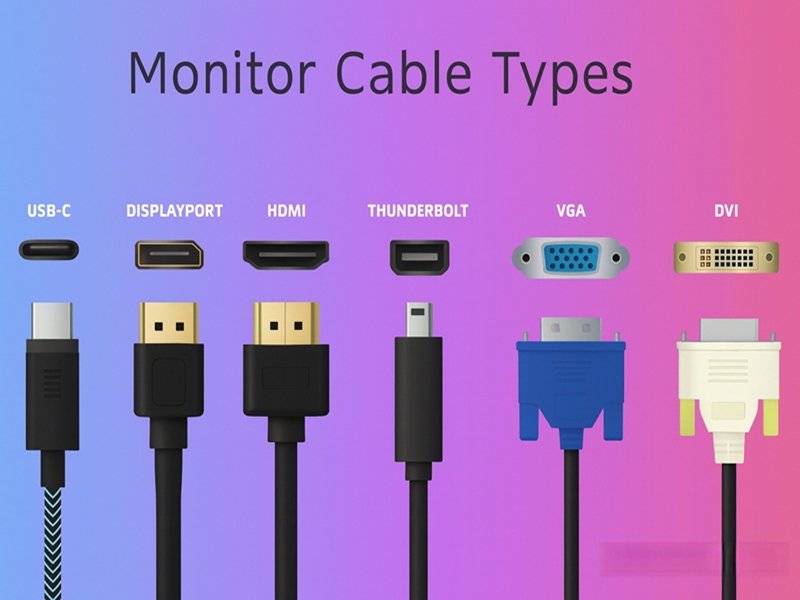
Choosing the right cable for your PC monitor has become far more important than most buyers realize. A decade ago, people simply grabbed whatever cable came with the display—usually VGA or DVI—and it worked. But modern monitors are different. Today’s displays use high refresh rates, HDR color depth, adaptive sync, and resolutions that push far beyond what older cables can handle. The wrong cable can limit performance, cause flickering, lock your monitor to low refresh rates, or even fail to deliver a signal. And yet, customers still walk into Sino-Conn every week holding a random cable photo from the internet asking, “Can you make this for my monitor?”
In reality, choosing the best monitor cable requires understanding the capabilities of HDMI, DisplayPort, USB-C, DVI, and VGA—and how each version affects real-world performance.
The best PC monitor cable type depends on your needs. DisplayPort offers the highest performance for gaming and high refresh rates, HDMI provides broad compatibility, and USB-C is ideal for laptops because it carries video, data, and power. For 4K or 144Hz monitors, DisplayPort is usually best; for everyday use, HDMI works well; for portable setups, USB-C is most convenient.
What makes this topic even more interesting is how frequently problems come from the cable, not the monitor or GPU. One OEM gaming brand came to Sino-Conn after weeks of testing failures. Their 240Hz displays wouldn’t pass certification. The culprit? They were unknowingly using HDMI 1.4 cables, which physically cannot support high refresh rates. Once we redesigned the harness using a properly shielded DP 1.4 cable with stable impedance, the problem disappeared instantly.
Little cable. Big impact.
Let’s explore each cable type—and how to choose the right one.
What Are the Main PC Monitor Cable Types?
The main PC monitor cable types are HDMI, DisplayPort, USB-C (with DisplayPort Alt Mode), DVI, VGA, and Mini DisplayPort. Modern monitors mostly use HDMI or DisplayPort, while laptops commonly use USB-C. DVI and VGA remain in use for legacy and industrial equipment.
PC monitor cables have evolved at the same pace as display technology itself. The earliest interfaces like VGA carried analog signals, suitable for CRT monitors but not for today’s 4K or HDR digital screens. DVI introduced digital video but lacked the bandwidth for emerging high-resolution displays. HDMI and DisplayPort later transformed the market with high-speed digital transmission, adaptive sync support, embedded audio, and significantly higher bandwidth capacities.
Today, most consumer and office monitors use HDMI or DisplayPort. Gamers and professionals tend to prefer DisplayPort, while USB-C is becoming extremely common on laptops, tablets, and portable display setups. Industrial and embedded-system customers—where Sino-Conn has extensive experience—may still rely on DVI, VGA, or transition to LVDS/eDP for internal panel wiring.
Understanding each type helps buyers avoid performance bottlenecks and ensures stable, flicker-free output.
What Type of Cable Does a Computer Monitor Use?
Most external monitors today use HDMI or DisplayPort. Laptops frequently use USB-C with DP Alt Mode, especially for docking stations and portable displays. DVI and VGA survive mainly in legacy or industrial equipment. Internal display panels (like in medical devices or kiosks) use LVDS, eDP, and V-By-One, which are not interchangeable with external monitor cables.
HDMI
- HDMI 1.4 → 4K 30 Hz
- HDMI 2.0 → 4K 60 Hz
- HDMI 2.1 → 4K 120 Hz / 8K
HDMI is widely supported across consumer displays but may vary in manufacturing quality.
DisplayPort
DP 1.4 supports 4K 144 Hz with DSC, while DP 2.0 supports up to 80 Gbps and extreme refresh rates. DP also supports MST daisy-chaining.
USB-C / DP Alt Mode
Carries DisplayPort signals over a USB-C connector, often with power delivery. Ideal for laptops.
DVI & VGA
Reliable for legacy and industrial systems but insufficient for modern high-resolution displays.
Monitor Cable Type Comparison Table
| Cable Type | Signal Type | Max Typical Resolution | Common Use Cases | Strengths | Limitations |
|---|---|---|---|---|---|
| HDMI (1.4–2.1) | Digital | 4K120 / 8K (2.1) | TVs, monitors, consoles | Universal compatibility, audio+video | Quality varies by version |
| DisplayPort (1.2–2.0) | Digital | 4K144 / 8K | Monitors, gaming | Highest bandwidth, MST | Shorter passive cable lengths |
| USB-C (DP Alt) | Digital | 4K144 | Laptops, docks | Video + data + power | Sensitive to cable quality |
| DVI | Digital | 1080p / 1440p | Older monitors | Stable legacy digital | Bulky, low bandwidth |
| VGA | Analog | Varies | Industrial / legacy | Long analog runs | No HD digital quality |
Which Monitor Cable Offers the Best Video Quality?
DisplayPort generally delivers the best video quality for PC monitors because it offers higher bandwidth, better support for high refresh rates, and more stable adaptive-sync performance.
Achieving optimal video quality depends on bandwidth, protocol version, signal integrity, EMI performance, and hardware compatibility.
Bandwidth and Why It Matters
Bandwidth determines how much visual data the cable can transport.
Bandwidth vs. Display Performance Table
| Interface Standard | Raw Bandwidth | Max Practical Resolution | Max Refresh Rate | HDR Support | Notes |
|---|---|---|---|---|---|
| HDMI 2.1 | 48 Gbps | 8K60 / 4K120 | 120–144 Hz | HDR10 / Dolby Vision | Ideal for TVs |
| DP 1.4 | 32.4 Gbps | 4K144 (DSC) | 240 Hz | HDR10 | Best for PC gaming |
| DP 2.0 | 80 Gbps | 8K60+ | 240 Hz+ | Advanced HDR | Emerging standard |
| USB-C (DP Alt) | Up to DP 1.4 | 4K144 | 144–165 Hz | HDR10 | Quality varies |
| DVI | 7.92 Gbps | 1440p | 144 Hz | No HDR | Legacy digital |
| VGA | Analog | ~1080p | — | No HDR | Quality varies heavily |
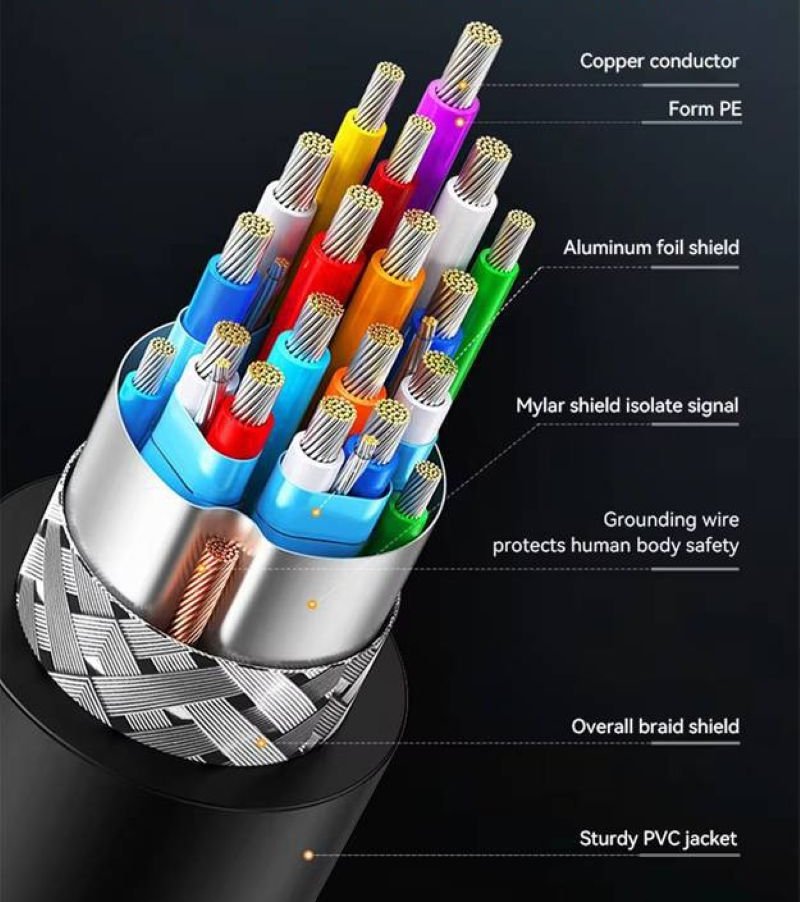
Signal Integrity and Cable Construction
Even identical versions perform differently depending on:
Shielding Performance
Foil
Braid
Combination
Poor shielding causes flicker, dropouts, or artifacts.
Impedance Control
Must maintain 100Ω differential (HDMI/DP).
Inconsistent impedance destabilizes high-refresh 4K signals.
Cable Length
Passive cable limits:
- HDMI 2.1 → ~3m
- DP 1.4 → ~2–3m
- USB-C Alt Mode → ~1–2m
Real-World Recommendations Based on Use Case
For Gaming
Use DisplayPort (highest refresh rates, better VRR stability).
For 4K Office Use
Use HDMI 2.0 / 2.1.
For Laptops
Use USB-C (DP Alt Mode) for single-cable docking.
For Legacy Systems
Use DVI / VGA.
How Do You Choose the Right Cable for Your Monitor?
Choose based on resolution, refresh rate, available ports, and cable length.
Cable Selection Decision Matrix
| User Scenario | Recommended Cable | Why It’s Best | Notes |
|---|---|---|---|
| Competitive gaming | DP 1.4 / 2.0 | Best refresh rates, VRR | GPU must support DP |
| 4K productivity | HDMI 2.0 / 2.1 | Stable 4K | Most universal |
| Laptop docking | USB-C (DP Alt) | Power + video | Ensure cable supports PD |
| Budget / everyday use | HDMI 1.4 / 2.0 | Affordable | Check monitor ports |
| Industrial systems | DVI / VGA | Legacy compatibility | Limited resolution |
| High-EMI factories | Shielded DP/HDMI | EMI-resistant | Requires custom cable |

Do All PC Monitors Use the Same Cable?
No. Consumer monitors mainly use HDMI/DP, laptops use USB-C, and industrial systems may use DVI, VGA, LVDS, eDP, or V-By-One.
What Technical Specifications Matter in Monitor Cables?
Shielding, impedance, conductor material, protocol version, and connector quality all significantly affect display performance.
Technical Specification Comparison Table
| Specification | HDMI | DisplayPort | USB-C (DP Alt) | Importance | Explanation |
|---|---|---|---|---|---|
| Impedance | 100Ω | 100Ω | 85–100Ω | ★★★★★ | Critical for high-speed signal stability |
| Shielding | Foil/Braid | Foil/Braid | Multi-layer | ★★★★★ | Prevents EMI frame drops |
| Conductor Gauge | 28–30 AWG | 26–30 AWG | 30–34 AWG | ★★★★☆ | Affects length & stability |
| Cable OD | 4.5–7mm | 5–7.5mm | 3.5–5.5mm | ★★★☆☆ | Relates to durability & shielding volume |
| Protocol Version | 1.4–2.1 | 1.2–2.0 | Matches DP | ★★★★★ | Determines resolution/refresh |
| Max Length | 2–3m | 2–3m | 1–2m | ★★★☆☆ | Passive limit |
Can PC Monitor Cables Be Customized?
Yes—length, shielding, materials, pinouts, and connectors can all be customized.
Sino-Conn supports:
- Custom lengths
- PVC / TPE / TPU / halogen-free jackets
- Shielding options
- Custom molded ends
- High-flex robotic-grade cables
- UV- and flame-resistant materials
- CAD drawings within 1–3 hours
- Samples in 2–3 days
- Mass production in 2 weeks
- UL, ISO, RoHS, REACH, PFAS compliance
- Triple 100% inspection
Conclusion
Choosing the right PC monitor cable directly impacts image clarity, refresh rate, and system stability. Whether you’re building consumer monitors, industrial systems, or laptop docking solutions, bandwidth, shielding, protocol version, and connector quality all matter.
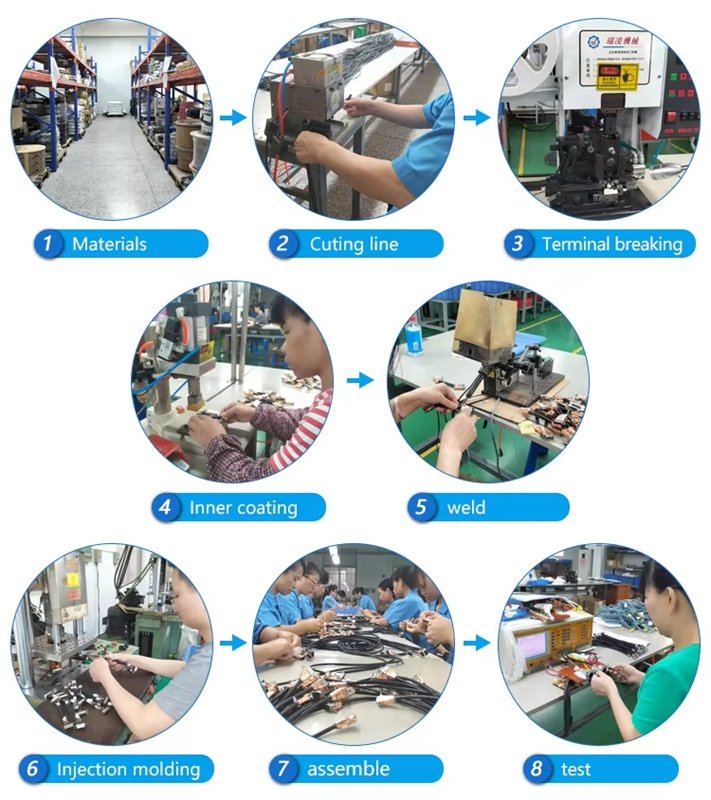
Sino-Conn specializes in custom HDMI, DP, USB-C, DVI, VGA, LVDS, eDP, and V-By-One cable assemblies, offering:
- No MOQ
- Fast sample turnaround
- Precise engineering support
- Full certification
- Flexible connector options (original or equivalent)
Contact Sino-Conn today to request a quote or discuss your custom monitor cable requirements.
Related Keywords :pc monitor cable types, HDMI DisplayPort comparison, USB-C monitor cable, 4K display cables, DP Alt Mode, monitor connectivity, display cable specs, Sino-Conn cable assembly, OEM display cables, custom monitor cable

With over 18 years of OEM/ODM cable assemblies industry experience, I would be happy to share with you the valuable knowledge related to cable assemblies products from the perspective of a leading supplier in China.
manufacturer catalogue
Get A Sample Now From Factory→
Get a quote quickly
Here, developing your OEM/ODM custom cable assemblies collection is no longer a challenge—it’s an excellent opportunity to bring your creative vision to life.



