 Skip to content
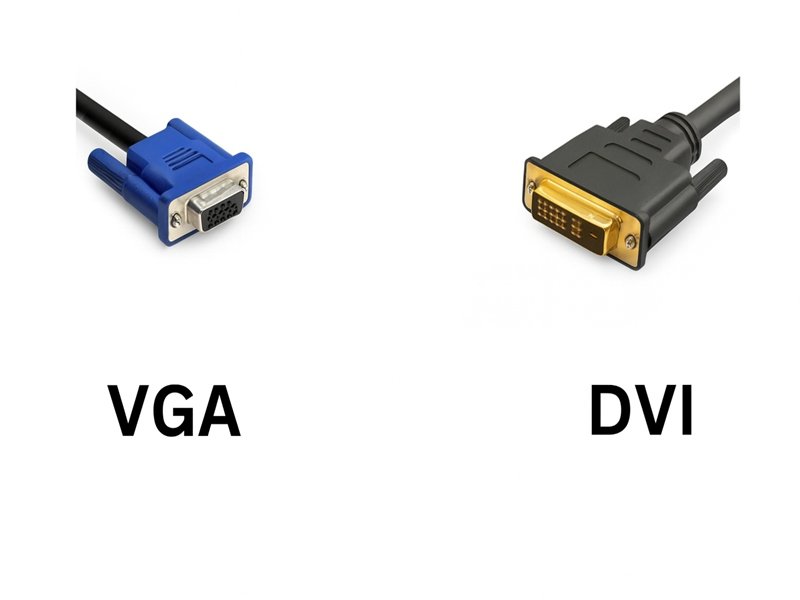
In the world of industrial automation, medical imaging, and embedded computing, visual signal interfaces play a vital role in data accuracy and display reliability. Yet, even in the era of HDMI and DisplayPort, two enduring names—DVI and VGA—still dominate countless machines, test systems, and control panels worldwide.
As engineers or OEM designers, you’ve likely faced a recurring decision: Should we continue using VGA for legacy support, or shift to DVI for higher-quality digital output?
DVI (Digital Visual Interface) transmits digital signals, providing sharper images and better color fidelity, while VGA (Video Graphics Array) transmits analog signals, which are more prone to signal degradation. DVI offers superior clarity and bandwidth, whereas VGA remains useful for legacy systems requiring analog compatibility.
At Sino-conn, we’ve supported clients from Europe to the U.S. through this very transition—helping OEMs replace aging VGA harnesses with DVI-compatible assemblies that maintain performance while optimizing cost and lead time. Let’s explore the technical and practical differences that drive such decisions.
What Is a VGA Connector and How Does It Work?
A VGA connector transmits analog video signals between a computer and a display. It uses a 15-pin DE-15 interface that carries RGB color channels and synchronization data. Common in older PCs, industrial monitors, and diagnostic equipment, VGA is valued for its simplicity and wide compatibility, though it’s limited in resolution and signal stability compared to digital interfaces like DVI.

VGA Connector Pinout and Signal Type
VGA (Video Graphics Array) operates purely on analog transmission. Its 15 pins carry three color channels—Red, Green, and Blue—along with horizontal and vertical sync signals.
Unlike digital signals, VGA’s analog waves degrade over distance and electrical interference, making cable quality and shielding critical.
| Pin | Signal | Description |
|---|---|---|
| 1 | Red | Red video channel |
| 2 | Green | Green video channel |
| 3 | Blue | Blue video channel |
| 13 | HSYNC | Horizontal sync |
| 14 | VSYNC | Vertical sync |
| 8, 10 | Ground | Signal reference |

OEMs often specify double-shielded VGA assemblies with EMI foils and braided copper to ensure stable transmission over longer runs in noisy environments like factory floors or testing labs.
Where Is VGA Still Used Today?
Despite being over 30 years old, VGA persists in industrial control systems, medical instruments, and legacy automation equipment where redesigning entire interfaces is costly. For these markets, Sino-conn continues to build custom VGA cables that meet UL and RoHS standards while maintaining exact pin-out compatibility.
Limitations of VGA in Modern Systems
VGA’s analog nature caps resolution (typically 1920×1080 max) and introduces color drift and signal noise. Engineers designing new systems are encouraged to evaluate DVI-D or HDMI to achieve higher fidelity and EMI resistance.
What Is a DVI Connector and How Does It Work?
DVI (Digital Visual Interface) is a digital video connector that transmits high-quality signals from a computer or graphics card to a display. It supports three formats—DVI-D (digital), DVI-A (analog), and DVI-I (integrated)—offering flexibility between old and new systems. DVI delivers sharper images and supports resolutions up to 2560×1600, making it ideal for professional, medical, and industrial displays.
Types of DVI Connectors — DVI-D, DVI-A, DVI-I
| Type | Signal | Description |
|---|---|---|
| DVI-D | Digital only | Ideal for modern LCDs and digital monitors |
| DVI-A | Analog only | Compatible with VGA-style signals |
| DVI-I | Digital + Analog | Supports both DVI and VGA signals |
This hybrid approach makes DVI-I connectors valuable in OEM applications needing compatibility with both analog and digital systems.
DVI Connector Structure and Pin Configuration
DVI connectors vary from 18+1 pins (single-link) to 24+5 pins (dual-link) depending on resolution support. A dual-link DVI-D can transmit data at up to 7.4 Gbit/s, easily surpassing VGA’s capacity.
For custom assemblies, Sino-conn engineers specify twisted-pair conductors and low-capacitance insulation to maintain impedance and reduce crosstalk.
Advantages of DVI for OEM and Engineering Applications

- Digital precision: No analog-to-digital conversion losses.
- Higher bandwidth: Up to 2560×1600 resolution at 60 Hz.
- Reduced EMI: Shielded differential pairs for signal integrity.
- Backward compatibility: DVI-I interfaces with VGA using adapters.
In short, DVI bridges the gap between legacy analog setups and next-gen digital displays—offering OEMs the flexibility to evolve systems progressively.
DVI vs VGA — What Are the Key Technical Differences?
Although DVI and VGA connectors may appear similar in purpose—both transmitting video signals between devices—their underlying technologies are fundamentally different. These differences affect signal integrity, resolution, electromagnetic performance, and system compatibility. Understanding these distinctions is essential for engineers designing reliable display systems in industrial, medical, or embedded applications.

1. Signal Type: Analog vs. Digital
The most significant distinction lies in the type of signal transmission.
- VGA (Video Graphics Array) is a purely analog interface. It carries continuous voltage levels corresponding to the brightness and color of each pixel. The longer the transmission path, the higher the chance of signal degradation, noise pickup, and loss of detail.
- DVI (Digital Visual Interface) was developed to overcome these issues. It can transmit both digital and, in certain formats, analog signals. In digital mode (DVI-D), image data is transferred as discrete bits, preserving pixel accuracy without intermediate conversions.
| Feature | VGA | DVI |
|---|---|---|
| Signal Type | Analog (RGBHV) | Digital (TMDS) / Analog (DVI-A, DVI-I) |
| Transmission Form | Continuous voltage signal | Binary data stream |
| Conversion | Requires DAC/ADC in source & display | Direct digital-to-digital |
| Signal Loss | Increases with distance and interference | Minimal, even over several meters |
From an engineering perspective, DVI’s TMDS (Transition Minimized Differential Signaling) provides better resistance to electromagnetic noise and maintains sharper signal edges, leading to improved color accuracy and stability.
2. Resolution and Bandwidth Capability
DVI’s digital architecture enables significantly higher bandwidth than VGA.
A single-link DVI supports up to 1920×1200 @ 60 Hz, while dual-link DVI extends this to 2560×1600 @ 60 Hz or higher. In contrast, VGA performance strongly depends on cable quality, shielding, and cable length, with practical limits around 1920×1080 before image clarity starts to degrade.
| Parameter | VGA | DVI (Single Link) | DVI (Dual Link) |
|---|---|---|---|
| Max Resolution | 1920×1080 | 1920×1200 | 2560×1600 |
| Bandwidth | ~300 MHz | 3.7 Gbit/s | 7.4 Gbit/s |
| Signal Quality | Susceptible to distortion | Stable digital output | High fidelity |
| Color Accuracy | Analog voltage tolerance | Bit-accurate | Bit-accurate |
In high-precision environments—such as industrial vision systems or medical diagnostic displays—DVI’s stable digital signal ensures pixel-level fidelity, while VGA’s analog conversion may introduce slight variations in brightness or geometry.
3. Connector Design and Pin Configuration
Physically, DVI connectors are more complex, supporting multiple formats.
- VGA connectors use a 15-pin DE-15 (often called HD15) interface, arranged in three rows of five pins.
- DVI connectors can include 18, 24, or 29 pins, depending on the variant (DVI-D, DVI-A, or DVI-I), and may incorporate additional pins for analog transmission or dual-link data channels.
| Connector Type | Signal Mode | Pin Count | Notable Feature |
|---|---|---|---|
| VGA (DE-15) | Analog RGBHV | 15 | Common in legacy PCs and monitors |
| DVI-D | Digital | 18 or 24 | Purely digital interface |
| DVI-A | Analog | 17 | Compatible with VGA signal paths |
| DVI-I | Digital + Analog | 23 or 29 | Combines both for hybrid systems |
The dual-link DVI format adds extra data channels to double the transmission bandwidth, which is particularly useful for high-resolution or multi-display industrial equipment.
4. Signal Integrity and EMI Performance
VGA signals are transmitted over unbalanced lines and are therefore more sensitive to electromagnetic interference (EMI). Over longer runs, analog signal degradation becomes visible as “ghosting,” “shadowing,” or “color bleeding.”
DVI, on the other hand, employs differential signaling, where each data bit is transmitted as a voltage difference between two wires. This method naturally cancels out external interference and reduces crosstalk.
For critical OEM environments—such as medical instrumentation, factory automation, or aerospace systems—this difference can determine whether a display remains stable under high electromagnetic noise. Shielded, twisted-pair DVI cables typically maintain signal integrity over 5–10 meters without visible degradation, whereas VGA may require active amplifiers beyond 3 meters.
5. Compatibility and System Integration
While DVI and VGA are different at the electrical level, partial compatibility exists:
- DVI-I includes both digital and analog pins, allowing connection to VGA through passive adapters.
- DVI-D does not support analog signals; connecting it to a VGA port requires an active converter that performs digital-to-analog conversion.
For OEMs updating equipment, this compatibility allows gradual transition strategies—keeping existing VGA-based displays operational while newer DVI interfaces are phased in.
6. Practical Considerations for Engineers
From a design and sourcing standpoint:
- VGA remains suitable for cost-sensitive or legacy applications, where the display module lacks digital inputs.
- DVI is preferable for high-definition or precision systems requiring image consistency and compliance with modern EMC standards.
- Cable assembly selection should prioritize impedance control, shielding coverage, and connector durability to ensure consistent signal transmission.
Core Technical Comparison:
| Aspect | VGA | DVI |
|---|---|---|
| Signal Type | Analog RGBHV | Digital (TMDS) / Analog (optional) |
| Max Resolution | 1920×1080 | 2560×1600 (dual-link) |
| EMI Susceptibility | High | Low |
| Transmission Distance | ≤ 3–5 m optimal | Up to 10 m without loss |
| Connector Pin Count | 15 | 18–29 |
| Adapter Availability | Common | Compatible via DVI-I |
| Image Fidelity | Depends on cable quality | Consistent and pixel-perfect |
In conclusion, the difference between DVI and VGA extends far beyond connector appearance—it reflects the evolution from analog voltage signaling to digital data transmission.
For engineers, the decision should be guided by system design priorities:
- DVI when resolution, signal integrity, and EMI resistance are essential.
- VGA when backward compatibility and cost-efficiency are more important.
Both interfaces continue to coexist in industrial and medical contexts, but the long-term trend clearly favors digital DVI or its successors (HDMI, DisplayPort) for higher stability and scalability.
Which Connector Should You Choose for Your Project?
Choosing between DVI and VGA depends on your system design priorities, device compatibility, and lifecycle objectives. The right connector is not defined by a single specification but by how the signal behaves in your intended environment.

1. Define the System Context
Begin by identifying the role of the display in your system:
- If your design targets modern LCD or digital panels, DVI (particularly DVI-D or DVI-I) ensures pixel accuracy and lower interference.
- If your system must connect to existing analog monitors or controllers, VGA remains functional and economical.
- Consider transmission distance, EMI exposure, and available I/O when determining which interface best fits your design.
| Application Case | Recommended Interface | Reason |
|---|---|---|
| New digital system | DVI-D or DVI-I | Stable digital data path |
| Legacy analog system | VGA or DVI-A | Compatible with older displays |
| Mixed-signal platform | DVI-I | Supports both digital and analog |
| EMI-heavy industrial environment | DVI (shielded) | Differential noise immunity |
| Cost-sensitive project | VGA | Mature tooling and low material cost |
2. Consider Compatibility and Transition Planning
For OEMs upgrading existing systems, compatibility can be a deciding factor.
DVI-I connectors include both digital and analog pins, allowing them to connect to VGA through a passive adapter.
However, DVI-D ports transmit only digital signals and need active converters for analog VGA displays.
This mixed compatibility supports phased migration — you can replace one part of a system at a time without redesigning the entire hardware chain.
| DVI Type | VGA Compatible? | Connection Method |
|---|---|---|
| DVI-I | ✅ Yes | Passive adapter |
| DVI-A | ✅ Yes | Passive adapter |
| DVI-D | ❌ No | Requires active converter |
3. Balance Performance and Cost
While VGA components are often cheaper, their analog limitations can lead to signal distortion or color drift in high-resolution displays.
DVI cables, despite slightly higher cost, offer longer stable transmission and reduced EMI, often resulting in lower maintenance and calibration expenses over time.
For industrial OEMs, evaluating total lifecycle cost (not just component price) leads to better long-term reliability.
4. Evaluate Industry Requirements
In regulated sectors—such as medical, aerospace, and factory automation—the connector decision may also be guided by compliance and reliability standards.
DVI’s differential signal structure and tighter impedance control align better with modern EMC and safety certifications, while VGA is still acceptable for legacy-certified instruments that cannot be redesigned without new validation cycles.
5. Anticipate Future Integration
Although DVI and VGA remain common, both are gradually being replaced by DisplayPort, HDMI, and USB-C DisplayLink.
When planning new systems, engineers can use DVI-D or DVI-I as transitional interfaces, maintaining compatibility with older displays while preparing for digital migration.
| Future-Ready Strategy | Connector Choice | Benefit |
|---|---|---|
| Gradual digital upgrade | DVI-I | Hybrid compatibility |
| Long-term digital design | DVI-D | Simplified data path |
| Legacy system maintenance | VGA | Proven analog reliability |
Selecting between DVI and VGA isn’t about declaring one superior; it’s about choosing what fits the technical, operational, and economic realities of your project.
- Use DVI when digital accuracy, EMI control, and long-term support are essential.
- Use VGA when simplicity, cost efficiency, or analog compatibility take priority.
A well-matched connector ensures consistent image performance, reliable signal integrity, and predictable behavior throughout the system’s service life.
How Can Sino-conn Support Custom DVI and VGA Cable Assemblies?

Sino-conn provides OEMs and engineers with fully customized DVI and VGA cable assemblies, including design drawings, rapid prototyping, and zero-MOQ manufacturing. From pin-out definition to EMI shielding and high-temperature jackets, every assembly is built for durability, compliance, and rapid delivery.
Customization Options — Length, Pin Definition, and Connector Type
Every project is unique. Sino-conn offers:
- Custom lengths (up to 10 m)
- Pin-to-pin mapping per schematic
- Material options: PVC, TPE, silicone, or halogen-free
- Overmolded or screw-lock connector designs
Engineering Support — Drawings, Samples, and Rapid Prototyping
Our in-house engineering team can deliver CAD-to-PDF drawings within 3 days, sometimes as fast as 30 minutes for standard configurations. Prototypes are typically available in 3 days, with bulk production in 2 weeks—a timeline unmatched by most suppliers.
Quality Control, Certification, and Global Supply Experience
Each assembly passes three-stage inspection and is 100% electrically tested. Certificates like UL, RoHS, and REACH accompany every batch.
With exports to Europe, Japan, and the U.S., Sino-conn adapts pricing to regional standards, offering both original-brand connectors and cost-effective substitutes depending on client needs.
Do DVI and VGA Still Matter in the Era of HDMI and DisplayPort?
Yes. While HDMI and DisplayPort dominate consumer markets, DVI and VGA remain critical in industrial, medical, and embedded systems due to legacy integration, ruggedness, and component compatibility. Many OEMs rely on DVI/VGA cables for reliable visual output in non-consumer environments.
Legacy System Integration and Industrial Upgrades
Replacing entire display systems is costly; upgrading cable assemblies is not. Sino-conn helps OEMs retrofit existing VGA-based systems with DVI or hybrid cables to extend equipment lifespan without redesign.
When to Use Converters or Adapters
Converters bridge incompatible systems but may introduce signal loss. Sino-conn recommends direct DVI-I to VGA cabling whenever possible for better impedance matching and fewer failure points.
The Transition Path from VGA/DVI to Digital Interfaces
As systems evolve, many engineers adopt DisplayPort-to-DVI or HDMI-to-DVI bridges. Sino-conn supports this migration with multi-interface harnesses, helping clients design forward-compatible systems while maintaining short-term backward compatibility.
Conclusion:
The debate between DVI and VGA isn’t just about picture quality—it’s about engineering reliability, lifecycle strategy, and system design efficiency.
Sino-conn helps OEMs, engineers, and R&D teams navigate these choices by offering:
- Expert consultation
- Rapid prototyping and pin mapping
- Custom materials and shielding options
- Global compliance certification
If you’re designing or upgrading display interfaces, reach out to Sino-conn for technical drawings, sample production, or a tailored DVI/VGA assembly quote.
Our engineers are ready to discuss your design—whether you need a single prototype or full-scale production.



