 Skip to content
PCB Connector Types: What They Are and How to Choose
- andy

People search “PCB connector types” when they feel stuck. A cable doesn’t fit the board. A connector “looks the same” but won’t mate. A prototype passes in the lab and fails after shipping. Or purchasing finds a cheaper alternative and suddenly the product starts resetting in the field.
Here’s the real point: a PCB connector is not a small accessory part. It decides whether your system can survive vibration, heat, pulling force, repeated plugging, EMI noise, and production variation. Most connector problems are not “bad quality.” They are wrong type + wrong assumptions.
Direct answer (clear and usable):
PCB connector types are standardized connector designs mounted on a PCB to connect wires/cables (wire-to-board), other PCBs (board-to-board), or flex circuits (FFC/FPC). Each type has different limits for current, voltage, pitch, mating cycles, vibration resistance, shielding, and assembly method. You identify the correct type by confirming the mating direction, pitch, locking method, current per pin, and the environment (temperature, vibration, chemicals).
A common story we see: the customer says “it’s a 10-pin PCB connector.” But there are dozens of 10-pin connectors that look similar. The cable gets made, arrives, and then… it doesn’t mate. Or it mates but fails after 2 weeks because the latch is wrong for vibration. That’s why this topic matters.
What Are PCB Connector Types?
PCB connector types are the different families of connectors designed to mount on a PCB, each family optimized for a different connection job:
- PCB to cable (wire-to-board)
- PCB to PCB (board-to-board / mezzanine)
- PCB to flexible circuit (FFC/FPC)
- PCB to external device (I/O connectors like USB, HDMI, circular, etc.)
If you’re buying or designing connectors, you don’t want a “connector name.” You want the connector type + the few key specs that prevent mismatch.
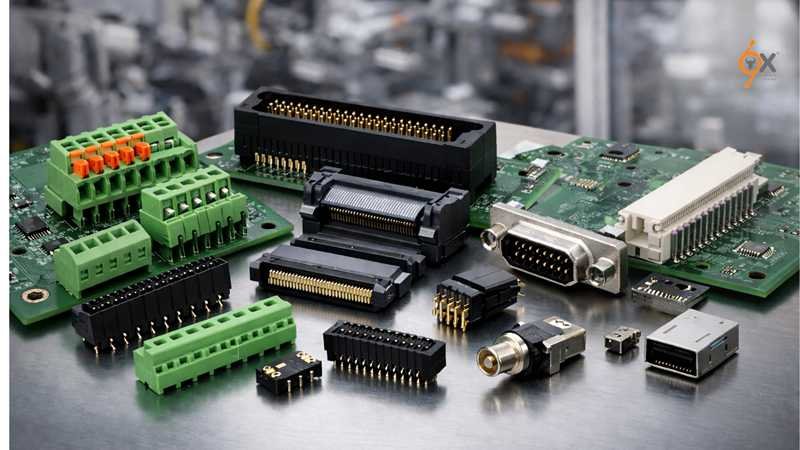
What PCB connector types control in real projects
A connector type directly controls these outcomes:
Will it mate correctly?
Pitch, keying, polarization, latch style, mating direction.
Will it survive vibration and pulling?
Locking method, retention force, strain relief design.
Will it carry your power safely?
Current per pin, contact resistance, temperature rise.
Will it keep signals stable?
Contact design, shielding, impedance stability, pair geometry.
Will production be stable?
SMT vs through-hole, coplanarity, pick-and-place feasibility, inspection access.
“PCB connector types” vs “part number” (why people get confused)
A part number is brand-specific. A connector type is function + geometry.
When customers only share a part number, it’s easy—until it becomes obsolete or long lead time.
When customers only share a photo, we must rebuild the definition based on type.
Here’s the difference:
| What the customer provides | What we can confirm quickly | Biggest risk |
|---|---|---|
| Full drawing + part number | Pitch, mating, footprint, pin map | Drawing may not match real stress/environment |
| Part number only | We can pull the series specs | Wrong mating half / wrong orientation |
| Photo only | Housing shape, latch, approximate pitch | Internal contact style, exact pitch, PCB footprint unknown |
| “10-pin connector” text only | Almost nothing | High mismatch risk |
The Fast Way to Classify PCB Connector Types
Before you go into brand series, first classify by connection relationship:
1) Wire-to-board PCB connector types
Used when a harness or cable plugs into a PCB.
Common places: power input, sensors, motors, fan cables, battery leads, internal wiring.
What usually matters:
- locking (friction vs latch)
- current per pin
- wire gauge range
- crimp quality and pull-out strength
2) Board-to-board PCB connector types
Used when one PCB plugs into another PCB (stacking, mezzanine, daughterboard).
Common places: modular electronics, industrial controllers, display boards, telecom modules.
What usually matters:
- stacking height tolerance
- coplanarity tolerance
- insertion force
- high-speed signal performance
3) FFC/FPC PCB connector types
Used when a flex cable plugs into a PCB.
Common places: displays, cameras, laptops, printers, compact consumer products.
What usually matters:
- pitch (often very fine)
- latch type (flip-lock vs slide-lock)
- insertion cycles
- handling damage risk
What Specs Customers Actually Ask For (and Why)
Your customers often ask for a spec sheet because they want to stop guessing. A “good enough” connector description is not helpful. What helps is a short list of specs that lock the design.
Here are the items that decide success:
A. Mechanical specs that prevent mismatch
- Pitch (mm) — the most common source of “looks same but won’t fit”
- Positions (pin count) — obvious, but errors happen
- Mating direction — top-entry / side-entry / right-angle
- Mounting style — SMT, through-hole, press-fit
- Locking method — none / friction / latch / screw-lock
- Keying / polarization — prevents reverse mating
- Mating height / stack height (board-to-board)
B. Electrical specs that prevent failure
- Current rating per pin (A) — but must be checked with wire gauge and temperature
- Voltage rating (V) — especially for power and creepage/clearance needs
- Contact resistance (mΩ) — affects heating and drop
- Dielectric withstand — safety margin
- Insulation resistance — moisture/contamination sensitivity
C. Reliability and environment specs (real field problems)
- Mating cycles — 10? 30? 100? 500? (depends on use)
- Operating temperature — consumer vs industrial vs automotive
- Vibration/shock — latch choice matters
- Material compliance — UL, RoHS, REACH, PFAS requests
- Flammability rating — UL94 V-0/V-1/HB (commonly required)
A Data Table Customers Find Useful (Power and Signal Reality)
Many people make wrong assumptions because they only look at pin count and pitch. Use this as a practical starting reference:
| Application style | What “bad choice” looks like | What you should confirm |
|---|---|---|
| Low power signal (sensors, I/O) | Intermittent signal, oxidation issues | plating choice, latch, vibration |
| Medium power (fans, small motors) | Hot pins, discoloration, melted housing | current per pin + wire gauge + temp |
| High current power (heaters, battery) | voltage drop, heating at contact | contact resistance + number of pins in parallel |
| High-speed data (LVDS, USB, HDMI internal) | flicker, CRC errors, random resets | impedance stability, shielding, ground pins |
Real-World Mistakes We See (and How to Avoid Them)
Mistake 1: “It’s a standard connector, any similar one works.”
What happens:
- mating half does not fit
- latch doesn’t engage
- connector sits too high/low and stresses solder joints
How to avoid:
- confirm pitch + keying + mating direction + PCB footprint before ordering
Mistake 2: Only asking for current rating, not wire gauge and temperature
What happens:
- connector “rated 3A” runs hot at 3A in a closed plastic enclosure
- contact resistance increases with poor crimp and heat
How to avoid:
- confirm wire gauge range, ambient temperature, and number of pins used for power
Mistake 3: Ignoring how the cable pulls the connector
What happens:
- intermittent disconnect during vibration
- cracked solder joints
- latch failure
How to avoid:
- confirm retention force, add strain relief, choose locking type based on environment
What Sino-Conn Can Provide (Neutral, Practical)
For many customers, the biggest pain is:
they only have a photo, a partial model, or a broken cable — no full parameters.
In those cases, what we normally do is very straightforward:
- Provide connector + cable photos (detail + overall) matching the target model
- Build a drawing (CAD to PDF) to lock: pitch, pin map, mating direction, length, wire definition
- Confirm whether you need original parts or compatible alternatives (cost/lead time flexibility)
- Deliver samples on normal or urgent schedule:
- sample: ~2 weeks (urgent 2–3 days when feasible)
- production: 3–4 weeks (urgent ~2 weeks)
Small But Important Format Note (for your Notion H1–H3 rule)
You said you only use H1–H3 in Notion.
So in the next parts, I’ll structure as:
H1 (title)
H2 (main section)
H3 (subsections)
No H4, no nested heading confusion.
Common PCB Connector Types (What They Are Used For)
When people ask about pcb connector types, they often expect a long catalog of part numbers.
That’s not actually useful.
What helps in real projects is understanding what each connector type is designed to tolerate—mechanically, electrically, and in production. Once you understand that, you can narrow down the correct connector family in minutes, even before looking at brands.
This section walks through the most common pcb connector types, explains where they are used, what usually goes wrong, and what to confirm before ordering.
Common PCB Connector Types
PCB connector types can be grouped by how they connect and what stress they are designed to survive. The four groups below cover the majority of real-world products.
Board-to-Board PCB Connector Types
Board-to-board pcb connector types are used to connect one PCB directly to another PCB without wires. They are chosen based on stacking height, pin density, and signal requirements, not just pin count.
These connectors appear in products where space is tight and modularity matters.
Where board-to-board pcb connector types are used
- Control boards with removable I/O boards
- Display boards connected to main logic boards
- Industrial controllers with expansion modules
- Telecom and networking equipment
- Embedded systems with daughterboards
What actually matters (beyond pin count)
Stacking height tolerance
Even ±0.2 mm matters. Too short stresses solder joints; too tall causes intermittent contact.
Coplanarity
Poor coplanarity causes uneven contact force and early failure.
Insertion force
High pin-count connectors can be difficult to mate in production.
Signal integrity
High-speed signals require controlled pin layout and ground referencing.
Common mistake we see
Customers often say:
“It’s just a board-to-board connector, 40 pins.”
What happens:
- The replacement connector has a different mating height.
- Boards flex during assembly.
- Cracked solder joints appear after vibration or thermal cycling.
Practical reference table
| Item | Typical range | Why it matters |
|---|---|---|
| Pitch | 0.4–2.0 mm | Smaller pitch = higher density, harder assembly |
| Stack height | 3–20 mm | Directly affects mechanical stress |
| Current per pin | 0.3–1.5 A | Power pins often need to be doubled |
| Mating cycles | 10–50 | Not designed for frequent plugging |
Wire-to-Board PCB Connector Types
Wire-to-board pcb connector types connect a cable or wire harness to a PCB. They are the most common connector type and also the most frequently misused.
These connectors are everywhere because almost every PCB eventually needs power or external signals.
Where wire-to-board pcb connector types are used
- Power input connectors
- Battery connections
- Fan and motor cables
- Sensor cables
- Internal wiring between PCBs and chassis parts
What actually matters in wire-to-board connectors
- Locking method
- No lock: low vibration, easy service
- Friction lock: moderate vibration
- Positive latch: industrial, automotive, moving parts
- Wire gauge range
- A connector rated for 3A may only support that current with thicker wire.
- Crimp quality
- Most failures happen at the crimp, not the contact.
- Strain relief
- Without it, cable pull force transfers directly to solder joints.
Common failure patterns
- Connector rated “3A” melts at 2A because:
- small wire gauge
- high ambient temperature
- poor airflow
- Cable disconnects during vibration because:
- friction-only lock
- no strain relief
Practical reference table
| Item | Typical range | Notes |
|---|---|---|
| Pitch | 1.0–5.08 mm | Larger pitch = higher current capability |
| Current per pin | 1–10 A | Depends heavily on wire gauge |
| Lock type | None / friction / latch | Choose based on vibration |
| Assembly method | Crimp + housing | Crimp quality is critical |
FFC / FPC PCB Connector Types
FFC/FPC pcb connector types are designed for flat flexible cables and prioritize compact size and fine pitch over mechanical strength.
These connectors enable thin, lightweight designs but require careful handling.

Where FFC/FPC pcb connector types are used
- Displays and touch panels
- Cameras and sensors
- Laptops and tablets
- Printers and scanners
- Compact consumer electronics
What matters most with FFC/FPC connectors
- Pitch accuracy
- Common pitches: 0.3 mm, 0.5 mm, 1.0 mm
- Latch type
- Flip-lock: easy but fragile
- Slide-lock: stronger, better for vibration
- Insertion cycles
- Many are rated for only 10–20 insertions.
- Cable orientation
- Same-side vs opposite-side contact is often confused.
Common real-world problems
- Latch breaks during assembly.
- Cable inserted upside down due to unclear orientation.
- Signal instability due to poor contact pressure.
Practical reference table
| Item | Typical value | Risk if ignored |
|---|---|---|
| Pitch | 0.3–1.0 mm | Misalignment, short circuits |
| Mating cycles | 10–30 | Damage during rework |
| Lock type | Flip / slide | Vibration failure |
| Current | <1 A | Not suitable for power |
Pin Header and Socket PCB Connector Types
Pin header pcb connector types are simple, low-cost connectors often used for development, testing, and low-stress applications.
They look basic, but misuse causes many hidden problems.
Where pin header pcb connector types are used
- Development boards
- Programming/debug ports
- Low-cost consumer products
- Internal jumpers
Strengths and limitations
Strengths
- Low cost
- Easy sourcing
- Flexible mating options
Limitations
- Poor vibration resistance
- No positive locking
- Inconsistent contact force
Common mistake
Using pin headers in:
- vibrating equipment
- shipping environments
- products with frequent plugging/unplugging
Result:
- intermittent contact
- field failures that are hard to diagnose
Practical reference table
| Item | Typical value | Note |
|---|---|---|
| Pitch | 2.54 mm | Industry standard |
| Current per pin | ~1 A | Depends on plating |
| Locking | None | Not vibration-safe |
| Mating cycles | Low–medium | Contact wear over time |
How Engineers Narrow Down PCB Connector Types Quickly
Experienced engineers usually reduce options by answering five questions:
- Does this connect a cable or another PCB?
- Will the product vibrate, move, or ship long distances?
- What is the real current, not the nominal current?
- How many times will it be plugged/unplugged?
- Is space or serviceability more important?
Once those are answered, pcb connector types eliminate themselves very quickly.
Why Connector Type Selection Affects Cable Assemblies
This is where many teams get stuck.
The connector type decides:
- cable exit direction
- strain relief design
- wire gauge
- overmolding feasibility
- assembly time and cost
Choosing the wrong connector type often forces:
- thicker cables than planned
- manual rework
- unreliable strain relief
- higher failure rates
That’s why in real projects, pcb connector types and cable assemblies must be designed together, not separately.
How PCB Connector Types Are Classified (And Why It Matters)
By the time most problems appear, the connector has already been chosen.
The PCB is laid out. The housing is designed. The cable length is fixed. And then someone notices: “This connector doesn’t quite work the way we expected.”
That’s why understanding how pcb connector types are classified is not academic knowledge.
It’s how you avoid redesigns, delayed launches, and repeated sampling.
PCB connector types are not only defined by “wire-to-board” or “board-to-board.”
They are defined by mounting method, pitch, locking, and mechanical behavior. These details decide whether a connector survives real use—or becomes the weakest point in your product.
PCB Connector Types by Mounting Method
PCB connector types are commonly classified by how they attach to the PCB: SMT, through-hole, or press-fit. This choice directly affects mechanical strength, assembly reliability, and long-term durability.
Surface-Mount (SMT) PCB Connector Types
SMT pcb connector types are widely used because they fit modern automated assembly lines and allow compact designs.
Where SMT connectors make sense
- Compact electronics
- High-density boards
- Products with controlled environments
- Designs optimized for automated assembly
What people often underestimate
- SMT connectors rely heavily on solder joint strength
- Cable pull force transfers directly to PCB pads
- Vibration can fatigue solder joints over time
Typical real-world issues
- Connector lifts slightly after repeated cable movement
- Pads crack after shipping vibration
- Failures appear months later, not during testing
When SMT is still a good choice
- Low cable pull force
- Proper strain relief in cable assembly
- Reinforced solder pads or anchor tabs
Through-Hole PCB Connector Types
Through-hole pcb connector types insert pins through the PCB and solder on the opposite side.
Why through-hole connectors still exist
- Much stronger mechanical anchoring
- Better resistance to vibration and pulling
- More forgiving in harsh environments
Common applications
- Power connectors
- Industrial equipment
- Automotive and heavy machinery
- Large wire gauges
Trade-offs
- Slower assembly
- More board space
- Often higher cost
Reality check
If your product:
- moves
- vibrates
- is handled roughly
- has thick or stiff cables
Through-hole is often the safer choice, even if SMT looks “cleaner” on paper.
Press-Fit PCB Connector Types
Press-fit connectors rely on mechanical interference instead of solder.
Where they are used
- High-reliability industrial systems
- Applications requiring rework or replacement
- Thick PCBs with controlled hole tolerances
Why they are special
- No solder thermal stress
- Strong mechanical retention
- Stable electrical contact over time
Limitations
- Higher PCB fabrication requirements
- Hole tolerance control is critical
- Not suitable for all layouts
PCB Connector Types by Pitch and Pin Density
Pitch is the center-to-center distance between pins. Smaller pitch increases density but reduces tolerance and robustness.
This is one of the most common causes of “looks right but doesn’t work” problems.
How pitch affects real projects
| Pitch size | What it enables | What it risks |
|---|---|---|
| ≥2.54 mm | High current, easy handling | Large footprint |
| 1.27–2.0 mm | Balanced design | Moderate alignment sensitivity |
| ≤1.0 mm | Compact, high pin count | Assembly damage, mis-mating |
Common mistake
Choosing fine pitch purely to save space, then discovering:
- difficult manual assembly
- higher defect rates
- fragile mating during service
Practical advice
- Use the largest pitch that fits your layout
- Smaller pitch should be justified by real space constraints, not aesthetics
PCB Connector Types by Locking and Retention
Locking is what keeps the connector mated under real conditions. Many failures are caused not by electrical limits, but by insufficient retention.
Common locking styles
No-lock (friction only)
- Easy assembly
- Low cost
- High risk in vibration or movement
Used mainly for:
- internal, fixed, low-stress connections
Friction lock
- Light mechanical resistance
- Better than nothing
- Still not vibration-safe
Often used in:
- consumer electronics
- short internal wiring
Positive latch / locking tab
- Audible or tactile “click”
- High retention force
- Much better reliability
Preferred for:
- industrial equipment
- automotive
- shipping-sensitive products
Screw or bolt lock
- Maximum retention
- Slower assembly
- Higher cost
Used when failure is not acceptable.
PCB Connector Types and Electrical Limits (What Numbers Actually Matter)
Electrical ratings on connectors only make sense when combined with wire size, temperature, and duty cycle.
Current rating misunderstandings
A connector labeled “3A per pin” does not mean:
- 3A at any temperature
- 3A with any wire gauge
- 3A with all pins loaded
What actually controls current
- Contact resistance
- Pin size and plating
- Wire gauge
- Ambient temperature
- Number of adjacent loaded pins
Real-world example
A connector rated 3A:
- Works at 3A in free air
- Overheats at 2A in a sealed enclosure
- Fails early when paired with thin wire
This is why engineers often:
- parallel power pins
- oversize connectors
- derate current intentionally
PCB Connector Types and Assembly Reality
A connector that is perfect electrically can still fail if it does not match the production process.
Questions production teams care about
- Can this connector be picked and placed?
- Is the coplanarity stable?
- Is visual inspection easy?
- Can operators insert cables without damage?
- How many seconds does this add to assembly?
A connector that saves ¥0.20 on BOM but adds 30 seconds of manual labor is not cheaper.
How Experienced Teams Classify PCB Connector Types Before Final Selection
Before locking a connector, experienced teams usually confirm:
- Mounting method fits environment and stress
- Pitch matches assembly capability
- Locking matches vibration and handling
- Electrical margin exceeds real load
- Cable exit direction fits enclosure
- Supply chain flexibility exists (original + alternative)
Only after this do part numbers matter.
How This Connects to Sino-Conn’s Work in Practice
In real projects, many customers come to us with:
- a PCB
- a photo
- a partial part number
- or just “something similar”
Our job is not just to “copy a connector,” but to:
- confirm pcb connector type
- verify mounting + pitch + locking
- match cable structure and strain relief
- produce drawings before mass production
- avoid silent failure points
This classification approach is how we reduce trial-and-error and help customers move from prototype to production smoothly.

How Sino-Conn Approaches PCB Connector Type Decisions
At Sino-Conn, PCB connector type selection is treated as a system-level manufacturing decision, not a catalog lookup exercise. In real projects, customers rarely come with a perfect specification. More often, they come with a PCB, a partial BOM, a photo, or a performance problem they need to solve.
Our role is to work backward from mechanical constraints, mating method, assembly process, and long-term reliability, then lock down the correct PCB connector type before defining terminals, cable structure, and pin mapping. Every project is supported by a confirmed drawing (CAD to PDF), reviewed with the customer before production, and built under full inspection control.
That approach is why many customers use Sino-Conn not just as a cable assembly supplier, but as a manufacturing partner who understands how PCB connectors behave in real systems, not just on datasheets.
Related Keywords :pcb connector types, pcb connectors, wire to board connector, board to board connector, pcb header connector, pcb socket connector, ffc fpc connector, mezzanine connector, pcb connector pitch, pcb connector current rating, pcb connector voltage rating, pcb connector locking, pcb connector retention, connector plating, tin vs gold plating, impedance controlled connector, EMI shielded connector, high temperature connector, cable assembly connector, custom wire harness

With over 18 years of OEM/ODM cable assemblies industry experience, I would be happy to share with you the valuable knowledge related to cable assemblies products from the perspective of a leading supplier in China.
manufacturer catalogue
Get A Sample Now From Factory→
Get a quote quickly
Here, developing your OEM/ODM custom cable assemblies collection is no longer a challenge—it’s an excellent opportunity to bring your creative vision to life.



