 Skip to content
Lightning vs Thunderbolt Connector: What’s the Difference and Which Should You Use?
- andy
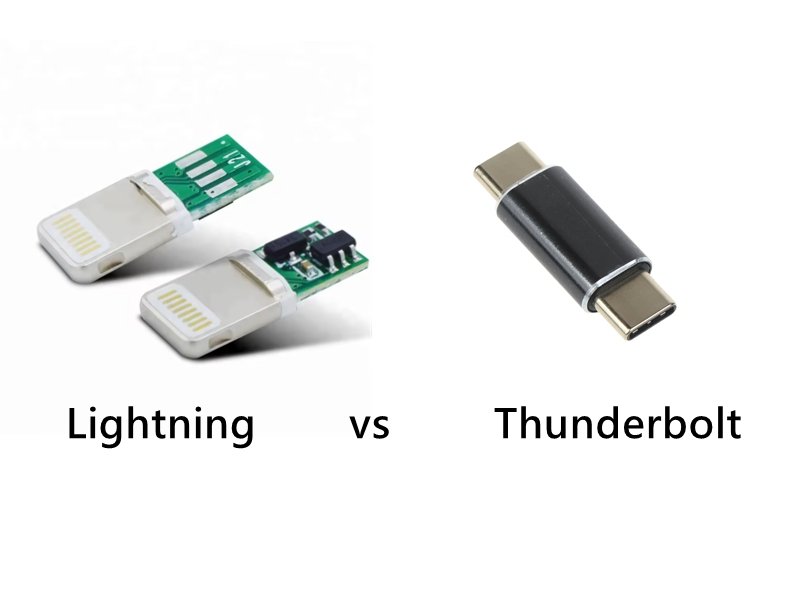
Choosing between a Lightning connector and a Thunderbolt connector seems straightforward—until you actually try to connect your devices. iPhones use Lightning, iPads switched from Lightning to USB-C, Macs rely on Thunderbolt 3/4, and accessories randomly support one or the other. Users often assume Lightning and Thunderbolt are simply “Apple cables,” but the two standards serve completely different purposes. One is a proprietary mobile connector; the other is a high-speed, high-power, computer-grade interface.
Lightning is a proprietary Apple connector designed primarily for charging and basic data transfer on mobile devices, while Thunderbolt is a high-performance interface built on USB-C that supports extremely fast data transfer, video output, and up to 100W–240W power delivery. Lightning plugs only into Lightning ports, while Thunderbolt uses the USB-C connector shape and is backward-compatible with USB-C.
This distinction explains why a Lightning cable can’t drive a monitor, can’t transfer files at Thunderbolt speeds, and can’t be plugged into a USB-C or Thunderbolt port. Yet a Thunderbolt cable can plug into USB-C—just not the other way around.
To understand this clearly—and avoid buying the wrong cable—let’s break down the differences, compatibility rules, use cases, and how Sino-Conn supports custom cable manufacturing for both connector families.
What Is a Lightning Connector?
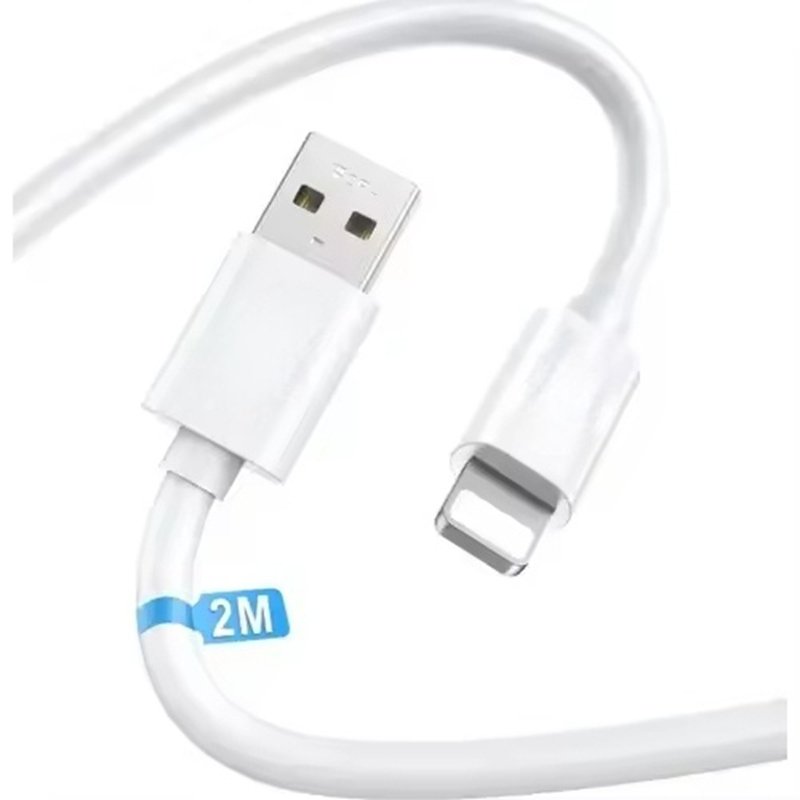
A Lightning connector is Apple’s proprietary 8-pin digital interface used primarily for charging, syncing, and basic data transfer on iPhones, older iPads, AirPods, and certain Apple accessories. It is compact, reversible, and mechanically simple, but technologically limited compared with modern USB-C or Thunderbolt interfaces. Lightning supports only USB 2.0 data rates and moderate charging power, making it suitable for lightweight mobile devices but not for high-bandwidth or high-power applications.
Lightning Connector Design and Core Characteristics
Lightning was introduced in 2012 to replace Apple’s large 30-pin dock connector. It is designed to provide a slim form factor with a reversible orientation for user convenience. Unlike USB-C, Lightning uses 8 exposed contact pads rather than internal pins.
Key characteristics include:
- Physical design: Slim 8-pin reversible connector
- Data speed: USB 2.0 (up to ~480 Mbps)
- Power delivery: Typically up to ~20W for supported iPhones
- Communication method: Digital, with Apple-managed authentication
- Typical devices: iPhone (pre-USB-C models), older iPads, AirPods, Magic Keyboard/Mouse, and many accessories
Lightning cables and accessories rely on an internal authentication chip (MFi program), which enables communication with Apple devices and ensures accessory compatibility.
Technical Strengths and Limitations
Lightning’s strengths lie in its compact size, reversible design, and reliability for low-power mobile use. However, compared with modern standards, Lightning falls short in several technical areas:
Limitations:
- No high-speed data (USB 2.0 only; slower than even basic USB-C)
- No video output (except limited analog passthrough on specific adapters)
- No multi-protocol support (cannot carry DisplayPort, PCIe, Thunderbolt, etc.)
- Lower power capability compared with USB-C PD or Thunderbolt
These limitations explain why Lightning cannot support external displays, high-speed file transfers, docking, or device-to-device networking.
Why Apple Is Transitioning Away from Lightning
Several factors are driving the migration from Lightning to USB-C:
- Regulatory compliance (EU’s USB-C mandate for mobile devices)
- Unified charging ecosystem across iPhones, iPads, and MacBooks
- Need for higher data rates for high-resolution photos and videos
- Enhanced accessory flexibility (USB-C supports far more protocols)
As a result, newer Apple products—including iPad Pro, iPad Air, iPad mini, and all recent MacBooks—have fully adopted USB-C or Thunderbolt ports.
Where Lightning Still Makes Practical Sense
Despite its limitations, Lightning continues to be used in certain contexts:
- Lightweight mobile accessories (AirPods, Magic Mouse/Keyboard)
- Cost-sensitive manufacturing where USB-C’s added electronics are unnecessary
- Legacy device ecosystems where millions of existing users still rely on Lightning cables
- Small-form-factor designs that benefit from Lightning’s physically narrow profile
For OEM manufacturers and engineering teams, Lightning remains relevant for replacement cables, backward-compatible accessories, and legacy product support.
What Is a Thunderbolt Connector?
A Thunderbolt connector is a high-speed, multi-protocol interface developed by Intel and Apple that uses the USB-C connector shape but supports far more functionality than standard USB-C. Thunderbolt combines data transfer, video output, networking, and power delivery into a single cable, making it a universal I/O standard for laptops, professional workstations, external storage, monitors, and docking systems. Thunderbolt 3 and Thunderbolt 4 both use the USB-C port type but enable up to 40 Gbps bandwidth and support 100W–240W power delivery.

Thunderbolt’s Architecture and Technical Capabilities
Thunderbolt is built to handle high-performance computing workloads and replace multiple separate ports. It transports several protocols simultaneously over a single physical connection:
- PCI Express (PCIe) for external GPUs, high-speed SSDs
- DisplayPort (DP Alt Mode) for 4K/8K monitors
- USB 3.x / USB4 for standard data devices
- Networking for peer-to-peer connections
- Power Delivery (PD) for laptop charging up to 100–240W
Unlike Lightning’s fixed mobile-focused design, Thunderbolt operates as a multi-lane, high-bandwidth transport system.
Thunderbolt Technical Specifications
Thunderbolt 3 and Thunderbolt 4 share the same connector type (USB-C) and maximum bandwidth (40 Gbps) but differ in performance consistency and minimum requirements.
| Specification | Thunderbolt 3 | Thunderbolt 4 |
|---|---|---|
| Connector | USB-C | USB-C |
| Max Data Rate | 40 Gbps | 40 Gbps (guaranteed) |
| Min PCIe Requirements | 16 Gbps | 32 Gbps |
| Video Support | Dual 4K or single 5K | Dual 4K or single 8K |
| Power Delivery | Up to 100W | Up to 100W (devices) |
| Cable Type | Active/passive | Active (up to 2 m), passive |
Why Thunderbolt Is Important in Modern Devices
Thunderbolt replaces several legacy interfaces by consolidating them into a single port. Its advantages include:
- High-speed file transfers (ideal for 4K/8K video workflows)
- Support for multiple monitors through daisy-chaining
- External GPU support via PCIe tunneling
- Reduced cable clutter (one cable for video + data + power)
- Universal docking compatible with laptops and monitors
This explains why Thunderbolt has become the standard on MacBooks, high-end PCs, and professional accessories.
Thunderbolt as Part of USB4
Thunderbolt 4 is fully integrated into USB4, meaning:
- All Thunderbolt 4 ports support USB4
- Not all USB4 ports support Thunderbolt
This relationship often causes confusion. Thunderbolt is essentially a superset of USB-C functionality.
Common Use Cases for Thunderbolt
Thunderbolt is typically used where speed and versatility are essential:
- External NVMe SSDs: Leveraging PCIe 3.0 x4 bandwidth
- High-resolution displays: 4K, 5K, and 8K monitors
- Docking stations: Single-cable charging + peripherals
- Professional cameras and interfaces: Fast media offloading
- eGPUs: External GPU expandability for laptops
- High-power laptop charging: Up to 100W–240W
Why Thunderbolt Is Not the Same as USB-C
Although the port looks identical, Thunderbolt has key differences:
- Requires certified active cables at long lengths
- Guarantees 40 Gbps across cables and devices
- Supports advanced protocols like PCIe
- Usually supports daisy-chaining (USB-C does not)
- Requires more complex electronics inside cables and connectors
This is why standard USB-C cables often do not deliver Thunderbolt performance—even though they physically fit.
Where Thunderbolt Makes the Most Sense
Thunderbolt is ideal in environments requiring:
- High-performance storage
- Multiple display outputs
- Professional audio/video workflows
- Unified docking for laptops
- Fast charging through the same port
Sino-Conn frequently works with engineering teams and OEMs who need Thunderbolt-capable USB-C assemblies, high-current E-marker cables, and precise shielding structures because Thunderbolt’s bandwidth is sensitive to impedance, EMI, and construction quality.
How Are Lightning and Thunderbolt Different?
Lightning and Thunderbolt differ across nearly every technical category.
Comparison Table: Lightning vs Thunderbolt
| Feature | Lightning | Thunderbolt 3/4 |
|---|---|---|
| Connector Shape | Proprietary 8-pin | USB-C |
| Max Data Speed | 480 Mbps | 40 Gbps |
| Charging Power | Up to ~20W | 100–240W |
| Video Output | No | Yes (4K/8K) |
| Used On | iPhones, AirPods | MacBooks, iPads, PCs |
| Compatibility | Lightning-only | Backward-compatible with USB-C |
| Target Use | Mobile charging & data | High-speed data, display, docking |
Key Takeaways
- Thunderbolt is dramatically faster (over 80× faster than Lightning).
- Thunderbolt supports charging + displays + PCIe; Lightning does not.
- Lightning is being replaced by USB-C across modern Apple devices.
Can You Plug Lightning Into Thunderbolt?
No. A Lightning plug cannot be inserted into a Thunderbolt or USB-C port because the connector shapes are physically incompatible.
1. Different Shapes
- Lightning = narrow 8-pin
- Thunderbolt/USB-C = oval 24-pin
They do not physically align.
2. Different Electrical Designs
Lightning uses USB 2.0 signaling.
Thunderbolt uses PCIe, DisplayPort, USB4, and PD.
They are not electrically compatible.
3. What About Adapters?
Only direction supported:
- Thunderbolt/USB-C → Lightning (via Apple USB-C to Lightning cable)
Opposite direction (Lightning → USB-C/Thunderbolt) does NOT exist.
Can You Plug USB-C Into a Thunderbolt Port?
Yes. A USB-C plug can be inserted into a Thunderbolt port, and it will work with USB-C functions such as charging or basic data transfer. However, it will not provide Thunderbolt speeds unless the cable and device also support Thunderbolt.
1. Physical Compatibility
Thunderbolt 3/4 ports use the USB-C shape, so they accept:
- USB-C charging cables
- USB-C data cables
- USB-C accessories
2. Functional Differences
| Cable Type | Works in Thunderbolt Port? | Max Function |
|---|---|---|
| USB-C Charging Cable | Yes | Charging only |
| USB-C Data Cable | Yes | USB 2.0/3.x speeds |
| USB-C Display Cable (DP Alt Mode) | Yes | Video output |
| Thunderbolt Cable | Yes | Full 40 Gbps + video + power |
3. Why Some USB-C Cables Underperform in Thunderbolt Ports
Because USB-C cables vary widely:
- Some support only USB 2.0
- Some support 60W, others 100W
- Some lack DisplayPort Alt Mode
Users often assume USB-C = universal, but internal wiring varies by cable category.
How to Choose Between Lightning and Thunderbolt?
Choose Lightning for legacy Apple mobile devices. Choose Thunderbolt for high-speed computing, display, and docking needs.
1. Choose Lightning If You Need:
- Charging an iPhone (pre-USB-C models)
- Connecting AirPods
- Using Apple accessories
- Lower-cost consumer cables
2. Choose Thunderbolt If You Need:
- Maximum data transfer (40 Gbps)
- External 4K/8K displays
- External SSDs or eGPUs
- Professional docking stations
- High-power laptop charging
3. For Mixed Apple Users
If you own both iPhone and MacBook/iPad, USB-C → Lightning cables may still be required—until Apple fully transitions iPhones to USB-C.
How Sino-Conn Supports Custom Lightning, USB-C, and Thunderbolt Cables
Sino-Conn manufactures custom cable assemblies for consumer electronics, industrial devices, medical equipment, and OEM production. For Lightning, USB-C, and Thunderbolt, we support:
Capabilities
- Custom cable length, OD, flexibility, shielding
- High-current E-marker USB-C cables (60W / 100W / 240W)
- USB-C → USB-C, USB-C → Lightning
- Thunderbolt-compatible USB-C high-speed assemblies
- Overmolded strain-relief options
- OEM/ODM branding
- Full 2D/3D drawings within 30 minutes–3 days
- No MOQ (1 pc prototype supported)
Quality & Certification
- UL / ISO / RoHS / REACH / PFAS
- 100% full inspection (process + final + pre-shipment)
- Options for genuine or cost-optimized compatible connectors
Whether you need high-performance Thunderbolt assemblies or legacy Lightning cables, Sino-Conn can match your drawing, reference sample, or even just a photo.
Ready to Develop a Custom Cable?

If your project requires Lightning, USB-C, or Thunderbolt connectors—and you want precise specifications, competitive pricing, and flexible lead times—Sino-Conn is ready to support you.
Send us your drawing, model number, or product photo, and we will provide accurate specifications and a fast quotation.
Contact Sino-Conn to customize your next-generation cable today.
Related Keywords :Lightning connector, Thunderbolt connector, USB-C, Apple cable types, Thunderbolt 3, Thunderbolt 4, fast charging cables, data transfer cables, USB-C vs Lightning, Apple accessories

With over 18 years of OEM/ODM cable assemblies industry experience, I would be happy to share with you the valuable knowledge related to cable assemblies products from the perspective of a leading supplier in China.
manufacturer catalogue
Get A Sample Now From Factory→
Get a quote quickly
Here, developing your OEM/ODM custom cable assemblies collection is no longer a challenge—it’s an excellent opportunity to bring your creative vision to life.



