 Skip to content

HDMI has become one of the most important connectivity standards in modern consumer electronics, powering everything from 4K TVs and streaming boxes to gaming consoles, laptops, cameras, and industrial displays. Yet despite being so common, HDMI cables remain widely misunderstood. Many buyers still wonder why some HDMI cables cost $3 while others cost $30, what “High-Speed” actually means, and which cable is required for 4K, 8K, HDR, 120Hz gaming, or automotive infotainment systems. With so many device categories adopting HDMI—including home theater, broadcasting, medical imaging, automotive dashboards, and embedded systems—the need to properly understand HDMI cable types is greater than ever.
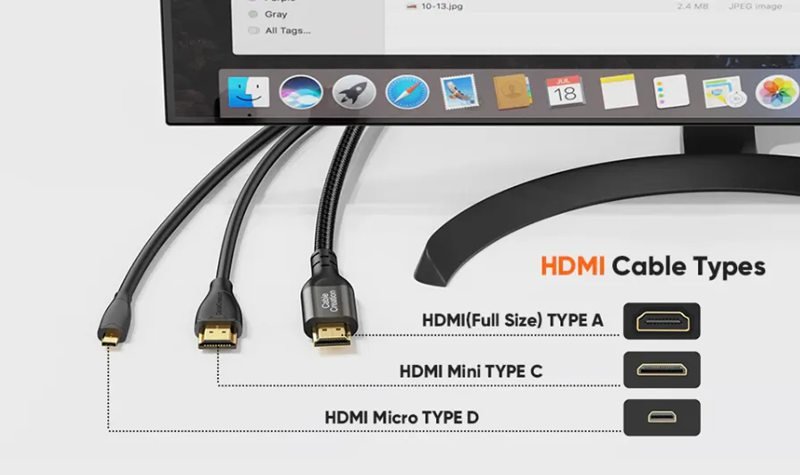
There are several types of HDMI cables: Standard HDMI, High-Speed HDMI, Premium High-Speed HDMI, Ultra High-Speed HDMI (HDMI 2.1), Active HDMI, Fiber Optic HDMI (AOC), and Automotive HDMI. Each type supports different bandwidth levels, resolutions, refresh rates, and use cases. Choosing the right HDMI cable depends on your device requirements such as 4K, 8K, HDR, gaming performance, cable length, and installation environment.
HDMI technology has evolved significantly since its introduction in 2002. Today’s cables support up to 48 Gbps bandwidth, 8K/10K resolution, 240Hz gaming, eARC audio, and even long-distance fiber-optic transmission. At the same time, OEM manufacturers, engineers, and procurement teams face new challenges: EMI interference, impedance matching, custom molding, limited routing space, automotive vibration, and compliance with UL, REACH, PFAS, and other certifications. Understanding HDMI categories and connector types is no longer optional—it directly impacts product performance, reliability, and user experience.
To make things more concrete, imagine a company that installs HDMI cables inside a medical imaging device. A poor-quality cable or the wrong category could cause flickering video, HDR dropout, instability during vibration, or failing compliance tests. These problems are expensive—but completely avoidable. This is exactly why Sino-conn manufactures OEM-grade HDMI assemblies with strict impedance control, UL-certified materials, and engineering drawings delivered in 30 minutes to 3 days.
Now let’s dive deeper into how HDMI cables work and why different types exist.
What Is an HDMI Cable?
An HDMI cable is a digital interface that transmits uncompressed audio, video, and data between devices such as TVs, monitors, game consoles, laptops, and set-top boxes. It works using high-speed TMDS (Transition-Minimized Differential Signaling) over multiple twisted-pair conductors with controlled impedance. Inside the cable, dedicated channels carry video, multi-channel audio, control signals (CEC), configuration data (EDID/DDC), Ethernet, and eARC audio, enabling stable 4K, 8K, HDR, and high-refresh-rate performance.
How Does an HDMI Cable Really Work
At first glance, an HDMI cable looks like a simple wire with a familiar plug on each end. In reality, it’s a high-speed digital transmission system designed to move massive amounts of data between a source device (like a Blu-ray player, GPU, or game console) and a sink device (like a TV, monitor, projector, or automotive display).
Unlike analog standards (VGA, RCA), HDMI carries fully digital information. That means it sends “1s and 0s” at very high frequencies over carefully engineered twisted pairs. Small problems in geometry, shielding, or impedance can cause those bits to arrive corrupted, which results in flicker, “sparkles,” dropouts, or a total loss of signal.
At the core, HDMI uses:
- TMDS data pairs to transmit video and embedded audio
- A TMDS clock pair to synchronize the data
- Low-speed lines for configuration and control
- Ground and shielding structures to keep noise out
- Optional channels like Ethernet and eARC depending on cable type
Because modern formats like 4K60, 4K120, and 8K60 require up to 48 Gbps, HDMI cable design has become a game of precision RF engineering, not just basic wiring. This is why different HDMI cable categories (Standard, High-Speed, Premium, Ultra High-Speed) exist.
Below is a simplified view of what’s happening inside:
| HDMI Layer | What It Does | Why It Matters |
|---|---|---|
| Physical Cable | Twisted pairs, shielding, jacket | Determines bandwidth, EMI performance |
| TMDS Signaling | Digital video + audio data | Enables 1080p, 4K, 8K, HDR |
| Control Channels | CEC, DDC/EDID, HDCP | Device control, handshakes, encryption |
| Optional Channels | Ethernet, ARC/eARC | Network + high-res audio return |
For OEM or engineering-focused buyers, understanding these layers is critical. If the cable’s impedance is off, or the pair skew (length difference between wires) is too large, the signal will fail long before it reaches the theoretical resolution spec. This is why Sino-conn focuses heavily on impedance control, shielding, and quality materials in custom HDMI assemblies.
What Signals Does HDMI Transmit?
An HDMI cable carries several logical types of signals at the same time:
- TMDS Video Data: The bulk of the bandwidth—pixel data, color information, timing.
- Embedded Audio: Multi-channel PCM, Dolby, DTS, Atmos embedded into the same stream.
- TMDS Clock: Synchronizes the video and audio data streams.
- DDC/EDID: Display Data Channel and Extended Display Identification Data, used so the display can tell the source its supported resolutions, refresh rates, and color formats.
- HDCP: Encryption/authentication for protected content like Blu-rays or streaming services.
- CEC (Consumer Electronics Control): Allows devices to control each other (e.g., TV remote controlling a soundbar or Blu-ray player).
- ARC / eARC: Audio Return Channel, especially eARC in HDMI 2.1, sending high-resolution audio back from TV to AVR or soundbar.
- HEC (HDMI Ethernet Channel, optional): Ethernet-over-HDMI for some specific equipment.
Practically, this means a single HDMI cable can replace multiple legacy cables (video + audio + control) while retaining high bandwidth and low latency.
How Is an HDMI Cable Constructed Internally?

Inside an HDMI cable, you’ll typically find:
- 4 high-speed twisted pairs
- 3 × TMDS data pairs
- 1 × TMDS clock pair
- Low-speed conductors for CEC, DDC, and hot-plug detect
- Drain wires and foil/braid shields
- Ground conductors and shield connection
- Outer jacket (PVC, TPU, LSZH, braided, etc.)
Key engineering points:
- Each twisted pair must maintain a 100 Ω differential impedance to avoid reflections and signal integrity problems.
- Twisted pairs must be length-matched (skew control) so bits arrive in sync.
- Shielding (foil + braid) reduces EMI/RFI susceptibility, especially critical near motors, power supplies, or in automotive environments.
- Dielectric material (insulation around conductors) must be low-loss to minimize attenuation at high frequencies.
For Ultra High-Speed (HDMI 2.1), these requirements are even tighter. Sino-conn optimizes conductor gauge, twist rate, dielectric, and shielding structure depending on whether the goal is short, flexible cables for small devices or long, robust assemblies for industrial or automotive use.
What Do HDMI Versions (1.4, 2.0, 2.1) Actually Change?

HDMI “version numbers” describe protocol capability and bandwidth, not the shape of the connector. The same Type-A housing can carry very different performance levels depending on cable category.
HDMI 1.4
- Up to 10.2 Gbps
- 1080p, basic 4K30
- ARC, 3D support
HDMI 2.0 / 2.0b
- Up to 18 Gbps
- 4K60, HDR10, BT.2020 color
- Better support for high frame rate 1080p/1440p
HDMI 2.1
- Up to 48 Gbps
- 4K120, 8K60, 10K (with DSC)
- VRR, ALLM, QMS, eARC, dynamic HDR
To reliably use HDMI 2.1 features, the cable must be Ultra High-Speed HDMI certified. For OEM projects, Sino-conn can design cables that match the required version and certify them accordingly, while also adjusting jacket material, OD, and connector style (full-size, mini, micro, automotive) to your mechanical and environmental constraints.
Which Types of HDMI Cables Are Available Today?
Today’s HDMI ecosystem includes Standard HDMI, High-Speed HDMI, Premium High-Speed HDMI, and Ultra High-Speed HDMI (HDMI 2.1), plus special variants such as Active HDMI, Fiber-Optic HDMI (AOC), and Automotive HDMI. These cable types differ in bandwidth, supported resolution and refresh rate, HDR capability, cable length, and installation environment. Choosing the correct HDMI type is critical for stable 4K, 8K, gaming, long-distance runs, and OEM/embedded applications.
A Complete Guide of HDMI Cable Types
Although all HDMI cables look similar from the outside, they are not all the same. Internally, there are significant differences in conductor quality, dielectric materials, shielding level, and even embedded electronics. These differences define the cable’s bandwidth rating, which in turn determines what resolutions, refresh rates, and features it can reliably support.
From a performance standpoint, the main HDMI cable categories are:
- Standard HDMI Cable
- High-Speed HDMI Cable
- Premium High-Speed HDMI Cable
- Ultra High-Speed HDMI Cable (HDMI 2.1)
On top of those, several special-purpose HDMI cable types exist:
- Active HDMI Cable (with signal boosting)
- Fiber Optic HDMI / AOC (Active Optical Cable)
- Automotive HDMI (Type-E)
For casual users, this can look confusing, but for engineers, product managers, and OEM buyers, knowing these distinctions helps avoid expensive design mistakes.
From a technical perspective, the key differentiator is maximum certified bandwidth, usually expressed in gigabits per second (Gbps). Higher bandwidth equals more data per second, which enables:
- Higher resolution (1080p → 4K → 8K)
- Higher refresh rate (60Hz → 120Hz)
- More color depth and color formats
- HDR and dynamic HDR
- Advanced gaming features (VRR, ALLM)
- eARC and high-resolution audio formats
Another crucial dimension is distance. Passive copper HDMI cables can handle high bandwidth only up to a certain length—typically 3–5 meters for 4K60 and often much less for 4K120/8K. Beyond that, active and optical HDMI types are needed.
Finally, the environment matters. Automotive and industrial HDMI require more robust jackets, better EMI performance, and mechanical reinforcement. This is where a custom cable manufacturer like Sino-conn steps in, tuning HDMI assemblies to the exact mechanical and electrical requirements of each project.
Below we break down each HDMI cable type so both engineers and non-technical buyers can clearly understand where each one fits.
Standard HDMI Cable (Legacy HD Applications)
Standard HDMI cables were designed for early HDTVs and support up to 4.95 Gbps of bandwidth. They are typically used for:
- 720p and 1080i video
- Basic audio transmission
- Older TVs, set-top boxes, and low-cost displays
These cables are rarely suitable for modern 4K content, especially at 60Hz or with HDR. However, they are still used in cost-sensitive or embedded environments where only basic HD is needed. For OEM use, they can be customized with specific OD, jacket materials, and molded connectors if bandwidth demands are modest.
High-Speed HDMI Cable (1080p and Entry-Level 4K)
High-Speed HDMI cables support up to 10.2 Gbps and were introduced to handle:
- 1080p video
- 4K at 24–30Hz
- 3D video
- Deep Color
These are still widely used and adequate for many office displays, education projectors, and standard home streaming setups where 4K60 HDR is not required. For OEMs, High-Speed HDMI is often the price-performance sweet spot when 4K usage is limited or refresh rates are low.
Premium High-Speed HDMI Cable (4K60 + HDR)
Premium High-Speed HDMI cables are certified to carry 18 Gbps of data, which supports:
- 4K at 60Hz (4K60)
- HDR10 and many Dolby Vision implementations
- Wider color spaces (BT.2020)
- Enhanced audio formats
This cable type is the recommended baseline for modern 4K TVs, streaming devices, Blu-ray players, and many gaming scenarios. It offers a good balance of capability and cost. For Sino-conn’s customers, Premium High-Speed HDMI is frequently used in consumer electronics, digital signage, and professional AV products.
Ultra High-Speed HDMI (HDMI 2.1 for 4K120 / 8K)
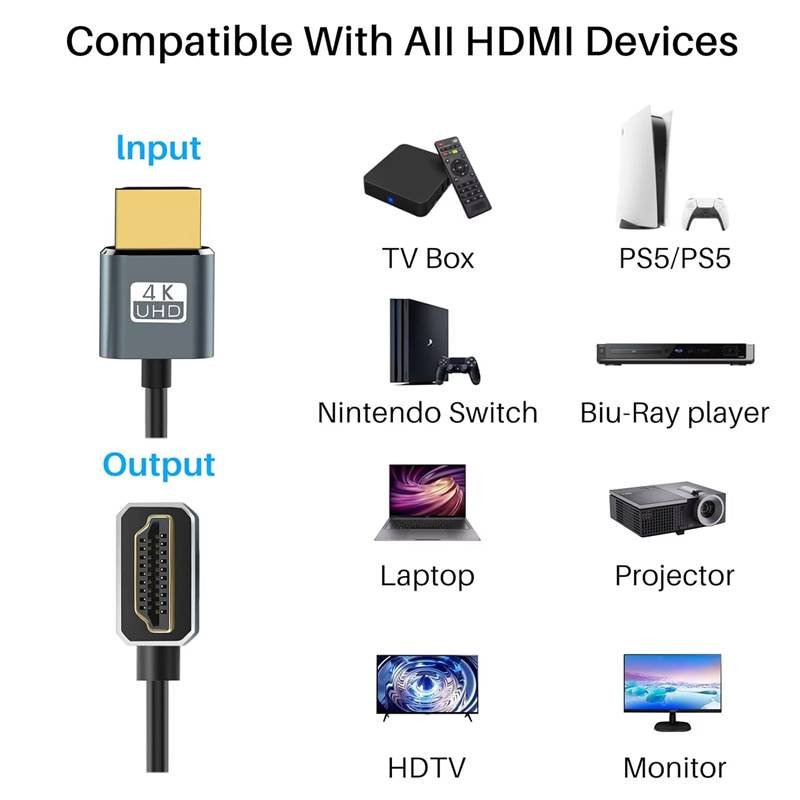
Ultra High-Speed HDMI cables are the current top tier and support up to 48 Gbps bandwidth. They are required for:
- 4K120 and 4K144 gaming
- 8K60 video
- Future higher resolutions with DSC
- VRR (Variable Refresh Rate)
- ALLM (Auto Low Latency Mode)
- QMS, QFT, and full eARC support
Every Ultra High-Speed cable must pass strict EMI and performance tests. These cables are critical for PS5, Xbox Series X, high-end GPUs, 8K TVs, medical imaging, and advanced industrial displays. Sino-conn can build Ultra High-Speed HDMI assemblies with custom lengths, flexible or rugged jackets, and mechanical features tailored to your product.
Active HDMI Cable (Long Distance Copper)
Active HDMI cables integrate signal conditioning electronics into one or both connectors. These circuits boost and equalize the high-speed TMDS signals, allowing longer runs (often 10–25 meters) over copper conductors without losing 4K/8K performance.
Use cases:
- Conference rooms and classrooms
- Large home theaters with projector ceilings
- Digital signage with remote media players
Active HDMI cables are typically directional (source ↔ display), and they must be designed carefully to match the targeted bandwidth. Sino-conn can help OEMs choose or design the right active chipset and implement it into custom-molded connectors.
Fiber Optic HDMI (AOC – Active Optical Cable)
Fiber Optic HDMI, also called AOC (Active Optical Cable), uses optical fibers for the high-speed lanes and copper for low-speed functions and power. Advantages include:
- Very long distances (30–100+ meters)
- Immunity to electromagnetic interference (EMI/RFI)
- Lightweight, thin, and flexible cable structure
These are ideal for:
- Stadiums and arenas
- Cinema and large venues
- High-end home theaters
- VR/AR systems
- Medical imaging and control rooms
For OEM and project-based deployments, Sino-conn can provide AOC HDMI with Kevlar reinforcement, plenum/LSZH jackets, and customized connector housings.
Automotive HDMI (Rugged Type-E and Custom Assemblies)
Automotive HDMI cables are engineered for in-vehicle infotainment (IVI) systems and use Type-E or custom hybrid connectors with locking mechanisms. They often feature:
- Thicker or high-temperature jackets (TPU, TPE, LSZH)
- Enhanced shielding for harsh EMI environments
- Strain relief and mechanical reinforcement for vibration
- Tight tolerances on length and routing flexibility
They connect head units, rear-seat displays, cameras, and dashboards. Sino-conn designs automotive HDMI assemblies to meet UL, REACH, PFAS-free, and OEM-specific standards, including custom molding, vehicle-specific harness integration, and rapid sampling for design validation.
What HDMI Connector Types Exist?

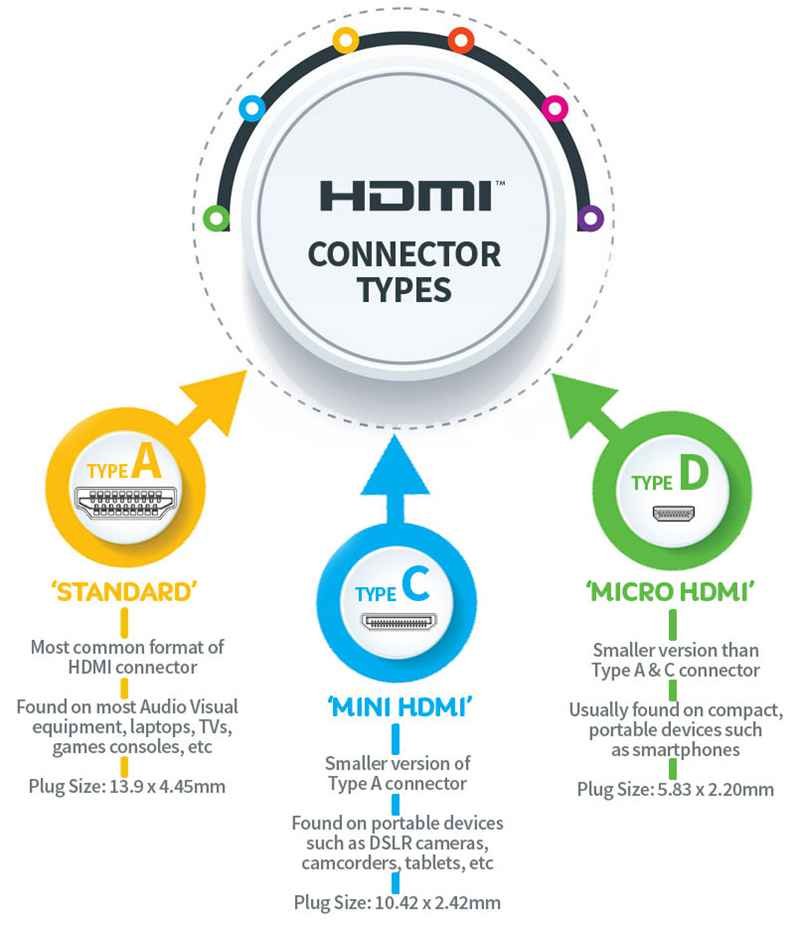
There are four main HDMI connector types: Type A (full-size), Type C (mini), Type D (micro), and Type E (automotive). All support digital audio and video, but they differ in size, mechanical design, and usage. Type A is used for TVs and consoles, Type C for cameras and tablets, Type D for ultra-compact devices, and Type E for in-vehicle infotainment systems and automotive environments.
HDMI is not just one connector shape. While most people recognize the full-size HDMI plug, there are actually several form factors designed for different devices and environments. All HDMI connector types carry the same fundamental signal structure—TMDS data pairs, clock, DDC, CEC, and optional features like Ethernet and ARC/eARC—but their physical size, pin pitch, robustness, and locking features vary significantly.
From an engineering and OEM perspective, choosing the right HDMI connector type is not just a mechanical decision; it directly affects:
- Device thickness and enclosure design
- Connector durability and mating cycles
- Cable routing space and bending radius
- Resistance to vibration, shock, and strain
- Ease of assembly and field replacement
The four key connector types in real-world use are:
- HDMI Type A — Full-size HDMI
- HDMI Type C — Mini HDMI
- HDMI Type D — Micro HDMI
- HDMI Type E — Automotive HDMI
Below we look at each type in detail and how Sino-conn can support different integration scenarios.
HDMI Type A (Full-Size) — The Standard for TVs and Home Theater
HDMI Type A is the most recognizable and widely used connector. It features 19 pins and is physically robust, designed for repeated plugging and unplugging in consumer environments.
Typical applications:
- TVs and monitors
- Desktop graphics cards and gaming consoles
- Blu-ray / DVD players and set-top boxes
- AV receivers, soundbars, switchers, and matrix units
- Conference room systems and digital signage players
Key characteristics:
- Full-size housing with strong shell
- Suitable for 1080p, 4K, 8K depending on cable category
- Available in straight, right-angle, and panel-mount variants
- Easy to grip and connect for end users
For OEM customers, Sino-conn can produce:
- Type A ↔ Type A cables (classic TV/AV use)
- Type A ↔ Mini/Micro HDMI cables for mixed devices
- Type A panel-mount connectors with custom harnesses
- Custom molding, branding, and strain relief to match enclosure design
Type A is usually the default choice whenever devices are large enough to accommodate a full-size connector and where user friendliness is prioritized.
HDMI Type C (Mini HDMI) — For Cameras, Tablets, and Compact Devices
Mini HDMI (Type C) is a smaller variant designed to save board space and allow thinner enclosures while still exposing full HDMI functionality.
Typical applications:
- DSLR and mirrorless cameras
- Tablets and some laptops
- Portable projectors and displays
- Development boards and compact embedded systems
- Drones and handheld devices with HDMI output
Key characteristics:
- 19 pins like Type A, but in a smaller shell
- Still supports high resolutions (4K and beyond, depending on cable spec)
- More sensitive to mechanical stress due to smaller pin pitch
- Often located on PCBs with tight layout constraints
For OEM/engineering projects, Sino-conn can provide:
- Type C ↔ Type A cables (camera to TV/monitor)
- Right-angle Mini HDMI plugs for tight spaces
- Over-molded or metal shell connectors for better durability
- Custom cable OD and flexibility to protect the small connector against bending stress
Choosing Mini HDMI is ideal when size and thickness are critical, but you still need full HDMI bandwidth.
HDMI Type D (Micro HDMI) — Ultra-Compact for Very Small Devices
Micro HDMI (Type D) is even smaller than Type C and is designed for ultra-slim devices where PCB and enclosure real estate are extremely limited.
Typical applications:
- Action cameras & sports cameras
- Compact tablets and ultrabooks
- Embedded computing modules
- Automotive dashboard units and compact IVI components
- Industrial or medical handheld terminals
Key characteristics:
- 19 pins in a very compact footprint
- Supports modern HDMI features depending on cable and controller (including 4K, HDR, etc.)
- More fragile if not properly supported mechanically
- Requires careful strain relief and board-level reinforcement
For reliability, Sino-conn often recommends:
- Custom molded Micro HDMI ends with extended overmold for strain relief
- Short, ultra-flexible cables to reduce mechanical leverage on the connector
- Optional right-angle Micro HDMI for flat enclosure designs
- Custom harnesses integrating Micro HDMI into broader cable assemblies for OEM devices
Micro HDMI is ideal for ultra-compact devices but must be engineered correctly to avoid field failures from repeated plug/unplug or cable strain.
HDMI Type E (Automotive HDMI) — For In-Vehicle Infotainment and Harsh Environments
HDMI Type E is specifically designed for automotive environments, where connectors face vibration, shock, temperature changes, dust, and EMI from power electronics and engine systems.
Typical applications:
- In-vehicle infotainment (IVI) head units
- Rear-seat entertainment screens
- HDMI links between central units and dashboard displays
- External video input ports hidden inside the vehicle
- Camera or sensor displays in automotive and off-highway equipment
Key characteristics:
- Robust, locking connector design to prevent accidental disconnection
- Often used in conjunction with short adapter leads ending in Type A for user devices
- High resistance to vibration and temperature extremes
- Usually paired with high-temperature, oil-resistant, or halogen-free jackets
Sino-conn’s automotive HDMI solutions focus on:
- Type E ↔ Type A / Type C harnesses
- Custom length and routing geometry for specific vehicle platforms
- High-temperature materials (TPU, TPE, LSZH) and reinforced shielding
- Compliance with UL, RoHS, REACH, PFAS-free, and automotive EMC requirements
For OEM automotive and industrial customers, Type E HDMI is often part of a larger wiring harness, and Sino-conn can integrate HDMI into multi-branch cable assemblies.
How Do HDMI Cable Categories Affect Performance?

HDMI cable categories determine how much data a cable can carry, which directly affects supported resolution, refresh rate, HDR quality, audio features, and maximum cable length. Standard HDMI supports basic HD, High-Speed supports 1080p and entry-level 4K, Premium High-Speed supports 4K60 HDR, and Ultra High-Speed supports 4K120, 8K, VRR, and eARC. Better categories use improved materials, tighter impedance control, and stronger shielding for higher stability and lower error rates.
Many users assume “an HDMI cable is just an HDMI cable.” In reality, cable category is one of the most important performance factors. As HDMI evolved from simple 1080p video to 4K120 and 8K60, the data rate jumped from a few gigabits per second to 48 Gbps. Not all cables are built to handle that.
From an engineering perspective, HDMI categories define:
- Maximum bandwidth (Gbps)
- Supported video resolutions and refresh rates
- HDR capabilities and color depth
- Audio features such as eARC and high-res formats
- EMI behavior and reliability over distance
If you use a cable below the required category, the system may:
- Fail to show a picture
- Drop down to lower resolution or refresh rate
- Disable HDR or advanced audio formats
- Show intermittent flicker, “sparkles,” or blackouts
This is critical not just for consumer home theater, but also for professional AV, industrial displays, medical imaging, conference systems, and OEM devices. For Sino-conn’s customers, specifying the correct category at the design stage helps avoid costly troubleshooting later.
Quick Comparison of HDMI Categories
| Cable Category | Max Bandwidth | Typical Use Case | Example Features Supported |
|---|---|---|---|
| Standard HDMI | 4.95 Gbps | 720p / 1080i HD | Basic HD video & audio |
| High-Speed HDMI | 10.2 Gbps | 1080p, 4K30 | 3D, Deep Color |
| Premium High-Speed HDMI | 18 Gbps | 4K60, HDR | HDR10, BT.2020, advanced color |
| Ultra High-Speed HDMI | 48 Gbps | 4K120, 8K60, HDMI 2.1 features | VRR, ALLM, QMS, QFT, eARC, dynamic HDR |
Now let’s break down how this impacts performance in specific technical dimensions.
How Do Bandwidth and Resolution Relate to HDMI Categories?
Every pixel on the screen is encoded as digital data. Higher resolutions and deeper color require more bits per second. Standard HDMI cables were fine when 1080i/720p was mainstream, but they simply cannot push enough data for 4K60 or 8K. High-Speed HDMI raises the ceiling to 10.2 Gbps, enough for 1080p and limited 4K.
Premium High-Speed HDMI increases this to 18 Gbps, which comfortably handles 4K60 4:4:4 in many scenarios. Ultra High-Speed HDMI with 48 Gbps is needed for 4K120, 8K60, and beyond. If a cable lacks the necessary bandwidth, the source and display often fall back to lower resolution or refresh rate without clearly telling the user the cable is the bottleneck. For OEM designs, Sino-conn validates cable performance to match the worst-case target mode (e.g., 4K120 HDR) so integrators can be confident the system will pass final tests.
How Do HDMI Categories Affect Refresh Rate and Gaming Performance?
Gamers care deeply about refresh rate (60Hz vs 120Hz vs 144Hz+). Higher frame rates provide smoother motion and lower input latency. However, high refresh rates at high resolutions like 4K120 require enormous bandwidth. In practice:
- High-Speed HDMI can support 1080p at high frame rates (e.g. 120Hz), but not 4K120.
- Premium High-Speed is typically sufficient for 4K60 gaming.
- Ultra High-Speed HDMI is required for 4K120, 4K144, or 8K modes, especially with VRR (Variable Refresh Rate) and ALLM.
If a low-category cable is used, consoles or GPUs may silently limit output to 4K60 or even 1080p, undermining the hardware’s potential. Sino-conn’s HDMI 2.1 assemblies are specifically designed for gaming-grade bandwidth and validated under worst-case refresh/load conditions to avoid intermittent failures.
How Do HDMI Categories Impact HDR and Audio Features?
HDR formats like HDR10, HDR10+, Dolby Vision, HLG increase color depth, brightness metadata, and overall data load. This extra information rides on top of the video stream, consuming more bandwidth. As a result:
- Standard / basic High-Speed may struggle or force reduced color formats.
- Premium High-Speed is generally recommended for stable 4K HDR.
- For 4K120 HDR or 8K HDR, Ultra High-Speed HDMI is mandatory.
On the audio side, eARC in HDMI 2.1 allows high-bitrate audio formats (Dolby TrueHD, DTS-HD MA, Atmos) to return from the TV to a receiver. The cable must meet Ultra High-Speed specs to guarantee clean, error-free audio transmission.
OEM builders who integrate soundbars, AVRs, or display devices into larger systems rely on Sino-conn to ensure that the cable’s category truly supports the advertised HDR and audio capabilities.
Why Construction Quality and EMI Performance Are Tied to Category
Higher HDMI categories are not only about speed—they also require:
- Better shielding (foil + braid combinations)
- Lower-loss dielectric materials
- Stricter impedance control (≈100 Ω differential)
- Pair-to-pair skew and crosstalk control
- EMI compliance (especially for Ultra High-Speed)
At very high data rates, cables behave like RF transmission lines, and environmental noise can easily corrupt the signal. Certified Ultra High-Speed HDMI cables must pass stringent EMI tests so they don’t interfere with Wi-Fi, Bluetooth, or cellular radios and are not impacted by nearby noise sources.
For Sino-conn’s industrial, medical, or automotive customers, this translates to better reliability in noisy environments. By customizing shielding, jacket material, and OD, Sino-conn can tailor HDMI cable performance not just for bandwidth, but for real deployment conditions such as inside vehicles, equipment racks, or factory floors.
Which HDMI Cable Do You Need for Your Device?
You should choose High-Speed HDMI for 1080p and basic 4K, Premium High-Speed HDMI for 4K60 with HDR, Ultra High-Speed HDMI for 4K120 or 8K with HDMI 2.1 gaming features, and Active or Fiber HDMI for long-distance runs. The right cable depends on your device type (TV, console, laptop, camera, projector, automotive system), resolution, refresh rate, HDR requirements, and installation length.
Which HDMI Cable Is Best for 4K TVs and Streaming Devices?
If your setup includes a 4K TV plus a streaming device, Blu-ray player, or set-top box, the minimum recommended cable category is Premium High-Speed HDMI (18 Gbps).
With Premium High-Speed HDMI, you can reliably use:
- 4K at 60Hz
- HDR10 and most Dolby Vision implementations
- 4:4:4 or 4:2:2 color at 10-bit (depending on device)
Using an older Standard or basic High-Speed cable often forces your TV to:
- Drop to 4K30
- Disable or downgrade HDR
- Or even fall back to 1080p
For typical living room distances (1–5 meters), a certified Premium High-Speed cable is ideal. For OEM TV/box brands, Sino-conn can manufacture:
- Custom-length Premium HDMI cables
- Specific OD and softness to fit in retail packaging or wall routing
- Branded connector shells and custom molding for better perceived quality
This ensures end-users get the full 4K experience without support headaches.
Which HDMI Cable Do You Need for 8K TVs or PS5 / Xbox Series X Gaming?
If you use a PS5, Xbox Series X, high-end gaming PC, or 8K TV, you should choose Ultra High-Speed HDMI (HDMI 2.1, 48 Gbps). This category is designed for:
- 4K120 or 4K144 gaming
- 8K60 video modes
- VRR (Variable Refresh Rate)
- ALLM (Auto Low Latency Mode)
- Advanced HDR formats and eARC audio return
Using anything less than Ultra High-Speed can result in:
- Inability to select 4K120 in the console settings
- Random signal dropouts or “no signal” at high frame rates
- HDR glitches or unstable VRR behavior
For gaming monitors and 8K applications, Sino-conn can provide:
- Short, flexible Ultra High-Speed HDMI for desktop setups
- Longer runs with active or AOC options for living-room or eSports rigs
- OEM-specific designs with reinforced strain relief for repeated plugging/unplugging
This matters especially for gaming brands that market “4K120-ready” systems and must ensure the included cable truly supports those specs.
What HDMI Cable Should You Use for Laptops, Cameras, and Projectors?
For laptops, cameras, tablets, and projectors, the correct HDMI cable depends on:
- The output port type (Type A, Mini HDMI Type C, or Micro HDMI Type D)
- The target resolution (1080p, 1440p, 4K)
- Whether you need 60Hz or higher frame rates
Common patterns:
- Business laptops → High-Speed or Premium High-Speed for 1080p/4K60 presentations
- DSLR / mirrorless cameras → Mini HDMI to Type A, usually High-Speed or Premium
- Projectors → For 4K projectors, Premium High-Speed is strongly recommended
Sino-conn often supplies:
- Mini/Micro HDMI ↔ Full-size HDMI cables with right-angle ends
- Ultra-thin, flexible HDMI for tight camera rigs and gimbal systems
- Short high-quality cables for meeting-room tables and ceiling-mounted projectors
For OEM device makers, selecting the right combination of connector (Type A/C/D), length, and category ensures a reliable user experience across many use environments.
Which HDMI Cable Is Suitable for Automotive Infotainment Systems?
Automotive environments are far more demanding than home living rooms. In vehicles, HDMI cables must endure:
- Constant vibration and shock
- Temperature extremes and fast thermal cycling
- Tight routing through dashboards and pillars
- Strong EMI from alternators, ECUs, motors, and inverters
For in-vehicle infotainment (IVI), the typical solution is:
- Automotive HDMI Type-E connectors inside the car
- Short adapter leads to user-facing Type-A or Type-C connections
- Cables built with high-temperature, oil-resistant, halogen-free jackets
From a performance standpoint, many automotive displays still use 720p, 1080p, or 4K. That typically maps to High-Speed or Premium High-Speed categories, but with much stricter mechanical and environmental design.
Sino-conn’s automotive HDMI solutions include:
- Custom Type-E ↔ Type-A/C harnesses
- Defined length tolerances and bend radii per platform
- Enhanced EMI shielding for automotive EMC compliance
- Material systems compatible with UL, RoHS, REACH, and PFAS-free requirements
For Tier-1 or Tier-2 automotive suppliers, custom HDMI assemblies are a necessity—not a luxury.
Conclusion
HDMI remains the most important video/audio interface in modern electronics, powering devices across home entertainment, gaming, automotive, medical, and industrial sectors. Understanding HDMI types, versions, connectors, and performance categories helps buyers select the right cable and avoid compatibility issues—especially as 4K, 8K, high-refresh-rate gaming, and in-vehicle multimedia systems continue to evolve.
For projects requiring precision, durability, compliance, or custom engineering, off-the-shelf HDMI cables are rarely enough. This is where Sino-conn becomes your ideal manufacturing partner.
Contact Sino-conn today to start your custom HDMI cable project.
Our engineering team will provide fast consultation, accurate drawings, and high-performance cable assemblies tailored to your device.



