Skip to content

In today’s world of automation, cloud computing, and real-time control systems, the humble Ethernet cable is the quiet hero connecting billions of devices. From factory PLCs to MRI scanners, these copper lines carry packets of data that decide whether a process runs smoothly or stops dead. Yet many engineers and OEM buyers still ask a simple but fundamental question: what does an Ethernet cable actually look like inside and out?
An Ethernet cable typically appears as a round or flat insulated cable ending with an RJ45 connector on each side. Inside, it contains four twisted pairs of copper wires, sometimes shielded to reduce electromagnetic interference. The jacket is usually labeled Cat5e, Cat6, Cat7, etc., indicating speed and bandwidth. Colors vary—most are gray, blue, or yellow—but structure, not color, defines performance.
Imagine a robotics engineer tracing network faults at midnight: the difference between a standard Cat5e and a shielded Cat6a cable can determine whether an assembly line restarts in minutes or hours. Understanding what’s inside—and how to identify it—empowers engineers to design, source, and troubleshoot confidently. Let’s open up the cable layer by layer.
What Is an Ethernet Cable?
An Ethernet cable is a twisted-pair copper cable designed for wired data transmission between network devices such as routers, switches, and industrial controllers. Each cable consists of eight conductors arranged in four color-coded pairs. Shielding, insulation, and jacketing protect signals from interference and environmental stress.
How Does an Ethernet Cable Work?
Ethernet cables transmit data using differential electrical signals. Each twisted pair carries one differential signal, minimizing noise pickup. The standard pinout—TIA-568A or TIA-568B—defines which colors correspond to transmit (TX) and receive (RX) lines. In high-speed variants (Cat6a and above), all four pairs carry bi-directional traffic using sophisticated encoding like PAM-16, enabling gigabit-to-multi-gigabit throughput.
What Are the Main Components of an Ethernet Cable?
- Conductor: Solid or stranded copper, typically 24–26 AWG.
- Insulation: Polyethylene or fluoropolymer dielectric maintaining pair spacing.
- Shielding: Foil (FTP), braid (STP), or unshielded (UTP).
- Separator: Plastic cross or spline preventing crosstalk.
- Jacket: PVC, LSZH, or PUR for mechanical protection.
- Connector: RJ45 plug with gold-plated contacts for secure mating cycles.

Does an Ethernet Cable Have to Be Plugged Into a Router?
No. While home users connect to routers, OEM systems often link devices directly—controller to PLC, computer to sensor—forming point-to-point or daisy-chain networks. In industrial Ethernet (Profinet, EtherCAT), direct links bypass routers entirely but still use standard RJ45 or M12 connectors. The key is maintaining correct pinout and impedance matching across every connection.
What Does an Ethernet Cable Look Like Physically?
At first glance, an Ethernet cable appears to be a simple insulated wire, but its physical structure is carefully engineered to preserve high-speed data transmission and resist interference.
Typically, Ethernet cables are round or flat, made with a flexible polymer jacket that protects multiple twisted copper pairs inside.
Both ends are terminated with RJ45 connectors, the familiar clear plastic plugs with eight gold-plated pins visible through the housing.
An Ethernet cable can vary in thickness, flexibility, and shielding, depending on its category (Cat5e, Cat6, Cat7, etc.) and intended use.
For instance, a Cat5e office cable is usually lightweight and unshielded, while an industrial Cat6a cable might be thicker, shielded with foil and braid, and covered with a rugged jacket material like PUR or LSZH.
Printed along the outer sheath are specifications such as “Cat6 UTP 24 AWG 75°C”, manufacturer code, and compliance markings — all valuable clues for identifying the cable’s type and performance class.
How to Identify an Ethernet Cable by Appearance
There are several physical cues that help distinguish an Ethernet cable from other types:
- Connectors: Each end has an RJ45 connector, wider than a telephone plug and with a locking tab that “clicks” when inserted. The transparent housing reveals eight aligned metal contacts.

- Markings on the Jacket: Look for text printed along the cable, often every 30–50 cm. It typically lists the category (Cat5e, Cat6, etc.), gauge (AWG), shielding type (UTP, FTP, S/FTP), and temperature rating.
- Shape and Diameter: Round cables dominate industrial and office installations, usually between 5 mm and 8 mm in diameter. Flat variants exist for compact routing but are less robust.
- Color Coding: Ethernet cables come in various colors (blue, gray, yellow, red, black). These colors have no technical meaning but help identify network segments in structured cabling systems.
- Alternative Connector Forms: In certain industrial or outdoor settings, you may find M12 or IP67-rated circular connectors instead of RJ45. These offer better vibration and moisture protection but maintain the same pin arrangement and function.
How Do You Tell if a Cable Is an Ethernet Cable?
A quick inspection provides reliable confirmation:
- Count the conductors – Ethernet uses eight conductors, visible through the clear RJ45 plug.
- Check the latch – an Ethernet plug has a locking tab that audibly clicks into a port.
- Read the printing – the words Cat5e, Cat6, or Cat7 will almost always appear on the outer jacket.
- Compare the size – the connector is larger and squarer than a USB or phone plug.
- Look for twisted pairs – cutting the end or viewing a transparent section reveals pairs of color-coded wires twisted together.
By contrast, HDMI, USB, or coaxial cables use entirely different connector shapes and pin arrangements, making Ethernet cables easy to distinguish once you know what to look for.
What’s Inside the Cable?
Inside an Ethernet cable lies a carefully balanced geometry designed to preserve signal timing and minimize crosstalk.
A typical structure includes:
- Four Twisted Pairs (Eight Conductors): Each pair is color-coded and twisted at a specific rate to reduce electromagnetic interference.
- Color Scheme (TIA-568B Standard): Pair Wire Colors Common Function 1 White/Orange – Orange Transmit (TX) 2 White/Green – Green Receive (RX) 3 White/Blue – Blue Data/Control 4 White/Brown – Brown Data/Control
- Insulation: Each conductor is coated with polyethylene or fluoropolymer insulation to maintain consistent impedance (typically 100 Ω ± 5%).
- Shielding (Optional): Depending on type, the cable may include foil (FTP), braid (STP), or both (S/FTP) around pairs or the full bundle. Shielded designs are essential in environments with motors, RF devices, or power lines.
- Filler and Separator: Higher categories often include a plastic spline or cross-member to maintain uniform pair spacing and reduce near-end crosstalk (NEXT).
- Outer Jacket: Provides mechanical protection and environmental resistance. Common materials include PVC (general purpose), LSZH (low smoke zero halogen), or PUR (oil and abrasion resistant).
What Does a Wi-Fi Ethernet Cable Look Like?
The term “Wi-Fi Ethernet cable” can be misleading — there’s no special cable for wireless networks.
In practice, it refers to the Ethernet cable that connects a Wi-Fi router or access point to a modem, switch, or wall jack.
It looks exactly like a regular Ethernet cable, most often a Cat6 UTP or FTP cable with blue or yellow jacket for easy identification.
Engineers commonly use shielded Cat6a cables in networking rooms where multiple radio and electrical devices operate close together, minimizing interference that could affect wireless performance.
How to Tell Different Categories Apart (Cat5e vs Cat6 vs Cat7)
Although all Ethernet cables look similar externally, their performance ratings and internal construction differ.
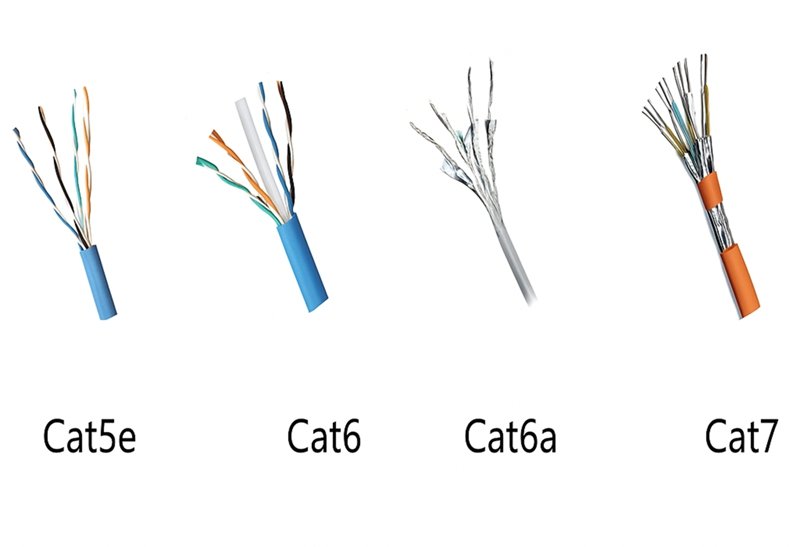
Below is a comparison of the most common categories:
| Category | Frequency (MHz) | Maximum Speed | Shielding | Jacket Type | Typical Diameter (mm) |
|---|---|---|---|---|---|
| Cat5e | 100 | 1 Gbps | UTP | PVC | 5.3 |
| Cat6 | 250 | 1 Gbps (10 Gbps up to 55 m) | UTP/FTP | LSZH | 6.0 |
| Cat6a | 500 | 10 Gbps | F/UTP or S/FTP | LSZH/PUR | 6.8 |
| Cat7 | 600–1000 | 10 Gbps | S/FTP | PUR | 7.5 |
| Cat8 | 2000 | 25–40 Gbps | S/FTP | PVC/PUR | 8.0+ |
Higher-category cables include better shielding and tighter twists, resulting in improved resistance to signal loss and external noise.
However, these enhancements often increase stiffness and cost, so engineers should match the cable category to both performance needs and installation conditions.
Physically, an Ethernet cable is more than just a plastic-covered wire.
It’s a precisely tuned transmission medium built from multiple twisted copper pairs, designed to maintain signal integrity even under mechanical stress or electrical noise.
Understanding its external markings, internal layout, and category differences allows engineers and OEM designers to identify, verify, and specify the correct type for any project — whether for a compact medical device, a control cabinet, or a high-speed data backbone.
Which Types of Ethernet Cables Are Commonly Used?
Common Ethernet cable categories include Cat5e, Cat6, Cat6a, Cat7, and Cat8. The higher the category, the greater its bandwidth and noise immunity. Shielded (STP/SFTP) variants are used in noisy or industrial environments, while unshielded (UTP) versions suit offices and home networks.
What Are the Common Categories?
Each category complies with ISO/IEC 11801 and TIA/EIA 568 standards.
- Cat5e: 1 Gbps up to 100 m; legacy office wiring.
- Cat6: tighter twists, internal separator; 1 Gbps @ 100 m or 10 Gbps @ 55 m.
- Cat6a: augmented Cat6; double shielding, supports 10 Gbps @ 100 m.
- Cat7/7a: individually shielded pairs, braided jacket; suited for EMI-dense zones.
- Cat8: data-center short runs up to 30 m at 25–40 Gbps.
Do Shielded and Unshielded Cables Look Different?
Yes. Shielded cables appear thicker and stiffer. The RJ45 plugs are usually metal-shelled and grounded. Unshielded versions are lighter and more flexible. OEM designers must weigh EMI immunity versus bend radius and cost. In factories with variable-frequency drives or robotics arms, shielded cables reduce bit errors by >95 % compared with UTP.
How to Choose the Right Ethernet Cable for Your Application
Selecting the correct Ethernet cable is not simply a matter of choosing the highest category number. Each application — whether in a laboratory, factory floor, or data center — imposes specific electrical, mechanical, and environmental demands.
A well-matched cable ensures stable data transmission, longevity, and compliance with system standards. Conversely, using an unsuitable type may cause crosstalk, packet loss, or premature wear.
The right Ethernet cable depends on data rate, transmission distance, EMI level, installation environment, and mechanical flexibility. For standard office or embedded applications, Cat5e or Cat6 cables are often sufficient. For industrial or high-speed systems, shielded Cat6a or Cat7 cables offer better noise immunity and mechanical resilience.
What Factors Matter Most?
1. Data Speed and Bandwidth Requirements
The first consideration is the network speed and bandwidth required by the system. Each cable category defines a frequency range that supports certain data rates.
| Category | Max Speed | Frequency | Typical Use Case |
|---|---|---|---|
| Cat5e | 1 Gbps | 100 MHz | Office PCs, printers, low-bandwidth sensors |
| Cat6 | 1–10 Gbps (≤55 m) | 250 MHz | Small networks, control panels |
| Cat6a | 10 Gbps (100 m) | 500 MHz | Industrial and enterprise systems |
| Cat7 | 10 Gbps (100 m) | 600–1000 MHz | EMI-heavy industrial setups |
| Cat8 | 25–40 Gbps (≤30 m) | 2000 MHz | Data centers, high-speed backbones |
Selecting a higher category than necessary increases cost and stiffness without practical benefit for low-speed systems. Engineers should align performance with protocol — for instance, 10 Gigabit Ethernet requires at least Cat6a over standard 100-meter runs.
2. Cable Length and Signal Integrity
Ethernet standards typically limit a single cable segment to 100 meters, including patch and horizontal runs.
For longer distances, signal attenuation increases due to copper loss and crosstalk. In such cases, consider:
- Using repeaters or switches to extend network length.
- Upgrading to Cat6a or higher, which supports lower insertion loss.
- Keeping bend radius ≥ 4× the outer diameter to avoid impedance mismatch.
In precision environments such as robotics or medical instruments, even small reflections can cause noticeable data delays.
Maintaining correct geometry during installation preserves signal timing and impedance balance.
3. Electromagnetic Interference (EMI) and Shielding
The surrounding electrical environment strongly influences cable choice.

In facilities with motors, inverters, or radio transmitters, unshielded cables (UTP) are vulnerable to EMI.
Shielded variants—such as FTP (foil twisted pair) or S/FTP (braid + foil)—reduce interference dramatically.
| Shielding Type | Construction | EMI Resistance | Flexibility | Typical Application |
|---|---|---|---|---|
| UTP | Unshielded twisted pairs | Low | High | Offices, home LAN |
| FTP | Foil over all pairs | Medium | Moderate | Commercial networks |
| S/FTP | Foil on each pair + braid overall | High | Lower | Industrial automation, RF zones |
Grounding the shield at least on one end is critical to ensure proper EMI drainage. In some sensitive measurement systems, engineers connect shields at both ends using drain wires and grounding clips to stabilize signal reference potential.
4. Temperature, Flexibility, and Environmental Resistance
Ethernet cables must physically endure their installation environment.
Key material choices include:
| Material | Temperature Range | Characteristics | Recommended Environment |
|---|---|---|---|
| PVC | –20 °C to +75 °C | Economical, flexible | Indoor, low movement |
| LSZH | –20 °C to +80 °C | Low smoke, non-toxic | Public or medical facilities |
| PUR | –40 °C to +80 °C | Oil, abrasion, and UV resistant | Industrial machinery |
| FEP | –70 °C to +200 °C | High temperature, chemical resistant | Aerospace, defense |
For moving machinery or cable chains, use high-flex Ethernet cables with stranded conductors and PUR or TPE jackets.
A typical high-flex model can withstand over 5 million bending cycles without performance degradation.
In static applications, solid-core conductors provide lower attenuation and are easier to terminate.
5. Compliance and Testing
Engineers should always verify whether a cable meets relevant standards:
- Electrical: TIA/EIA-568, ISO/IEC 11801, IEEE 802.3.
- Safety: UL CMX, CM, or CMP flame ratings.
- Environmental: RoHS 2.0, REACH, PFAS-free.
- Mechanical: Minimum bend radius, tensile strength, and crush resistance.
During system design, specifying compliance early ensures downstream certification is straightforward and avoids rework during product validation.
Which Industries Require Custom Ethernet Cables?
Although the electrical principles are universal, industry-specific conditions often require tailored construction.
| Industry | Environment | Recommended Cable Type | Typical Feature |
|---|---|---|---|
| Medical Equipment | Cleanroom, low EMI | Cat6 LSZH | Non-toxic, flame-retardant jacket |
| Industrial Automation | Oil, vibration, EMI | Cat6a S/FTP PUR | Flexible, shielded, UV-resistant |
| Military / Aerospace | Extreme temperature, vibration | Cat7 S/FTP TPE | High tensile strength, MIL-grade |
| Data Centers | Dense patching, short runs | Cat8 S/FTP | 25–40 Gbps high-frequency support |
| Commercial Buildings | Moderate EMI, long runs | Cat6 UTP PVC | Economical, easy termination |
Customization may include specific jacket materials, connector standards (RJ45 or M12), length tolerances, and color coding for network management.
By aligning these attributes with operating conditions, engineers can achieve both electrical stability and long service life.
Choosing the right Ethernet cable is a process of balancing performance, durability, and cost.
An engineer should first define the system’s bandwidth, length, and EMI exposure, then match those parameters to the appropriate cable category and construction.
Beyond the numbers printed on the jacket, real-world reliability depends on material selection, shielding design, and installation quality.
With clear specifications, an Ethernet cable becomes not just a connector — but a critical element of a system’s overall signal integrity and uptime.
Are Ethernet Cables Customizable?
Yes. Ethernet cables can be customized in length, shielding, connector type, pin-out, jacket material, and color. OEM customization ensures compatibility with system architecture and environmental demands.
What Can Be Customized by OEM or Engineer Request?
Sino-conn supports full customization parameters:
- Length: 10 cm to 100 m precision cutting.
- Definition (Pin-Out): standard T568B or custom pair mapping.
- Connector Style: RJ45, M12 X-coded, IP67 sealed.
- Jacket Material: PVC, LSZH, PUR, or FEP.
- Color Coding: for system differentiation.
- Over-molding: strain-relief boots, bend-limiting design.
How Does Sino-conn Support Custom Design?
- Engineering Drawings: CAD-to-PDF within 30 minutes for simple projects; ≤ 3 days for complex harnesses.
- Sample Lead Time: 2–3 days urgent; 2 weeks standard.
- Production Lead Time: 2–4 weeks mass run.
- Certifications: UL, ISO 9001, RoHS, REACH, PFAS-free.
- Testing: 100 % continuity + signal integrity inspection (3 stages).
- MOQ: 1 piece—ideal for prototype or pilot batch.
OEM engineers gain full traceability and configuration control before production.
Why Choose Sino-conn for Custom Ethernet Cable Assemblies?
Sino-conn has decades of expertise in precision cable manufacturing for networking, automation, and embedded systems. Our technical strengths include:
- Speed: quotes + drawings in 30 minutes.
- Agility: flexible pricing—original or equivalent connectors.
- Quality: 3-stage inspection (in-process, post-assembly, pre-shipment).
- Scalability: from 1 prototype to tens of thousands.
- Global Compliance: UL, ISO, ROHS, REACH, COC, COO.
| Capability | Standard | Benefit |
|---|---|---|
| Electrical Performance | ≤ 100 Ω impedance ± 5 % | Stable signal integrity |
| Mechanical Durability | > 750 plug cycles | Long service life |
| Environmental Resistance | –40 °C to +80 °C | Field reliability |
| Lead Time | Sample 2–3 days / Mass ≤ 4 weeks | Fast delivery |
| MOQ | 1 pcs | Zero waste prototyping |
Sino-conn’s OEM engineers collaborate directly with clients to convert conceptual requirements into certified production drawings—ensuring both technical accuracy and commercial efficiency.

FAQ About Ethernet Cables
Do Ethernet cables go bad over time?
Yes—oxidation, repeated bending, or connector fatigue increase return loss and bit errors. Industrial-grade jackets extend life > 10 years.
Are all RJ45 cables the same?
No. Pin-out, shielding, and category differ. Always verify T568B or custom mapping before integration.
Can I use Cat6 cable in a Cat5 system?
Absolutely. Backward compatible; performance limited by weakest component.
Is there a visual difference between flat and round Ethernet cables?
Flat cables are ribbon-like, easier to route under floors but less shielded. Round cables provide better pair geometry for high-frequency use.
Conclusion
Ethernet cables may look simple, but their internal design defines the stability of entire automation lines and data infrastructures. Recognizing the visual cues—RJ45 plugs, twisted pairs, shielding types—and matching them to system requirements transforms routine connectivity into engineered reliability.
For OEMs and R&D teams, the right partner shortens design cycles and guarantees compliance. Sino-conn delivers precisely that:
- Custom-engineered Ethernet cable assemblies,
- Fast prototyping (3 days),
- Certified quality (UL / ISO / RoHS / REACH), and
- No MOQ.
Ready to turn your design into a tested, production-ready Ethernet assembly?
Contact Sino-conn’s engineering team today to discuss your specifications and receive your first CAD drawing within 30 minutes.