 Skip to content
Medical Cables Manufacturer vs General Electronics Cables Supplier: Which to Choose?
- andy

At first glance, a USB-C cable seems deceptively simple. It is small, symmetrical, and familiar—something almost everyone has handled. Yet this familiarity is exactly what causes confusion. Many buyers assume that if a connector “looks like USB-C,” then it must be USB-C in every functional sense. Engineers know that this assumption is risky. Two cables that look nearly identical from the outside may behave very differently in real applications: one may safely deliver 100 W of power and 10 Gbps of data, while another may only handle basic charging at low current.
This gap between appearance and performance is where misunderstandings begin. Procurement teams often receive only photos from end customers. Engineers may be asked to approve a cable without full specifications. OEM factories might substitute cables based solely on connector shape, only to encounter field failures later. In practice, understanding what a USB-C cable looks like means more than recognizing its shape—it means learning how visual cues connect to internal structure, electrical capability, and application suitability.
A USB-C cable typically has a small, oval, reversible connector with no top or bottom orientation. However, appearance alone does not define capability. True identification requires checking connector symmetry, cable thickness, overmold quality, internal conductor count, shielding, and—when possible—drawings or specifications. Two USB-C cables can look similar yet support very different power, data speed, and reliability levels.
As we move deeper into this guide, we will step through the same process experienced engineers use—starting from first visual inspection and ending with confirmed specifications—so you can confidently recognize, evaluate, and specify USB-C cables for real projects.
What Does a USB-C Cable Look Like at First Glance?
At first glance, a USB-C cable is defined by its small, oval, reversible connector that can be inserted either way. The connector is uniform on top and bottom, unlike older USB types. However, while this shape confirms it is USB-C in form, it does not reveal what the cable can actually do in terms of power, speed, or durability.
What shape is a USB-C connector?
The USB-C connector has a slim, rounded-rectangle shape with smooth edges and a symmetrical design. There is no visible “up” or “down,” which enables reversible insertion. This feature alone distinguishes USB-C from USB-A and Micro-USB. Inside the metal shell are up to 24 contact positions, although not all cables populate every pin. From a distance, this shape is often the first and fastest indicator that a cable is USB-C.How do I know if a cable is USB-C by its connector shape?

Connector shape is the fastest screening method, especially when dealing with photos or physical samples. If the connector is symmetrical and oval, it is almost certainly USB-C. However, shape only confirms the interface standard, not performance. Many low-cost cables use the same external shell while omitting internal conductors needed for high-speed data or high-power delivery.
Is a USB-C cable the same on both ends?
Not always. A USB-C cable may be**-to-C**, C-to-A, or C-to-other formats. Visually, C-to-C cables appear identical on both ends, while mixed cables do not. This distinction matters because full USB-C features such as Power Delivery and alternate modes typically require C-to-C configurations.
Are all USB-C cables visually identical?
No. While the connector shell may look similar, differences appear in overmold size, strain relief length, cable diameter, and jacket material. These subtle visual differences often correlate with mechanical strength, current rating, and application intent.
What Is Inside a USB-C Cable? (Structure Breakdown)
What truly defines a USB-C cable is not its external connector shape, but its internal structure. Two USB-C cables may look nearly identical from the outside, yet their internal conductor layout, shielding design, and material selection can be completely different. These internal differences directly determine power delivery capability, data speed, signal integrity, mechanical durability, and long-term reliability.
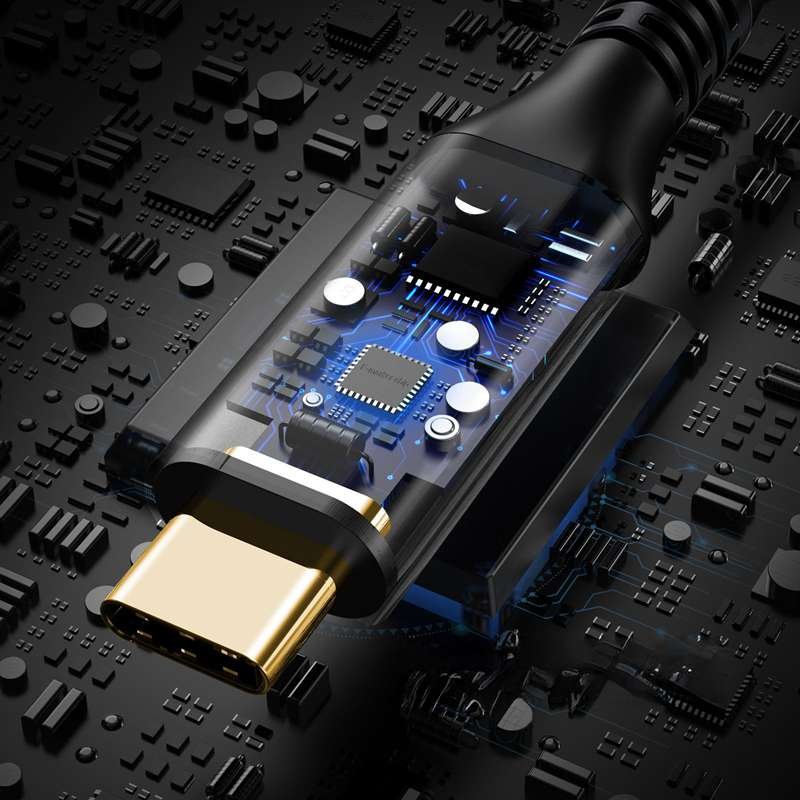
A USB-C cable is not a single wire, but a multi-layer electrical assembly. Inside the outer jacket, there may be multiple types of conductors, control lines, grounding paths, and shielding layers. Which elements are present—and how they are implemented—depends entirely on the cable’s intended application rather than its appearance.
Typical Internal Components of a USB-C Cable
| Internal Element | What It Does | Why It Matters |
|---|---|---|
| Power Conductors | Carry charging current between devices | Conductor gauge determines current capacity, heat generation, and voltage drop |
| High-Speed Data Pairs | Transmit USB 3.x / USB4 data or video signals | Required for high data rates; poor design causes signal loss or instability |
| Configuration (CC) Lines | Enable orientation detection and power negotiation | Essential for USB-C Power Delivery and correct device behavior |
| Ground Conductors | Provide reference and return paths | Improves electrical stability and noise suppression |
| Shielding Layers | Reduce EMI and protect signals | Critical for high-speed data, compliance, and reliability |
This internal composition explains why two USB-C cables that “look the same” can behave very differently in real-world use.
How Internal Structure Relates to Cable Capability
| Cable Function | Internal Structure Characteristics | Typical External Clues |
|---|---|---|
| Charging-only | Fewer conductors, minimal shielding | Thin, lightweight cable |
| USB 2.0 data | Moderate conductor count, light shielding | Medium thickness |
| USB-C PD / USB 3.x | Larger power conductors, multiple data pairs, heavy shielding | Thicker, firmer feel |
| High-speed / video-capable | Precisely controlled impedance, advanced shielding | Less flexible, robust build |
It is important to note that outer diameter alone is not a specification. While thicker cables often indicate higher conductor count or heavier shielding, this is not guaranteed. Two cables with similar thickness may use different copper gauges, insulation materials, or shielding strategies.
Why Shielding Plays a Critical Role
Shielding is one of the most important internal elements, especially for high-speed USB-C cables. Depending on performance requirements, manufacturers may use aluminum foil shielding, braided copper shielding, or a combination of both. Effective shielding minimizes electromagnetic interference, protects data integrity, and helps cables meet regulatory standards.
Cables designed for higher data rates or electrically noisy environments typically require more robust shielding, which also influences flexibility and overall cable feel.
Internal Design Determines Real Performance
Ultimately, the internal structure of a USB-C cable determines:
- Maximum supported power and current
- Supported data speed and protocols
- Signal stability over distance
- Resistance to bending, vibration, and repeated use
- Suitability for consumer, industrial, or regulated applications
This is where most misunderstandings occur. A USB-C cable that appears correct externally may be internally simplified for cost, while another visually similar cable may be engineered for demanding electrical and mechanical conditions. For this reason, experienced engineers rely on drawings, conductor tables, and specifications rather than appearance alone when selecting or approving USB-C cables.
How Do USB-C Cables Differ by Application and Industry?
USB-C cables vary significantly by industry. Industrial and medical cables prioritize durability and compliance, while consumer cables emphasize cost and convenience. These priorities influence jacket material, overmolding, and overall appearance.
What does an industrial USB-C cable look like?
Industrial USB-C cables often appear thicker, with rugged jackets and extended strain reliefs. They are designed for vibration, oil exposure, and repeated motion.
How do medical USB-C cables look different?
Medical USB-C cables typically use light-colored, smooth jackets made from biocompatible materials. They look clean and uniform, reflecting strict hygiene and compliance requirements.
How do I know if a USB-C cable is designed for my application?
Visual inspection provides clues, but industry suitability is confirmed through material declarations, certifications, and test results. This is especially important for regulated sectors.
Visual Tendencies by Industry
| Industry | Visual Traits | Key Focus |
|---|---|---|
| Consumer | Thin, flexible | Cost |
| Industrial | Thick, rugged | Durability |
| Medical | Clean, smooth | Compliance |
How Can You Identify a USB-C Cable from a Photo Alone?
In real projects, engineers and buyers are often asked to evaluate a USB-C cable using nothing more than a few photos. End customers may send images from a phone, procurement teams may forward pictures without specifications, or legacy products may lack documentation altogether. While photos can help confirm form factor, they have strict limits when it comes to function and performance.
Understanding what can and cannot be identified from an image alone is critical to avoiding incorrect assumptions and costly mistakes.
What You Can Confirm from a Photo
From a clear photo, you can usually confirm the following basic characteristics:
Connector shape and symmetry
A USB-C connector has a small, oval, fully symmetrical profile with no visible top or bottom. This allows you to confirm the cable uses the USB-C form factor.
Connector type at each end
Photos can reveal whether the cable is C-to-C, C-to-A, or C-to-other formats. This matters because full USB-C functionality often depends on cable configuration.
Overmold style and strain relief design
The size and shape of the overmold can suggest how the cable was designed to handle mechanical stress. Reinforced overmolds and longer strain reliefs often indicate higher durability.
Relative cable thickness
Comparing the cable diameter to known references (connectors, fingers, ports) can give a rough sense of whether the cable is lightweight or more robust.
These observations are useful as initial screening tools, especially when no other information is available.
What You Cannot Confirm from a Photo
Despite these visual cues, photos cannot reveal the most critical performance-defining details, including:
- Conductor gauge and copper quality
- Number of internal conductors and populated pins
- Shielding type, coverage, or effectiveness
- Supported data protocols or maximum data rate
- Power Delivery capability or current rating
- Compliance with safety or industry standards
Two USB-C cables may appear identical in photos yet behave completely differently in real applications. One may support high-speed data and high power, while the other may be limited to basic charging.
Why Photos Alone Lead to Misidentification
Relying solely on images is one of the most common causes of cable mis-selection. Manufacturers often use similar connector shells and jackets across different cable designs to reduce tooling costs. As a result, external appearance is not a reliable indicator of internal capability.
This is especially risky in applications involving higher power, data integrity requirements, or regulated environments, where incorrect assumptions can lead to overheating, signal instability, or compliance failures.
How Professionals Use Photos Correctly
Experienced engineers treat photos as a starting point, not a conclusion. Images are used to:
- Confirm connector form factor
- Identify obvious mechanical constraints
- Ask the right follow-up questions
From there, correct identification requires additional information such as drawings, pin definitions, conductor tables, or electrical specifications. When these are unavailable, a physical sample or controlled teardown may be necessary.
A Practical Rule to Remember
Photos can help you recognize what a cable looks like, but they cannot tell you what a cable can do. Any USB-C cable intended for real-world deployment should be approved based on documented specifications—not visual inspection alone.
How Are USB-C Cables Customized in Real Projects?
USB-C cables can be customized in length, pin definition, connector type, materials, and performance level. Customization ensures the cable matches both the electrical and mechanical requirements of the application.
What parts of a USB-C cable can be customized?
Length, jacket material, overmold shape, pinout, and connector sourcing can all be tailored.
How do I confirm a USB-C cable type during customization?
The most reliable method is reviewing engineering drawings and specifications before production.
How do drawings and pin definitions affect the final cable?
Drawings translate intent into manufacturable reality. They prevent misunderstandings and ensure repeatability.
Do original and alternative connectors look different?
Often they look similar, but availability, lead time, and cost differ. Performance can be comparable when properly selected.
What Should Engineers and Buyers Know Before Choosing a USB-C Cable?
Engineers and buyers should not rely on appearance alone. Clear specifications, drawings, and communication with the manufacturer are essential to ensure performance, reliability, and timely delivery.
What is the safest way to know if a cable is USB-C?
Combine visual inspection with documentation review. Drawings and specifications remove ambiguity.
How do lead time and MOQ affect USB-C cable selection?
Flexible manufacturing and fast prototyping reduce risk, especially for custom designs.
When should you request drawings before production?
Always—before committing to production. Early confirmation saves time and cost.

Conclusion:
If you have ever asked, “What does a USB-C cable really look like?” you now know the answer goes far beyond shape. True identification requires understanding structure, performance, and application context.
If you are working with photos, partial information, or custom requirements, a structured engineering approach makes all the difference. By sharing your application details, drawings, or even just reference images, you can move from uncertainty to clarity—and from concept to production—with confidence.
At Sino-conn, our engineering-first process helps transform visual ideas into fully defined USB-C cable assemblies, ready for real-world use. Reach out to discuss your project, request drawings, or explore customization options tailored to your application.
Related Keywords :usb c cable appearance,what does usb c cable look like,usb type c connector,usb c cable structure,usb c pd cable,custom usb c cable,usb c cable identification,usb c cable thickness,usb c pinout,usb c cable manufacturing

With over 18 years of OEM/ODM cable assemblies industry experience, I would be happy to share with you the valuable knowledge related to cable assemblies products from the perspective of a leading supplier in China.
manufacturer catalogue
Get A Sample Now From Factory→
Get a quote quickly
Here, developing your OEM/ODM custom cable assemblies collection is no longer a challenge—it’s an excellent opportunity to bring your creative vision to life.



