 Skip to content
Display Cable Types Explained
- andy
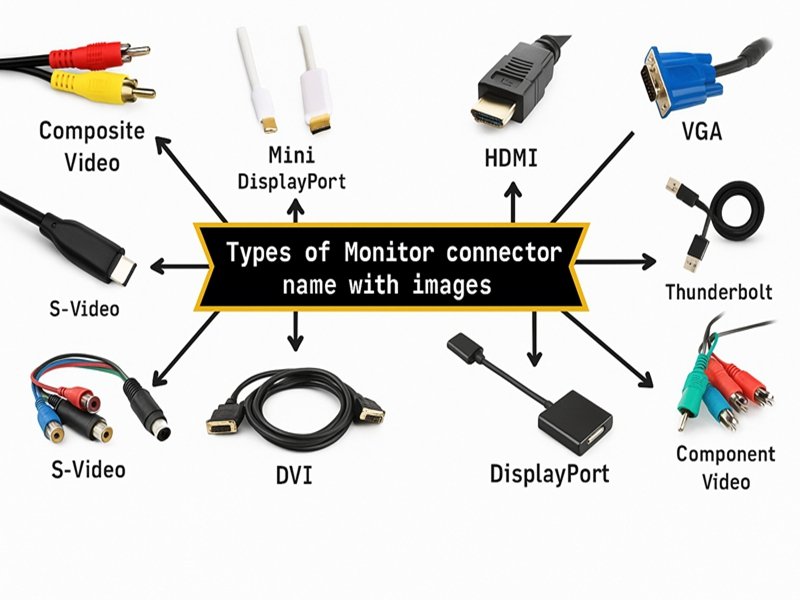
Choosing a display cable seems simple—until it isn’t. Behind every crisp image, stable connection, and interference-free display is a cable engineered with precise impedance, shielding, and conductor geometry. Whether you’re connecting a 4K industrial HMI, an 8K signage wall, an automotive dashboard, or a medical imaging screen, the wrong cable can cause ghosting, flicker, EMI noise, or even total signal loss.
Display cables are specialized high-speed assemblies that transmit video, audio, control signals, and sometimes power between devices. The main types—HDMI, DisplayPort, USB-C Alt Mode, LVDS, eDP, and V-by-One—use controlled-impedance differential pairs, precise connectors, and multi-layer EMI shielding to maintain signal integrity. Choosing the right one depends on resolution, bandwidth, environment, connector compatibility, and device architecture.
At Sino-Conn, we see this scenario constantly: customers send us a blurry photo of a cable and ask, “Can you make this? I’m not sure what it’s called.” Sometimes they have a part number; often they don’t. So our engineers reverse-engineer the pinout, identify compatible connectors, redesign the shielding layers, and deliver drawings within 30 minutes to 3 days. Many OEMs choose us not just to build cables, but to solve problems their previous supplier couldn’t.
If you want to understand which display cable your product truly needs—and avoid compatibility issues, signal loss, or costly redesigns—let’s break down each type, compare their capabilities, and help you choose with confidence.
What Are Display Cables and How Do They Work?
Display cables are high-speed signal assemblies designed to carry video, audio, data, and control signals between devices. They work by transmitting differential high-frequency electrical signals through controlled-impedance conductors with specialized connectors and multi-layer shielding to preserve signal integrity, reduce EMI, and ensure compatibility with display standards like HDMI, DP, USB-C, LVDS, eDP, and V-by-One.
Display cables are far more complex than general wire harnesses or low-frequency power cables. While a power cable simply moves electrical current from point A to point B, a display cable must transmit billions of bits per second with minimal signal loss, interference, and impedance mismatch. Any slight deviation in conductor geometry, shielding, or twisting consistency can distort the eye diagram, collapse the signal window, and cause visible display artifacts.
What Exactly Counts as a Display Cable? (Are there different types?)
A “display cable” refers to any cable designed to carry video signals to a screen. This includes mainstream interfaces (HDMI, DP, USB-C) and embedded interfaces (LVDS, eDP, V-by-One).
Differences exist in:
- bandwidth (MHz → multi-GHz)
- connector type (19-pin HDMI, 20-pin DP, 24-pin USB-C, 20–60 pin micro)
- shield construction
- signal standard (TMDS, Main Link, SerDes, LVDS differential)
- mechanical complexity
Legacy options like VGA and DVI are still used in older or cost-sensitive systems, though they lack the bandwidth and EMI performance of modern digital standards.
Signal Transmission Basics (Digital, Differential, SerDes)
Most display cables use differential signaling to reduce noise and improve speed.
Examples:
- HDMI → TMDS lanes
- DisplayPort → Main Link lanes
- USB-C → DP Alt Mode
- LVDS → differential pairs
- V-by-One → high-speed SerDes lanes
Each interface has strict requirements for:
- impedance (85Ω or 100Ω)
- pair twist
- skew tolerance
- dielectric material
- shielding
Sino-Conn engineers validate each parameter during design to prevent jitter, bit errors, and EMI susceptibility.
Why Impedance & EMI Shielding Matter
High-speed signals are extremely sensitive to external noise. Poor shielding can cause:
- flickering
- snow/static
- color banding
- total signal drop
We use combinations of foil, braid, spiral serve, or hybrid shielding depending on whether the application is consumer-grade or industrial-grade.
Applications Across Industries
Display cables appear in:
- laptops & monitors
- automotive dashboards
- medical imaging systems
- industrial HMIs
- commercial signage
- smart appliances
Each environment demands different flexibility, heat resistance, EMI control, and durability requirements.
Which Display Cable Types Are Most Common Today?
The most common display cables are HDMI, DisplayPort, USB-C DisplayPort Alt Mode, eDP, LVDS, and V-by-One. Legacy interfaces like VGA and DVI still appear in older equipment. These cables differ in bandwidth, image quality, connector structure, EMI shielding, and suitability for consumer vs. industrial applications.
Choosing among display cables can feel overwhelming because each interface serves a different purpose. Some are designed for ultra-high-resolution screens; others are optimized for durability or low EMI in industrial environments. Legacy cables like VGA and DVI still appear in certain cost-sensitive or mature industries, but modern digital standards dominate new designs.
Legacy Interfaces: VGA and DVI Still in Use
Despite being decades old, VGA and DVI remain in:
- industrial machines
- testing equipment
- older monitors
- factory automation systems
VGA is analog and susceptible to noise. DVI is digital and more stable but lacks the bandwidth of HDMI or DP. Sino-Conn still manufactures these cables for OEMs with older equipment that cannot be redesigned.
VGA vs. DVI vs. HDMI — Which Is Better?
Here’s a simplified comparison:
| Standard | Analog/Digital | Max Resolution | Notes |
|---|---|---|---|
| VGA | Analog | 1080p (with noise) | Old, noisy, EMI-sensitive |
| DVI | Digital | 1080p / 1440p | Better than VGA, limited bandwidth |
| HDMI | Digital | Up to 8K60 | Most versatile, modern choice |
Verdict: HDMI is superior for modern systems due to bandwidth, noise resistance, and feature support (audio, HDR, ARC).
HDMI (1.4 / 2.0 / 2.1)

HDMI is the world’s most common consumer display cable. Sino-Conn produces HDMI assemblies with:
- controlled impedance
- gold-plated contacts
- multi-layer shielding
- flexible or ultra-thin designs
DisplayPort & Mini DP
DP is preferred in computers, workstations, and multi-monitor setups. Features include:
daisy chain (MST)
high refresh rates
locking connectors
Sino-Conn builds DP cables for industrial and commercial display integrators.
USB-C DisplayPort Alt Mode
USB-C is becoming the universal port for everything: power, data, and video.
Applications:
tablets
laptops
docking stations
USB-C cables often require micro-coaxial assemblies due to extremely fine pitch.
eDP for Embedded Displays
eDP is used inside laptops, monitors, and industrial modules.
It uses small-pitch connectors (I-PEX, JAE), which Sino-Conn supports in both genuine and equivalent versions.
LVDS for Industrial & Automotive
LVDS is reliable, affordable, and EMI-resistant.
Ideal for:
automotive clusters
vending systems
industrial touchscreens
Sino-Conn customizes LVDS pinouts per OEM request.
V-by-One HS for High-Resolution Screens
V-by-One is the go-to technology for 4K and 8K panels.
Benefits:
- low EMI
- long transmission distance
- scalable lane count
How Do These Display Cable Types Compare?
Display cable types differ in bandwidth, resolution support, connector design, EMI performance, cable construction, and application suitability. HDMI and DP lead consumer electronics; USB-C enables power + data + video; LVDS and eDP dominate embedded systems; V-by-One handles high-resolution industrial and commercial panels. The right option depends on your bandwidth needs, mechanical constraints, and system architecture.
Display interfaces may share the same purpose—moving video from source to screen—but they differ dramatically in how they achieve it. If you compare HDMI with LVDS, or USB-C with V-by-One, you’re essentially comparing different engineering philosophies shaped by the environments where the cables are used.
HDMI and DisplayPort were designed for consumer devices, prioritizing high bandwidth and compatibility with TVs, graphics cards, and game consoles. USB-C evolved into a multipurpose connector that carries not only video but power and data through shared lanes, making its internal architecture the most complex among all consumer standards. LVDS and eDP were designed for short-distance embedded connections inside laptops and industrial panels. V-by-One, meanwhile, was created to simplify UHD screen wiring by reducing the number of differential pairs required.
Understanding these differences prevents costly mistakes—such as trying to use LVDS for 4K signage, or using HDMI in an environment with intense EMI. Below we break down the most important comparison points engineers should evaluate before choosing a display interface.
Bandwidth & Resolution Comparison (Analog → Digital → SerDes)
Bandwidth determines how much video data a cable can carry.
| Interface | Max Bandwidth | Typical Resolution | Notes |
|---|---|---|---|
| VGA | n/a (analog) | 1080p (lossy) | EMI-sensitive, legacy |
| DVI | 3.96 Gbps | 1080p/1440p | Limited modern use |
| HDMI 2.1 | 48 Gbps | 8K60 / 4K120 | Consumer 8K standard |
| DP 1.4 | 32.4 Gbps | 8K30 / 4K120 | Great for multi-monitor setups |
| USB-C DP Alt | 10–40 Gbps | 4K60/8K30 | Depends on lane mapping |
| eDP | 1–8.1 Gbps/lane | 1080p–4K | Embedded displays |
| LVDS | <1 Gbps | 720p–1080p | Industrial & automotive |
| V-by-One HS | 3.75 Gbps/lane | 4K/8K | High-speed SerDes |
V-by-One is surprisingly powerful because it scales by increasing lane count rather than changing protocol or cable structure.
EMI Shielding Structures (Foil, Braid, Spiral, Hybrid)
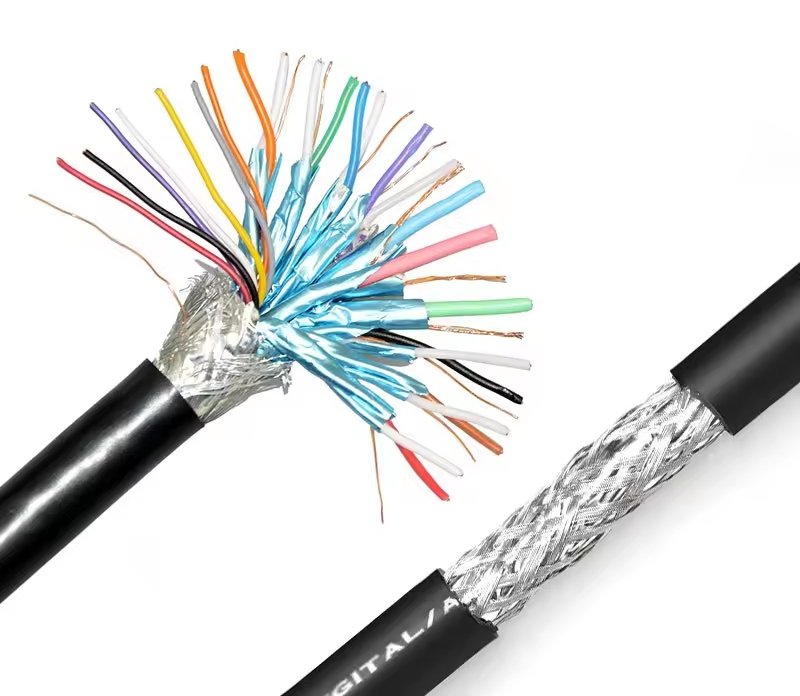
EMI shielding protects high-speed signals from noise.
Different environments require different shield constructions:
- Foil shield (100% coverage) → Best for consumer electronics
- Braid shield (70–95%) → More durable, ideal for industrial use
- Spiral serve → Highly flexible, suitable for robotic or bending applications
- Combination (foil + braid) → Most robust, used in medical, automotive, and commercial displays
- Hybrid multi-layer → Used when the environment includes motors, RF equipment, or high vibration
At Sino-Conn, our engineers adjust shield layers based on EMI tests, frequency range, and cable OD constraints.
Connector Structure & Pin Definitions
Different protocols use different pin counts:
- HDMI → 19 pins
- DisplayPort → 20 pins
- USB-C → 24 pins
- LVDS/eDP → 20–60 pins depending on the panel family
- V-by-One → often uses 55–60 pin I-PEX/JAE connectors
We support both original brands (I-PEX, JAE, Amphenol) and high-quality equivalents, allowing customers to choose between premium stability and cost-efficient alternatives.
Mechanical & Material Factors (OD, Flex, Temperature)
Beyond electrical performance, mechanical properties matter:
- Outer Diameter (OD): affects routing & flexibility
- Bending Radius: critical for laptop hinges & automotive dashboards
- Jacket Material: PVC, TPE, TPU, LSZH, FEP depending on heat & flame rating
- Temperature: consumer devices often require 60–80°C, while industrial/automotive need 105°C or more
Poor material choices can cause cracking, stiffness, or premature failure in field conditions.
What Specifications Do OEM Engineers Usually Ask For?
OEM engineers typically request mechanical, electrical, and environmental specifications such as impedance, shielding type, conductor material, OD tolerance, flexibility, voltage/current ratings, temperature resistance, flame rating, and certification requirements. They also require drawings, connector cross-references, and pinout definitions before approving production.
Engineers rarely buy a cable “as is.” Instead, they evaluate whether the cable integrates properly into their device’s architecture. Before approving a purchase, they analyze mechanical dimensions, electrical performance, and environmental durability—and request documentation to ensure compliance with internal and regulatory standards.
In reality, many customers don’t initially know what their existing cables contain. They only have a photo or a damaged sample. This is where Sino-Conn’s engineering support becomes crucial. Our team reverse-engineers the pinout, identifies the connector family, measures the conductor AWG and OD, and reconstructs the full specification so the customer can receive an accurate replacement or upgraded version.
These are the specification categories OEM engineers care about most.
Mechanical Parameters (OD, Flex, Jacket Materials)
Mechanical characteristics ensure the cable fits inside the device and withstands repeated bending.
Engineers often define:
- OD range (e.g., 3.0–4.5 mm)
- conductor AWG
- jacket hardness (Shore A or D)
- hinge-cycle requirements (e.g., 10,000 bends)
- reinforcement parts (pull bars, strain relief)
At Sino-Conn, we tune material softness and bending radius for applications like laptop hinges, automotive interiors, robotics, and industrial HMIs.
Electrical Parameters (Impedance, Crosstalk, Skew)
Engineers request precise electrical specs because high-speed interfaces are extremely sensitive to electrical noise.
Common requirements:
- 85Ω (LVDS/eDP) or 100Ω (HDMI/DP/USB-C) impedance
- pair-to-pair skew ≤ 100ps
- low insertion loss
- controlled shielding coverage
- specific drain wire structure
Electrical mismatches cause jitter, flicker, or complete signal drops. Sino-Conn ensures every custom cable meets the exact impedance window needed.
Environmental Requirements (UV, Oil, Halogen-Free, PFAS-Free)
Industrial, automotive, and medical devices require strict environmental conditions:
- UV-resistant jackets for outdoor displays
- Oil-resistant materials for factory floors
- Halogen-free options for safety compliance
- PFAS-free materials for EU regulations
- Corrosion resistance for humid or chemical environments
We help customers choose materials that meet UL, ISO, IP67 waterproofing (if needed), and industry-specific standards.
Certification Requirements (UL, ISO, RoHS, REACH)
Engineers almost always ask for documentation:
- UL → safety & flame rating
- ISO → process and quality management
- RoHS → hazardous substance restriction
- REACH → chemical compliance
- PFAS → increasingly required in EU
- COC / COO → required for import & customs
Sino-Conn supplies all certifications and generates a full specification sheet upon request.
Do Display Cables Support Customization?
Yes. Display cables can be fully customized—including length, OD, materials, shielding layers, flex rating, connector type, pinout mapping, EMI protection, and temperature resistance. Sino-Conn provides drawings within 30 minutes–3 days, supports original or equivalent connectors, offers no MOQ, and delivers samples within 2–14 days. Customization ensures compatibility, performance, and reliability across consumer, industrial, automotive, and medical applications.
Display cables are rarely one-size-fits-all. Even standard interfaces like HDMI or USB-C require adjustments to meet the needs of different industries and devices. For example, a consumer HDMI cable for a TV has different performance expectations from an HDMI cable used in an industrial vision system, where EMI noise, temperature, and vibration are serious concerns.
OEM engineers often come to Sino-Conn with a sketch, a photo, or a partially damaged cable. Sometimes they have a part number; sometimes they have nothing. Our engineering team reverse-engineers the cable, identifies compatible connectors, measures electrical parameters, and rebuilds the specification to deliver a functionally identical—or superior—replacement.
Customization allows engineers to solve real-world challenges: routing through tight mechanical spaces, passing regulatory testing, preventing EMI, or reducing premature cable fatigue. Below are the core elements that can be tailored for any display cable assembly.
Length, OD, Shielding, and Material Options
Length is often the first thing customers want to modify—from ultra-short 5–10 cm internal cables to 10-meter industrial assemblies. A longer cable may require thicker conductors or enhanced shielding to maintain signal integrity at high data rates.
OD (outer diameter) affects flexibility and fit. A 3.0 mm cable bends differently from a 5.5 mm cable. Sino-Conn adjusts OD by modifying dielectric thickness, jacket options, and shielding layers.
Material options include:
- PVC: affordable, common in consumer electronics
- TPE/TPU: excellent flexibility and abrasion resistance
- LSZH: safe for public spaces
- FEP: high-temperature and low-loss dielectric for high-speed lanes
Shielding can be foil-only, foil + braid, multi-layer hybrid, or even custom spiral serve structures for robotic applications.
Pinout Definition & Connector Mapping
This is one of the most overlooked aspects of custom display cables. Many customers think “HDMI to HDMI” means identical wiring—but pin mapping, grounding strategy, and shield termination vary by device.
For embedded interfaces like LVDS, eDP, or V-by-One, pinout definition becomes even more critical. Engineers must define:
- lane order
- ground return strategy
- backlight power pins
- EDID/I²C pins
- shield bonding method
Sino-Conn routinely reverse-engineers pinouts from photos or samples, ensuring a fully functional and compatible replacement.
Original vs. Equivalent Connectors (I-PEX, JAE, Amphenol)
OEM engineers often ask, “Should I use original connectors or alternatives?”
We typically recommend:
| Option | When to Choose | Pros | Cons |
|---|---|---|---|
| Original (I-PEX/JAE/Amphenol) | High-volume OEM, certified devices | Highest reliability | Higher cost, longer lead time |
| Equivalent / Compatible | Cost-sensitive, flexible lead time | Lower price, in-stock, fast | Slight cosmetic differences |
Sino-Conn supplies both, and our equivalent connectors maintain full mechanical and electrical compatibility.
Drawings & Sample Support (30-Minute Fast Service)
Every custom order includes a detailed engineering drawing (CAD → PDF).
Our timelines:
- 30 minutes for urgent drawing requests
- 1–3 days for standard projects
- 2–14 days for samples
- 2–4 weeks for mass production
This rapid iteration helps engineers accelerate prototyping and avoid delays in project timelines.
How to Choose the Right Display Cable?
Choose the right display cable based on resolution, bandwidth, connector compatibility, cable routing constraints, mechanical environment, EMI sensitivity, power requirements, and budget. Consumer products typically use HDMI/DP, while embedded and industrial systems rely on LVDS, eDP, or V-by-One. USB-C is preferred for portable, multi-function devices that need video + data + power.
Selecting the correct display cable is not simply about choosing a connector type. Two cables that look identical may behave very differently depending on impedance control, shielding structure, and material choice. Engineers often underestimate the impact of environmental factors such as vibration, temperature, humidity, mechanical stress, and EMI.
For example, a cable that works perfectly on a desk may fail inside an industrial cabinet next to motors and power supplies. Similarly, a flexible laptop hinge cable requires different manufacturing techniques than a rigid cable for a fixed installation.
Choosing the right display cable requires a combination of understanding system requirements, anticipating environmental challenges, and matching the cable’s electrical performance to the device’s architecture. Below we break down the key decision factors.
Choosing by Resolution & Bandwidth
Your resolution dictates your cable type:
- 8K60 / 4K120 → HDMI 2.1 or DP 2.0
- 4K60 → HDMI 2.0, DP 1.4, USB-C Alt Mode
- 1080p industrial → LVDS or eDP
- 4K/8K large panels → V-by-One with multiple lanes
For long cables, low-loss materials or active signal boosting may be necessary.
Choosing by Device Type (Consumer, Industrial, Automotive)
Different devices call for different standards:
- Consumer electronics: HDMI, USB-C, DP
- Laptops: eDP, USB-C
- Automotive: LVDS, V-by-One
- Commercial displays: HDMI, DP, V-by-One
- Factory equipment: LVDS, DVI, VGA (legacy)
Industrial customers often prioritize EMI resistance and durability over maximum bandwidth.
Choosing by Environment & Mechanical Stress
Environmental factors influence material choices:
- high vibration → locking DP or secure micro-connectors
- high temperature → TPU or FEP
- outdoor → UV-resistant jackets
- tight hinges → ultra-flexible micro-coax constructions
Sino-Conn tailors each cable to withstand the expected life cycle of the device.
Choosing by Budget and Region
Costs vary by:
- region (US/EU > Japan > Korea > India/ASEAN)
- industry (medical/military > commercial > consumer)
- connector type (original vs. alternative)
- material grade
Sino-Conn provides tiered pricing options to help buyers meet budget constraints without sacrificing essential performance.
Conclusion:
No two display cables are truly alike—and choosing the wrong one can limit resolution, reduce reliability, or cause EMI failures that take weeks of debugging to resolve. Whether you’re designing a 4K industrial HMI, refreshing an automotive display module, or sourcing cables for consumer products, Sino-Conn provides the engineering expertise, customization options, and fast lead times needed to keep your projects moving.

We offer:
- Custom lengths, pinouts, shielding, materials
- Original or equivalent connectors
- Drawings in 30 minutes–3 days
- Samples in as fast as 2–14 days
- No MOQ—start from 1 piece
- 100% inspection for every assembly
- Competitive pricing for global markets
If you’re ready to source a reliable, custom-engineered display cable — reach out now.
Our engineers are ready to review your drawings, photos, or samples and help you build the perfect solution.
Contact Sino-Conn today and get your custom display cable quote.
Related Keywords :display cables, HDMI cable, DisplayPort cable, USB-C display cable, LVDS cable, eDP cable, monitor cables, video interface types, custom cable assembly, Sino-Conn

With over 18 years of OEM/ODM cable assemblies industry experience, I would be happy to share with you the valuable knowledge related to cable assemblies products from the perspective of a leading supplier in China.
manufacturer catalogue
Get A Sample Now From Factory→
Get a quote quickly
Here, developing your OEM/ODM custom cable assemblies collection is no longer a challenge—it’s an excellent opportunity to bring your creative vision to life.



