Skip to content
DP Cable vs HDMI: What’s the Best Monitor Cable for Your Setup?
- andy

Choosing the right monitor cable sounds simple—until you try to connect a high-refresh gaming monitor, a new 4K TV, or a professional color-grading display. Suddenly, DP vs HDMI becomes more than a technical comparison; it determines how smooth your gameplay feels, how accurate your colors look, and how reliably your device performs. Both cables transmit digital video and audio, but they aren’t identical. They differ in bandwidth, stability, compatibility, and even how they behave under longer distances or higher resolutions.
DP (DisplayPort) and HDMI are not the same. DP offers higher bandwidth, better support for high refresh rates, and is preferred for PC monitors. HDMI is more universal, works with TVs and consoles, and is ideal for home entertainment. Your best choice depends on your display resolution, refresh rate, and device compatibility.
Many customers at Sino-Conn come to us with a simple question—“Which cable should I use?”—sometimes even sending only a photo of a connector. Let’s clarify the real differences and help you pick the right cable for your setup.
What Is the Main Difference Between DP and HDMI?
The main difference between DisplayPort (DP) and HDMI is that DisplayPort is built for computers and high-performance monitors, while HDMI is designed for TVs, consumer entertainment devices, and multimedia systems. DP typically supports higher refresh rates and more efficient bandwidth use, while HDMI focuses on broad device compatibility and advanced audio features.
DisplayPort excels in PC-based applications such as gaming monitors and multi-screen setups. HDMI remains the universal standard for TVs, projectors, and home entertainment systems.
DisplayPort vs HDMI: Key Differences at a Glance
To make the comparison easy to understand, the table below summarizes the most important technical and practical differences between the two interfaces:
| Feature / Parameter | DisplayPort (DP) | HDMI |
|---|---|---|
| Primary Use Case | PC monitors, gaming, workstations | TVs, consoles, home entertainment |
| Typical Ports on Devices | Desktop GPUs, high-end monitors | TVs, laptops, consoles, projectors |
| Bandwidth | DP 1.2: 21.6 GbpsDP 1.4: 32.4 GbpsDP 2.0: up to 80 Gbps | HDMI 2.0: 18 GbpsHDMI 2.1: 48 Gbps |
| Max Resolution / Refresh Rate | 4K 144–240Hz (with DSC)8K 60Hz (with DSC) | 4K 120Hz8K 60Hz (uncompressed) |
| Transmission Method | Packet-based (data-network style) | TMDS (signal-based) |
| Adaptive Sync Support | Native (FreeSync, G-Sync) | Supported only on HDMI 2.1 devices |
| Multi-Monitor Capability | Supports MST (daisy-chain) | No MST support |
| Audio Features | Standard audio | ARC / eARC for advanced audio |
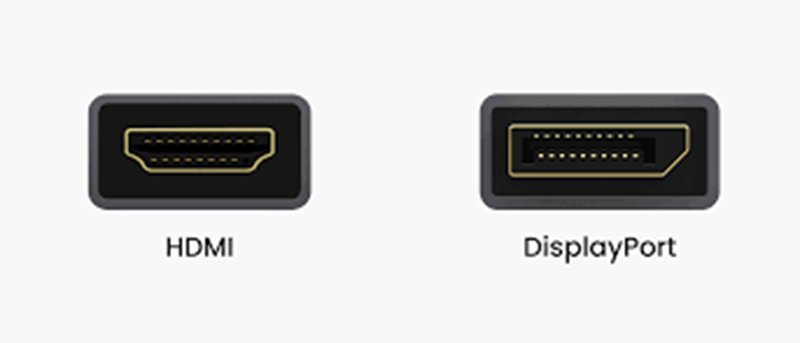
| Connector Pin Count | 20 pins | 19 pins |
| Cable Length Behavior | More stable for short high-bandwidth runs | Better for longer passive cable runs |
| Best Applications | PC gaming, multi-monitor workstations | TVs, consoles, multimedia devices |
Is a DP the Same as an HDMI?
No. DisplayPort and HDMI use different signaling technologies, different pin layouts, and serve different device ecosystems.
- DP uses packetized data transmission, allowing efficient scaling for high refresh rates.
- HDMI uses TMDS, optimized for stable transmission to TVs and media devices.
Because of these protocol differences, the two interfaces are not directly interchangeable without active conversion chips or dual-mode DP (DP++) support.
Which Cable Is Better for Gaming—DP or HDMI?
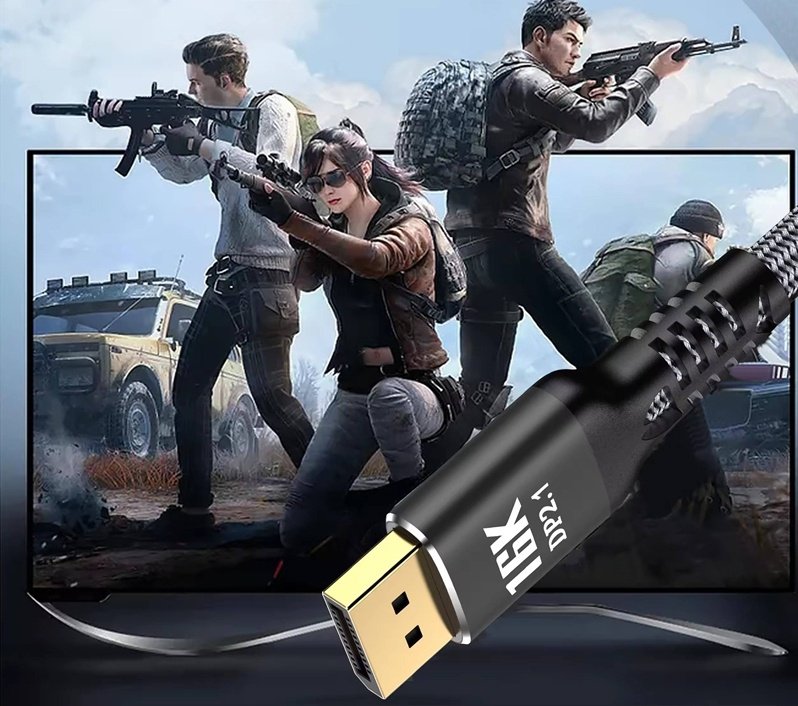
DisplayPort is generally better for PC gaming because it supports higher refresh rates, lower latency, and more reliable adaptive-sync performance. HDMI works well for console gaming and TVs but may limit refresh rates on some monitors due to version inconsistencies.
DP vs HDMI for Gaming: Performance Comparison
| Gaming Feature | DisplayPort (DP) | HDMI |
|---|---|---|
| Refresh Rates | 144Hz–360Hz (depends on DP version) | 60–120Hz depending on HDMI version |
| Adaptive Sync | Native support (FreeSync, G-Sync) | Supported only on HDMI 2.1 devices |
| Input Lag | Lower latency for PC gaming | Slightly higher, depending on TV/console |
| 1440p Gaming | Excellent | Good, but varies by monitor |
| 4K Gaming | 4K 120Hz stable via DP 1.4 + DSC | 4K 120Hz only on HDMI 2.1 |
| Multi-Monitor Setups | Easy with MST | Not supported |
| Best Scenario | PC competitive gaming | Console gaming & living-room setups |
Why DisplayPort Usually Wins for PC Gaming
DP was designed with high-performance displays in mind. It handles bandwidth more efficiently, supports higher refresh rates without compression, and integrates better with GPU technologies like G-Sync and FreeSync. HDMI has improved greatly with 2.1, but adoption varies widely—many monitors still use HDMI 2.0.
Is a DP the Same as an HDMI?
No. Even though both are digital interfaces, they operate using different signaling technologies, protocols, and design goals:
- DP uses packetized data transmission, similar to network data, which allows flexible bandwidth management and efficient high-refresh-rate support.
- HDMI uses TMDS (Transition-Minimized Differential Signaling), optimized for stable TV signal transmission and compatibility with consumer electronics.
Their connectors, pin definitions, certifications, and device ecosystems also differ. This is why the two interfaces are not directly interchangeable without conversion chips or protocol-specific adapters.
Signal Type & Bandwidth Capabilities
Bandwidth plays an important role in determining resolution, refresh rate, and color depth.
DisplayPort Bandwidth
- DP 1.2: 21.6 Gbps
- DP 1.4: 32.4 Gbps
- DP 2.0: Up to 80 Gbps
DP’s bandwidth efficiency allows higher frame rates at the same resolution compared to HDMI. This is why PC monitors commonly include DP as the primary high-performance input.
HDMI Bandwidth
- HDMI 2.0: 18 Gbps
- HDMI 2.1: 48 Gbps
Although HDMI 2.1 provides extremely high peak bandwidth, HDMI adoption varies widely across devices. Many monitors still include HDMI 2.0 only, limiting refresh rate options.
Key Idea:
DP bandwidth scales more consistently across PC hardware, while HDMI bandwidth varies depending on device manufacturers and version adoption.
Video & Audio Feature Differences
Both interfaces support modern features, but their feature priorities differ.
DisplayPort Video Features
- Excellent high-refresh support (144Hz, 165Hz, 240Hz, 360Hz depending on version)
- Native support for Adaptive Sync
- Daisy-chaining multiple monitors (MST)
- Efficient compression using DSC (important for 4K 144Hz or 8K)
HDMI Video & Audio Features
- Widest compatibility across TVs, projectors, and media devices
- eARC support for advanced audio formats
- Strong support for TV-oriented HDR formats (Dolby Vision, HDR10+)
- Required for gaming consoles (PS5, Xbox Series X)
DP leans toward performance and flexibility for PCs; HDMI focuses on broad multimedia and entertainment compatibility.
Connector Structure & Pin Count
The connector design influences shielding requirements, stability, and how cables are manufactured.
DisplayPort Connector
- 20 pins
- Includes a locking mechanism on some versions
- Supports dual-mode (DP++), enabling passive DP-to-HDMI conversion
- Typically found on GPUs and high-refresh monitors
HDMI Connector
- 19 pins
- No locking latch (to avoid damage if pulled on TVs)
- Available in multiple sizes: Standard, Mini, Micro
- Found across nearly all consumer audio/video devices
Importance:
Pin layout differences reflect the protocols underneath, which is why direct wiring between DP and HDMI is not enough—you often need conversion logic.
Compatibility With PCs and TVs
DisplayPort Compatibility
- Standard on desktop graphics cards
- Common on high-end gaming monitors
- Rare on TVs
- Supported on some business laptops
HDMI Compatibility
- Standard on TVs, laptops, gaming consoles, media players, and projectors
- Essential for home entertainment systems
- Present on most monitors, but version varies widely
DP is dominant in the PC ecosystem; HDMI dominates the consumer electronics world.
How Do DP and HDMI Compare for 4K and 8K Displays?
HDMI 2.1 supports the highest theoretical resolution (8K and beyond), but DisplayPort 1.4 handles 4K high-refresh more efficiently. Both work for 4K, but DP is preferred for PC monitors, while HDMI suits TVs and entertainment devices.
Resolution and Bit Depth
DP 1.4: 4K 120Hz or 8K 60Hz with compression
HDMI 2.1: 4K 120Hz, 8K 60Hz, uncompressed
HDR Differences
HDMI supports advanced TV-centric HDR formats. DP supports DisplayHDR—which is better for monitors.
Cable Length & Signal Integrity
HDMI performs better on long passive cable runs. DP is more sensitive to distance but more stable at short, high-bandwidth lengths.
Are DP and HDMI Interchangeable?
DP and HDMI are not truly interchangeable. Passive adapters only work in specific directions, and active converters may reduce refresh rates or disable features. Capabilities depend on the source device, not just the cable.
Adapter Types
DP → HDMI works passively because DP supports dual-mode. HDMI → DP requires an active chip.
Compatibility Issues
Some features like HDR, 144Hz, or G-Sync may not pass through adapters.
EDID and Pin Definition
Signal mapping between the two protocols differs significantly, which is why Sino-Conn engineers always confirm specifications before production.
How Do DP and HDMI Cables Differ in Construction?
DP and HDMI cables differ in shielding, conductor material, impedance, and jacket type. These factors affect stability, EMI resistance, flexibility, and durability—especially for industrial or high-resolution applications.
Shielding Option
Foil, braid, or combination shielding reduce EMI. High-refresh DP cables often require combination shielding.
Conductor Material
OFC copper improves stability; cheaper copper-clad options suit low-cost consumer applications.
Outer Jacket Materials
PVC for general use
TPE/TPU for flexibility
LSZH/Halogen-free for safety-critical industries
OD, Bend Radius & Durability
Industrial clients often require thicker jackets, specific OD targets, and tighter bend-radius tolerances.
When Should You Choose DP and When HDMI?
Choose DP for PC monitors, gaming, and professional displays. Choose HDMI for TVs, consoles, and home-entertainment setups. Each excels in different scenarios.
PC Monitors
DP is almost always better.
TVs & Consoles
HDMI is mandatory.
Professional Color Work
DP offers more stable workstation connectivity.
Industrial Displays
Choice depends on embedded system interfaces; Sino-Conn supports both.
How Can Sino-Conn Support Custom DP or HDMI Cable Requirements?
Sino-Conn offers fully customizable DP and HDMI cables, including lengths, pin-outs, materials, shielding, connector brands, and environmental ratings. Fast sampling, full certification, and no MOQ ensure flexibility for engineers, OEMs, and distributors.
Customization Options
Length, pin definition, molding shape, material upgrades, halogen-free, high-temp, UV-resistant, or oil-resistant jackets.
Original vs Equivalent Connectors
I-PEX, JAE, Amphenol originals—or cost-effective equivalents with faster lead times.
Lead Times
Samples in 2 weeks; urgent samples in 2–3 days; mass production 3–4 weeks.
Certifications
UL, ISO, ROHS, REACH, PFAS, COC, COO available for global compliance.
Engineering Support
Free drawings in 30 minutes–3 days; full customer confirmation before production.

Conclusion:
Choosing between DP and HDMI affects performance, compatibility, and long-term reliability. If you need a cable that perfectly matches your device, resolution, or environmental requirements, Sino-Conn can design and manufacture it with precision.
No MOQ, fast sampling, full engineering support, and certified materials—tell us your requirements, and we’ll build the ideal DP or HDMI solution for your application.
Related Keywords :DP Cable vs HDMI: What’s the Best Monitor Cable for Your Setup?

With over 18 years of OEM/ODM cable assemblies industry experience, I would be happy to share with you the valuable knowledge related to cable assemblies products from the perspective of a leading supplier in China.
manufacturer catalogue
Get A Sample Now From Factory→
Get a quote quickly
Here, developing your OEM/ODM custom cable assemblies collection is no longer a challenge—it’s an excellent opportunity to bring your creative vision to life.