Skip to content
PC Fan Connector Types: Which One Is Right for Your PC?
- andy
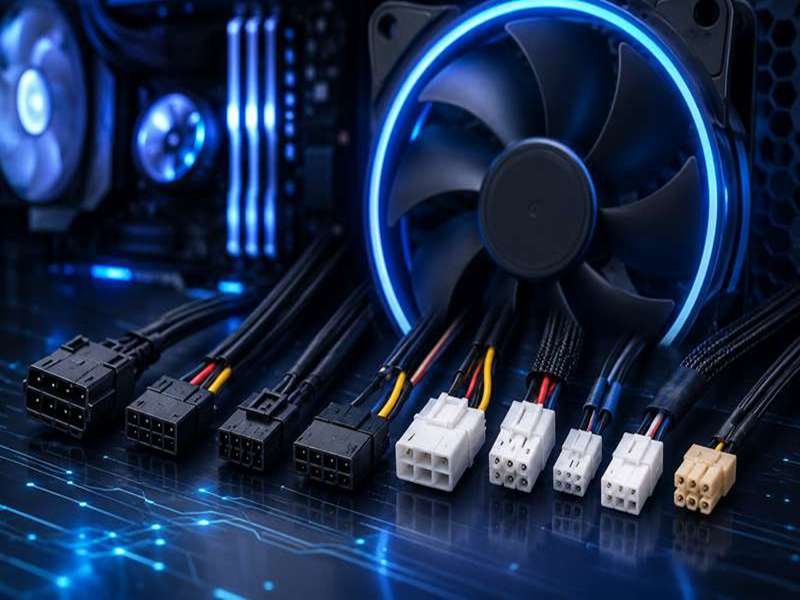
A PC fan looks simple until you try to replace one. The fan size may be correct, the screw holes may line up, and the airflow rating may look fine, but the connector can still stop the whole job. One missing pin, one reversed wire, one oversized housing, or one wrong control signal can turn a quick fan replacement into a sourcing problem.
PC fan connector types are not only used in gaming computers. They are also found in workstations, servers, graphics cards, medical equipment, industrial PCs, telecom devices, charging systems, and compact electronic enclosures. The connector decides how the fan receives power, whether speed can be detected, and whether the motherboard or controller can adjust fan speed automatically.
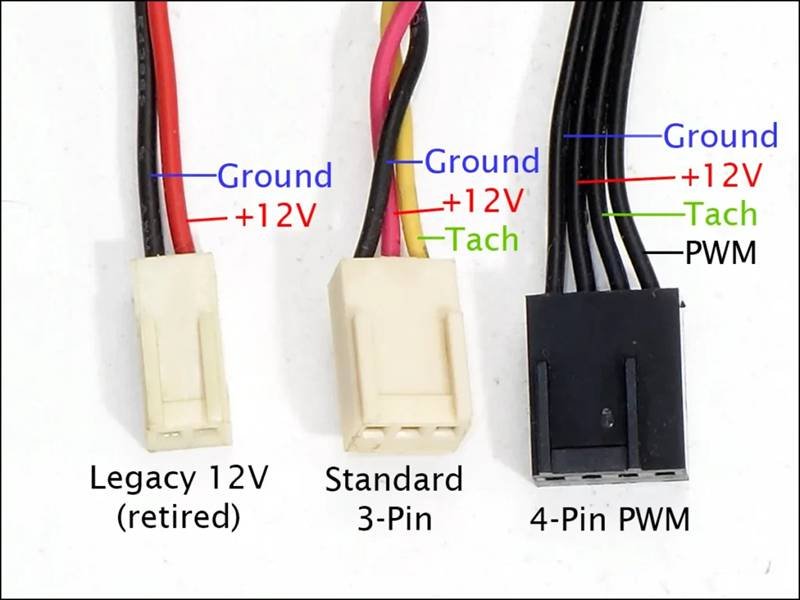
PC fan connector types mainly include 2-pin, 3-pin, 4-pin PWM, Molex, mini GPU fan connectors, and customized connectors. A 2-pin connector only powers the fan. A 3-pin connector adds speed feedback. A 4-pin PWM connector supports more accurate speed control. Molex connectors are used for direct power. Mini and custom connectors are common in GPUs, compact devices, and OEM cooling systems.
For a home PC builder, the wrong connector may only mean buying an adapter. For an OEM project, it can mean a delayed sample build, a failed assembly test, or a production line waiting for corrected cables. This is why engineers and purchasing teams usually do not ask only, “Can this fan spin?” They ask, “Will this fan connector match our board, our enclosure, our control method, our safety requirements, and our delivery schedule?”
At Sino-Conn, many fan cable inquiries start with a very common situation: the customer sends a photo of an old fan cable and says, “Can you make this?” Sometimes there is no drawing, no part number, and no pinout. In this case, the work is not just production. The first step is connector identification, wire sequence checking, material selection, drawing confirmation, and then sample production. That process saves customers from guessing, especially when the fan is used inside a real product rather than a personal computer.
What Are PC Fan Connector Types?
PC fan connector types are standardized or customized electrical interfaces that connect a cooling fan to a motherboard, fan controller, graphics card, power supply, or control board. Their primary function is to deliver power, transmit speed signals, and, in many modern systems, support intelligent PWM (Pulse Width Modulation) speed control. Although these connectors are physically small, they have a direct impact on cooling efficiency, system stability, assembly convenience, and the overall reliability of the final product.
Many people assume that if two connectors have the same number of pins, they are interchangeable. In practice, this is rarely the case. Differences in connector pitch, housing dimensions, locking structure, pin definition, cable specification, and terminal design mean that two connectors with an identical appearance may not work together.
For OEM manufacturers, selecting the correct fan connector is an engineering decision rather than simply a purchasing decision. A suitable connector not only ensures reliable operation but also reduces assembly time, simplifies future maintenance, and helps avoid expensive redesigns during mass production.
What Is a PC Fan Connector?
A PC fan connector is the electrical connection point between a cooling fan and the system that powers and controls it. It consists of multiple components working together rather than just the plastic housing visible from the outside.
A complete fan cable assembly typically includes:
- Connector housing
- Metal terminals
- Copper conductors
- Insulation material
- Wire jacket
- Crimp terminals
- Optional sleeving or heat shrink tubing
- Wire identification labels when required
Each component plays a role in ensuring reliable electrical performance.
For example, the connector housing determines mechanical compatibility, while the terminals affect contact resistance and long-term durability. The conductor size influences current-carrying capacity, and the insulation material determines flexibility, temperature resistance, and environmental performance.
Many customers focus on the connector model number, but experienced engineers usually evaluate the complete cable assembly before approving production.
The following table shows the key specifications typically confirmed during a custom project.
| Specification | Typical Options | Why It Matters |
|---|---|---|
| Connector Type | 2-pin, 3-pin, 4-pin PWM, Molex, Mini GPU | Determines compatibility |
| Connector Pitch | 1.0 mm, 1.25 mm, 2.0 mm, 2.54 mm | Ensures correct mating |
| Voltage | 5V, 12V, 24V | Matches system requirements |
| Current | 0.05A–2A | Determines wire gauge |
| Wire Gauge | 22–30 AWG | Balances current capacity and flexibility |
| Cable Length | 50 mm–1000 mm or custom | Optimizes installation |
| Wire Material | PVC, TPE, Silicone, LSZH | Matches operating environment |
| Temperature Rating | 80°C–150°C | Supports different applications |
| Compliance | UL, RoHS, REACH, PFAS | Meets international requirements |
In many projects, the fan connector itself represents only a small portion of the total cable cost. Engineering support, accurate drawings, stable manufacturing processes, and quality control often have a much greater influence on the success of the finished product.
At Sino-Conn, every custom fan cable begins with a technical review rather than immediate production. Whether the customer provides a complete drawing, a connector part number, or only an existing sample, the engineering team first confirms the connector specification, wire sequence, and installation requirements before preparing the production drawing for approval.
Why Do PC Fan Connector Types Matter?
Selecting the wrong fan connector may seem like a minor issue during product development, but it often creates significant problems during assembly or field operation.
For example, a connector with the correct number of pins may still fail because:
- The connector pitch is different.
- The locking mechanism does not match.
- The pin sequence is reversed.
- The wire gauge cannot carry the required current.
- The cable is too long or too short.
- The connector housing interferes with nearby components.
Each of these issues can delay production or require costly rework.
According to industry observations, connector and wiring issues account for a considerable portion of prototype assembly problems in electronic products. Many of these issues are not caused by poor connector quality but by incorrect specification selection during the design stage.
Different connector types also provide different levels of functionality.
| Function | 2-Pin | 3-Pin | 4-Pin PWM |
|---|---|---|---|
| Power Supply | ✔ | ✔ | ✔ |
| Ground | ✔ | ✔ | ✔ |
| Speed Monitoring | ✘ | ✔ | ✔ |
| PWM Speed Control | ✘ | ✘ | ✔ |
| Intelligent Thermal Management | ✘ | Limited | Excellent |
For gaming computers, servers, AI workstations, and high-performance industrial equipment, precise fan speed adjustment is essential because processor temperatures change continuously during operation.
For simpler products such as routers, LED drivers, or compact power supplies, constant-speed cooling is often sufficient, making a 2-pin connector a practical and economical choice.
Another important consideration is long-term reliability.
A cooling fan in a desktop computer may operate for several hours each day, while fans inside communication equipment, industrial controllers, or medical systems often run continuously for years.
This places higher demands on:
- Terminal retention force
- Contact resistance
- Wire flexibility
- Temperature resistance
- Crimp consistency
- Connector durability
For this reason, many OEM manufacturers evaluate not only the connector supplier but also the manufacturing process used to assemble the cable.
Where Are PC Fan Connectors Used?
Most people associate fan connectors with desktop computers, but they are used across a much wider range of electronic products.
As electronic devices become more compact and more powerful, efficient cooling has become essential for maintaining performance and extending component life.
Common applications include:
| Industry | Typical Equipment | Common Connector Type |
|---|---|---|
| Consumer Electronics | Desktop PCs, Gaming PCs | 3-pin, 4-pin PWM |
| Graphics Processing | GPU Cooling Fans | Mini GPU Connector |
| Data Centers | Servers, Storage Systems | 4-pin PWM |
| Industrial Automation | IPCs, PLC Controllers | 2-pin, 3-pin, Custom |
| Medical Equipment | Diagnostic Systems, Imaging Devices | Custom Fan Cable |
| Telecommunications | Base Stations, Network Switches | Custom Connector |
| Energy Storage | Battery Management Systems | 2-pin, Custom |
| Embedded Computing | Mini PCs, Edge AI Devices | JST and Mini Connectors |
Although these products operate in different industries, they share similar design priorities:
- Stable cooling performance
- Compact installation space
- Reliable electrical connection
- Easy assembly
- Long operating life
However, each industry also has its own requirements.
For example:
Gaming PCs
Users focus on quiet operation, RGB compatibility, and intelligent PWM speed control.
Industrial Equipment
Reliability under vibration, high temperature, and continuous operation is more important than appearance.
Medical Equipment
Cable cleanliness, insulation performance, material compliance, and production consistency are often key purchasing considerations.
Server Systems
Cooling fans may operate continuously for 24 hours a day, 365 days a year. Stable terminals and consistent cable quality are essential to avoid unexpected downtime.
These different priorities explain why a standard retail fan cable is often unsuitable for commercial or industrial products.
What Do Customers Usually Customize?
Many first-time customers believe customization only means changing the cable length.
In reality, custom fan cable assemblies can be modified in many different ways depending on the product design.
The most common customization requests received by Sino-Conn include:
| Custom Item | Description |
|---|---|
| Cable Length | Any length based on installation requirements |
| Pinout | Custom wire sequence for specific PCB designs |
| Connector Orientation | Straight, reverse, left-angle, right-angle |
| Wire Gauge | Selected according to current requirements |
| Wire Color | Standard or customer-defined colors |
| Insulation Material | PVC, Silicone, TPE, LSZH |
| Connector Brand | Original or high-quality compatible alternatives |
| Protective Sleeving | Braided sleeve, heat shrink, fabric wrap |
| Labels | Custom identification labels |
| Packaging | Individual, bulk, OEM packaging |
One customer developing a compact AI edge computing device contacted Sino-Conn because the standard fan cable occupied too much internal space. Instead of redesigning the cooling system, the engineering team shortened the cable, optimized the routing direction, and reinforced the cable exit point with heat shrink tubing. The updated assembly improved airflow inside the enclosure while reducing assembly time on the production line.
In another project, a customer only provided a damaged graphics card fan cable without any technical documentation. After examining the sample, Sino-Conn identified the connector family, verified the pin assignment, recreated the engineering drawing, and produced replacement cable assemblies that matched the original installation without requiring any PCB modifications.
These examples demonstrate an important point: choosing the correct PC fan connector type is only the beginning. A well-designed cable assembly, built around the actual application, often delivers greater improvements in reliability, manufacturing efficiency, and product quality than changing the connector alone.
This is why experienced OEM manufacturers usually evaluate the complete cable assembly—including connector selection, wire specification, pin definition, and production quality—rather than focusing on connector appearance or price alone.
Which PC Fan Connector Types Are Common?
The cooling fan inside a computer may look simple, but the connector attached to it determines how the fan receives power, communicates with the motherboard, and responds to changing temperatures. Choosing the correct connector type is one of the first decisions engineers make when designing a cooling system, because it affects not only electrical compatibility but also installation, maintenance, noise levels, and long-term product reliability.
Today, most PC cooling systems use one of five connector types: 2-pin, 3-pin, 4-pin PWM, Molex, and Mini GPU connectors. Each serves a different purpose, and none can be considered the “best” choice for every application. Instead, the right connector depends on the product’s cooling requirements, available installation space, control method, and expected operating environment.
The comparison below provides a quick overview of the most widely used connector types.
| Connector Type | Pin Count | Voltage | Speed Detection | PWM Control | Typical Current | Common Applications |
|---|---|---|---|---|---|---|
| 2-Pin | 2 | 5V / 12V | No | No | 0.05–0.30A | Small electronics, routers, power supplies |
| 3-Pin | 3 | 12V | Yes | No | 0.10–0.60A | Desktop case fans, industrial PCs |
| 4-Pin PWM | 4 | 12V | Yes | Yes | 0.15–1.20A | CPU coolers, servers, gaming PCs |
| Molex | 4 | 5V / 12V | No | No | Depends on PSU | Legacy desktop systems |
| Mini GPU | 4–6 | 12V | Yes | Usually | Depends on GPU | Graphics cards, embedded devices |
Although these connectors perform similar functions, the differences become important once products enter mass production. Selecting the wrong connector can lead to assembly difficulties, unstable fan operation, unnecessary adapters, or redesign costs that far exceed the price of the connector itself.
2-Pin Connector
The 2-pin connector is the most basic cooling fan connection still found in electronic equipment today. It contains only two electrical circuits: positive power and ground. Once power is applied, the fan starts rotating immediately at its designed operating speed.
Because there are only two wires, the system cannot monitor the fan’s rotational speed or adjust it automatically. The fan simply operates continuously whenever power is available.
Although this design is simple, it remains an excellent solution for products where cooling requirements remain relatively stable.
Typical applications include:
- Network routers
- Industrial power supplies
- Small battery chargers
- LED lighting drivers
- Embedded control boards
- Compact consumer electronics
Typical specifications:
| Parameter | Typical Value |
|---|---|
| Voltage | 5V or 12V |
| Current | 50mA–300mA |
| Wire Gauge | 28–30 AWG |
| Connector Pitch | 1.25 mm / 2.0 mm / 2.54 mm |
| Speed Control | Fixed |
Advantages
- Lowest overall cost
- Simple wiring
- Easy installation
- High reliability
- Suitable for continuous operation
Limitations
- No RPM monitoring
- No intelligent speed control
- Less suitable for high-performance computing
For many industrial products, these limitations are not disadvantages. Equipment such as communication modules or power conversion devices often generate relatively stable heat loads, making constant-speed cooling more practical than variable-speed control.
3-Pin Connector
The 3-pin connector is one of the most widely recognized fan connectors in desktop computers. It adds a third wire dedicated to tachometer feedback, allowing the motherboard or control board to monitor fan speed in real time.
This additional signal makes fault detection much easier. If the fan slows down or stops unexpectedly, the controller can generate an alarm or adjust thermal management accordingly.
Unlike PWM fans, however, speed adjustment is achieved by changing the supply voltage. As voltage decreases, fan speed decreases as well.
This approach is reliable but less precise than PWM control.
Common applications include:
- Desktop chassis fans
- Office computers
- Industrial workstations
- Control cabinets
- Networking equipment
- Entry-level servers
Typical specifications:
| Parameter | Typical Value |
|---|---|
| Voltage | 12V |
| Current | 0.10–0.60A |
| Wire Gauge | 26–28 AWG |
| Speed Range | Approximately 800–2500 RPM |
Advantages
- Supports RPM monitoring
- Good balance between cost and functionality
- Compatible with many motherboard headers
- Simple electrical design
Limitations
- Speed adjustment is less accurate than PWM
- Low-speed operation may be less stable
- Voltage regulation generates more heat within the controller
Many commercial desktop computers continue using 3-pin fans because they provide dependable cooling while keeping manufacturing costs under control.
4-Pin PWM Connector
The 4-pin PWM connector has become the preferred standard for modern desktop computers, gaming systems, enterprise servers, AI workstations, and professional cooling solutions.
Unlike a 3-pin fan, a PWM fan always receives a stable 12V power supply. Fan speed is controlled through a dedicated Pulse Width Modulation signal rather than changing the supply voltage.
This allows the motherboard to make very small speed adjustments based on processor temperature, resulting in quieter operation during light workloads and maximum cooling when system temperatures increase.
For users building high-performance computers, this provides several important benefits.
Typical applications:
- CPU air coolers
- Liquid cooling radiators
- Gaming PCs
- AI servers
- Workstations
- NAS storage systems
- Enterprise servers
Typical specifications:
| Parameter | Typical Value |
|---|---|
| Voltage | 12V |
| Current | 0.15–1.20A |
| PWM Frequency | Around 25 kHz |
| Wire Gauge | 24–28 AWG |
| Speed Range | Approximately 300–4000 RPM |
Advantages
- Excellent speed accuracy
- Lower operating noise
- Faster response to temperature changes
- Better energy efficiency
- Longer bearing life due to optimized operation
Limitations
- Slightly higher manufacturing cost
- Requires a PWM-compatible controller to achieve full functionality
According to motherboard market trends, more than 80% of newly released ATX and Micro-ATX motherboards now provide multiple 4-pin PWM headers. As processor power consumption continues to increase, PWM control has become the preferred solution for intelligent thermal management.
Molex Connector
Before dedicated motherboard fan headers became common, Molex connectors were the standard method for powering cooling fans directly from the computer power supply.
Unlike motherboard fan connectors, Molex connections deliver constant power without any communication between the fan and the system.
The fan therefore runs continuously at full operating speed.
Although Molex-powered fans are less common in modern desktop computers, they remain useful in certain situations.
Typical applications include:
- Older desktop computers
- Legacy industrial equipment
- Custom power distribution
- Test equipment
- Mining systems
Typical specifications:
| Parameter | Typical Value |
|---|---|
| Voltage | 5V / 12V |
| Current | Higher than motherboard headers |
| Speed Control | None |
Advantages
- Stable power supply
- High current capability
- Very reliable connection
- Simple installation
Limitations
- No speed monitoring
- No automatic fan control
- Higher operating noise
- Greater power consumption
Many industrial systems continue using Molex because continuous cooling is preferred over intelligent thermal management.

Mini GPU Connector
Graphics card cooling systems operate under very different mechanical constraints than desktop motherboards.
Available installation space is extremely limited, leading manufacturers to develop compact connector families with unique housing shapes and customized pin assignments.
Mini GPU connectors generally contain four, five, or six pins depending on the graphics card design.
Unlike standard motherboard connectors, there is no universal industry standard.
Connector differences may include:
- Housing dimensions
- Locking mechanism
- Pin sequence
- Terminal style
- Wire exit direction
Because of these differences, replacing a graphics card fan cable is often much more complicated than replacing a desktop case fan.
Typical applications include:
- Gaming graphics cards
- Professional workstation GPUs
- AI accelerator cards
- Embedded GPU modules
- Mini industrial computers
Advantages
- Compact size
- Optimized for limited PCB space
- Supports RPM monitoring
- Usually supports PWM control
Limitations
- Proprietary connector designs
- Difficult identification
- Different pinouts between manufacturers
- Limited availability in retail markets
This connector category is one of the most common custom projects handled by Sino-Conn.
Many customers contact us after discovering that replacement GPU fan cables are unavailable through normal distribution channels. In most cases, they provide only a damaged cable or photographs of the original assembly. Our engineering team identifies the connector family, verifies the wire sequence, prepares a production drawing, and manufactures replacement cable assemblies that match the original installation requirements.
How Do Different Connector Types Compare?
Each connector has its own advantages, and selecting the right one depends entirely on the product’s operating environment.
The comparison below can help narrow the selection.
| Requirement | Recommended Connector |
|---|---|
| Lowest Cost | 2-Pin |
| Basic Speed Monitoring | 3-Pin |
| Intelligent Thermal Control | 4-Pin PWM |
| Direct PSU Connection | Molex |
| Compact PCB Installation | Mini GPU Connector |
For OEM projects, engineers usually evaluate additional factors beyond the connector itself.
These include:
- Product life expectancy
- Operating temperature
- Assembly efficiency
- Maintenance accessibility
- Production cost
- Future component availability
- Certification requirements
- Supply chain stability
For example, a gaming PC manufacturer may prioritize quiet operation and PWM control, while an industrial automation company may focus on connector retention force, vibration resistance, and stable long-term operation. A medical equipment manufacturer may pay greater attention to insulation materials, documentation, and production consistency.
Customer Project Example
A European manufacturer developing an industrial edge computing platform originally selected a standard retail 4-pin PWM extension cable for its cooling fan. During pilot production, operators discovered that the cable was nearly 150 mm longer than necessary. The excess cable partially obstructed airflow, increased assembly time, and occasionally interfered with nearby components during servicing.
After reviewing the enclosure layout, Sino-Conn redesigned the cable assembly using the same connector family but with a custom cable length, optimized wire routing, and reinforced strain relief. No changes were required to the motherboard or cooling fan, yet assembly became faster, airflow improved, and internal cable management became much cleaner.
Projects like this demonstrate that choosing the correct PC fan connector type is only the first step. A properly engineered cable assembly, designed specifically for the product, often delivers greater improvements in manufacturing efficiency, cooling performance, and long-term reliability than replacing the fan itself.
At Sino-Conn, this is exactly where our engineering team adds value. We support projects from connector identification and drawing creation to prototype production and volume manufacturing. Whether a customer provides a complete CAD drawing, a BOM, or simply a sample cable, our goal is the same—to deliver a cable assembly that fits correctly, performs reliably, and can be manufactured consistently throughout the entire product lifecycle.
How Do You Choose PC Fan Connector Types?
Choosing the right PC fan connector type is about much more than matching the number of pins. A connector that fits physically may still fail electrically, while a connector with the correct electrical specification may not fit inside the enclosure. For desktop users, selecting the wrong connector usually means buying another cable or adapter. For OEM manufacturers, it can result in engineering delays, repeated prototype testing, increased production costs, or product recalls.
A good fan connector should meet both electrical and mechanical requirements while supporting long-term reliability. Engineers generally evaluate connector compatibility, voltage, current, cable specification, installation space, environmental conditions, and future maintenance before finalizing a design.
The table below summarizes the main factors that should be reviewed before selecting a PC fan connector.
| Selection Factor | Why It Matters | Common Mistakes |
|---|---|---|
| Connector Type | Ensures compatibility | Choosing by appearance only |
| Pin Count | Determines signal functions | Assuming every 4-pin connector is identical |
| Connector Pitch | Ensures proper mating | Ignoring housing dimensions |
| Voltage | Prevents fan damage | Using 5V fans in 12V systems |
| Current | Determines wire gauge | Undersized conductors |
| PWM or DC | Affects speed control | Choosing PWM when controller doesn’t support it |
| Cable Length | Simplifies installation | Too much or too little cable |
| Material | Matches operating environment | Using PVC in high-temperature applications |
| Certifications | Meets customer requirements | Missing compliance documents |
Rather than selecting a connector based on price alone, successful projects start by understanding how the cooling system will actually operate inside the finished product.
Match the Motherboard or Control Board
The first question should never be, “Which connector does the fan use?”
Instead, ask:
“Which connector does the motherboard or control board require?”
The motherboard determines:
- Connector family
- Pin count
- Connector pitch
- Pin definition
- Voltage output
- Fan control method
Desktop motherboards typically follow standard connector layouts, making replacement relatively straightforward. However, embedded systems, industrial controllers, medical equipment, graphics cards, and networking devices often use customized connectors designed specifically for their products.
Even connectors with the same number of pins can differ in:
- Housing size
- Locking structure
- Terminal position
- Wire exit direction
- Pin assignment
The following comparison illustrates why physical appearance alone should never determine compatibility.
| Feature | Standard Motherboard Fan | GPU Fan Connector |
|---|---|---|
| Pin Count | 4 | 4 or 5 |
| Connector Size | Standard | Compact |
| Pitch | Usually 2.54 mm | Often 1.25 mm or smaller |
| Pinout | Standard PWM | Manufacturer-specific |
| Compatibility | High | Limited |
One of the most common sourcing mistakes occurs when customers purchase a connector based only on photographs.
A connector may appear identical but fail because:
- The pitch differs by only a few tenths of a millimeter.
- The latch is positioned differently.
- The housing is slightly taller.
- The wire order is reversed.
These differences often become apparent only during installation.
At Sino-Conn, connector verification is always performed before production begins. Customers can provide a connector model number, PCB drawing, existing cable, or even product photographs. The engineering team confirms connector dimensions and pin definitions before preparing production drawings, reducing the risk of assembly problems later.
Choose Between PWM and DC Control
Another important decision is whether the cooling system requires voltage-controlled (DC) fans or PWM-controlled fans.
Although both types perform the same basic function, they behave differently during operation.
A DC-controlled fan adjusts speed by changing the supply voltage.
For example:
- 12V → Maximum speed
- 9V → Medium speed
- 7V → Lower speed
This method is simple and inexpensive but provides limited control accuracy.
A PWM-controlled fan works differently.
The fan always receives a stable 12V supply while the controller adjusts motor speed using a separate Pulse Width Modulation signal.
This offers several practical advantages:
- Faster response to temperature changes
- Better low-speed stability
- Reduced operating noise
- Improved cooling efficiency
- Lower power consumption during light workloads
The differences become obvious in high-performance systems.
| Feature | DC Fan | PWM Fan |
|---|---|---|
| Voltage Changes | Yes | No |
| PWM Signal | No | Yes |
| Speed Accuracy | Moderate | Excellent |
| Idle Noise | Higher | Lower |
| Temperature Response | Slower | Faster |
| Best For | Basic cooling | Intelligent cooling |
However, PWM is not automatically the best choice.
Many industrial products operate under nearly constant thermal conditions.
Examples include:
- Power supplies
- PLC controllers
- Communication equipment
- Battery chargers
- Industrial displays
For these products, constant-speed cooling often provides greater simplicity without sacrificing reliability.
The correct choice depends on how the equipment operates rather than which technology appears more advanced.
Select the Right Cable Assembly
The connector receives most of the attention, but experienced engineers know that the cable assembly has an equally important influence on reliability.
A fan cable assembly includes:
- Connector housing
- Metal terminals
- Copper conductors
- Wire insulation
- Protective sleeving
- Heat shrink tubing when required
Every element should match the product’s operating environment.
For example, cable length directly affects assembly efficiency.
If the cable is too short, it places continuous stress on the connector.
If it is too long, excess cable may:
- Block airflow
- Touch rotating fan blades
- Increase assembly time
- Make maintenance more difficult
Recommended cable lengths vary by application.
| Product | Typical Cable Length |
|---|---|
| CPU Cooler | 150–300 mm |
| Case Fan | 300–600 mm |
| GPU Fan | 50–120 mm |
| Industrial Controller | 150–500 mm |
| Medical Equipment | Custom |
| AI Server | Custom |
Wire gauge should also be selected according to current demand.
Although many desktop cooling fans consume less than 0.30A, industrial blowers and server cooling modules often require thicker conductors.
General recommendations include:
| Current | Recommended Wire |
|---|---|
| Under 0.15A | 30–28 AWG |
| 0.15–0.50A | 28–26 AWG |
| 0.50–1.00A | 26–24 AWG |
| Above 1.00A | 24–22 AWG |
Material selection is another factor frequently overlooked.
Different applications require different insulation materials.
| Material | Main Advantage | Typical Application |
|---|---|---|
| PVC | Cost-effective | Consumer electronics |
| TPE | Flexible | Industrial equipment |
| Silicone | High flexibility | Repeated bending |
| LSZH | Low smoke | Public facilities |
| UL Wire | Compliance | Export products |
For export-oriented manufacturers, compliance documentation is often part of the purchasing requirement.
Common requests include:
- UL-recognized wire
- RoHS
- REACH
- PFAS Declaration
- ISO Quality Management
- Certificate of Conformity (COC)
- Certificate of Origin (COO)
Sino-Conn supports these documentation requirements while recommending cable structures based on the customer’s operating environment rather than applying a one-size-fits-all solution.
Consider Long-Term Reliability, Not Just Initial Cost
Many projects compare suppliers only by unit price.
However, the cost of a fan cable represents only a tiny fraction of the total product cost.
If an unreliable cable causes overheating, product failure, or production delays, the resulting costs can easily exceed the savings achieved through lower purchasing prices.
For OEM manufacturers, long-term reliability often depends on details that are difficult to see during visual inspection.
Examples include:
- Terminal retention force
- Crimp quality
- Contact resistance
- Wire flexibility
- Heat resistance
- Batch consistency
A connector that performs well during prototype testing should continue performing after thousands of operating hours.
For this reason, many manufacturers include environmental testing such as:
- High-temperature testing
- Low-temperature testing
- Vibration testing
- Pull-force testing
- Electrical continuity testing
- Insertion and extraction cycle testing
These tests help verify that the cable assembly will remain stable throughout the product’s expected service life.
At Sino-Conn, quality control begins long before final inspection.
Every custom fan cable follows a structured manufacturing process that includes:
- Incoming material inspection
- Terminal crimp verification
- Wire length measurement
- Pinout confirmation
- Electrical testing
- Appearance inspection
- Final inspection before shipment
This three-stage inspection process helps maintain consistent quality from prototype samples to mass production.
Customer Project Example
A North American manufacturer developing an AI edge computing platform initially purchased standard retail PWM extension cables because they were readily available.
During pilot production, several issues became apparent.
The cables were significantly longer than required, making cable routing difficult inside the compact enclosure. Excess cable reduced airflow around the processor heat sink and increased assembly time because operators had to secure additional wire using cable ties.
After reviewing the mechanical drawings, Sino-Conn redesigned the cable assembly with a shorter custom length, optimized connector orientation, and improved strain relief near the connector housing. The fan itself remained unchanged, but the customized cable reduced installation time, improved internal airflow, and simplified future servicing.
This project illustrates an important lesson.
Selecting the correct PC fan connector type should never focus only on the connector. The most reliable cooling solution comes from considering the complete cable assembly—including connector compatibility, electrical performance, installation space, production efficiency, and long-term durability.
For this reason, many OEM customers choose to involve Sino-Conn early in the design process. Whether the project starts with a CAD drawing, a sample cable, or only a product photograph, our engineering team helps verify specifications, prepare production drawings, recommend suitable materials, and develop cable assemblies that can move smoothly from prototype testing to high-volume manufacturing.
How Can PC Fan Connector Types Be Customized?
Off-the-shelf PC fan cables are designed to fit the widest possible range of products, but they are rarely the best solution for OEM equipment. Once a product enters the prototype or production stage, engineers often discover that a standard cable is either too long, too short, uses the wrong connector orientation, or cannot fit inside the enclosure. In many cases, the cooling fan itself performs perfectly—the cable assembly is the only part that needs to be redesigned.
For this reason, custom fan cable assemblies have become increasingly common across industrial computers, AI servers, medical equipment, networking devices, gaming systems, and embedded electronics. Instead of modifying the product to fit a standard cable, manufacturers customize the cable to fit the product.
At Sino-Conn, custom projects range from simple cable length adjustments to complete redesigns involving new connectors, wire specifications, insulation materials, and cable routing. Every project begins with understanding the customer’s application rather than simply manufacturing according to a standard specification.
The table below summarizes the most common customization requests received from OEM customers.
| Custom Item | Typical Options | Customer Benefits |
|---|---|---|
| Connector Type | Original or compatible | Better compatibility and supply flexibility |
| Cable Length | 50 mm to over 1000 mm | Cleaner installation and improved airflow |
| Pinout | Standard or custom | Matches PCB design exactly |
| Wire Gauge | 22–30 AWG | Supports required current safely |
| Wire Material | PVC, TPE, Silicone, LSZH | Matches operating environment |
| Connector Orientation | Straight, reverse, side exit | Easier assembly |
| Protective Sleeving | Braided sleeve, heat shrink, fabric wrap | Better abrasion resistance |
| Labels | Heat-shrink labels, printed labels | Faster production and maintenance |
| Packaging | Individual, bulk, OEM packaging | Meets customer logistics requirements |
Customizing a fan cable is not about adding unnecessary complexity. It is about removing installation problems before production begins.
Custom Cable Length
Cable length is the most frequently requested customization, and for good reason.
A cable that is only 50 mm longer than necessary may seem insignificant during prototype assembly. However, when hundreds or thousands of products are assembled every week, excess cable quickly becomes a production issue.
Extra cable can:
- Restrict airflow around heat sinks
- Increase assembly time
- Occupy valuable internal space
- Touch moving fan blades
- Make maintenance more difficult
- Create an untidy internal appearance
Conversely, cables that are too short create continuous tension on the connector, increasing the likelihood of damaged terminals or broken wires during servicing.
The correct cable length depends on several factors:
- Distance between the PCB and fan
- Cable routing path
- Connector orientation
- Required service loop
- Bending radius
- Assembly sequence
Typical customized lengths include:
| Product | Standard Market Cable | Typical Custom Cable |
|---|---|---|
| CPU Cooler | 300 mm | 180–250 mm |
| GPU Fan | 120 mm | 60–100 mm |
| Mini PC | 250 mm | 120–180 mm |
| Industrial Controller | 300 mm | Application-specific |
| Medical Device | Varies | Fully customized |
Customer Project
A customer manufacturing compact AI gateway devices found that operators were spending additional time folding standard 300 mm fan cables into a housing only 180 mm wide. Besides slowing assembly, the bundled cable partially blocked airflow over the processor heat sink.
After reviewing the enclosure design, Sino-Conn shortened the cable to 170 mm and adjusted the wire exit direction. No changes were required to the fan or motherboard, but assembly time was reduced by approximately 12%, and internal airflow improved because excess cable no longer obstructed ventilation.
Custom Pinout
One of the biggest misconceptions in fan cable sourcing is that connectors with the same number of pins always share the same wiring sequence.
In reality, many manufacturers define their own pin assignments.
This is especially common in:
- Graphics cards
- Embedded computers
- Industrial control boards
- Medical devices
- Proprietary cooling modules
An incorrect pinout can lead to:
- Fan failing to start
- Incorrect RPM readings
- Constant maximum speed
- Controller communication errors
- Permanent damage to the fan control circuit
For this reason, pinout verification should always be completed before production.
The following information is normally confirmed during engineering review.
| Verification Item | Required |
|---|---|
| Pin Number | ✔ |
| Wire Color | ✔ |
| Voltage | ✔ |
| Ground | ✔ |
| Tachometer Signal | ✔ |
| PWM Signal | ✔ |
| Connector Orientation | ✔ |
Customers often ask whether they need to provide a complete wiring diagram.
The answer is no.
Sino-Conn regularly supports customers who provide only:
- An existing cable
- Product photographs
- PCB images
- Connector model numbers
- Hand-drawn sketches
The engineering team identifies the connector, verifies the wire sequence, prepares a CAD drawing, and sends it to the customer for approval before production starts.
This process significantly reduces wiring mistakes and avoids unnecessary prototype revisions.
Connector and Material Options
The connector housing is only one part of the cable assembly.
The wire itself has a major influence on flexibility, durability, electrical performance, and environmental resistance.
Different applications require different materials.
| Wire Material | Main Advantages | Typical Applications |
|---|---|---|
| PVC | Economical, easy processing | Consumer electronics |
| TPE | Flexible, abrasion resistant | Industrial equipment |
| Silicone | Excellent flexibility, high temperature | Robotics, repeated bending |
| LSZH | Low smoke, halogen free | Public infrastructure, transportation |
| UL Approved Wire | International compliance | Export products |
Wire gauge should also match the electrical load.
Using wire that is unnecessarily thick increases cost and reduces flexibility.
Using wire that is too small may increase voltage drop and heat generation.
General recommendations are shown below.
| Fan Current | Recommended Wire Gauge |
|---|---|
| Up to 0.15A | 30–28 AWG |
| 0.15–0.50A | 28–26 AWG |
| 0.50–1.00A | 26–24 AWG |
| Above 1.00A | 24–22 AWG |
Another decision concerns connector sourcing.
Some OEM customers specify original connector brands because of internal design standards.
Others choose high-quality compatible connectors to reduce cost and improve lead time.
| Item | Original Connector | Compatible Connector |
|---|---|---|
| Price | Higher | More economical |
| Lead Time | Usually longer | Usually shorter |
| Availability | May fluctuate | More flexible |
| Low-volume Projects | Limited | Easier to support |
| Performance | Excellent | Equivalent when properly verified |
Sino-Conn supports both options and recommends the most appropriate solution according to the customer’s technical requirements, production volume, and purchasing strategy.
Protection and Cable Routing
As electronic products become more compact, cable routing has become just as important as electrical performance.
Modern equipment often contains:
- Heat sinks
- SSD modules
- Memory slots
- High-speed signal cables
- Antennas
- Batteries
- Power modules
The fan cable must be routed carefully to avoid interference with these components.
Additional protection is frequently added to improve reliability.
Popular options include:
- Braided sleeving
- Heat shrink tubing
- Fabric wrapping
- UV-resistant jackets
- Oil-resistant insulation
- High-flex construction
- Color-coded wires
- Printed identification labels
These features become increasingly valuable in products exposed to vibration, repeated maintenance, or elevated temperatures.
Customer Project
A customer producing industrial communication gateways discovered that standard PVC fan cables were rubbing against an aluminum chassis edge during servicing. Although electrical performance remained normal, repeated maintenance caused visible wear on the insulation.
Sino-Conn upgraded the assembly with a braided protective sleeve and reinforced heat shrink at both connector ends. The improved design increased abrasion resistance while maintaining the same connector, pinout, and cable dimensions. No modifications to the customer’s enclosure were required.
OEM Production Support
Developing a custom fan cable involves more than manufacturing the first sample.
For OEM companies, consistency across every production batch is equally important.
An ideal supplier should be able to support projects from initial concept through long-term production.
At Sino-Conn, a typical custom fan cable project follows this process:
- Review customer drawings, samples, or product photos.
- Confirm connector family, pin count, and pitch.
- Verify electrical requirements and pinout.
- Recommend suitable wire specification and materials.
- Prepare CAD and PDF drawings.
- Obtain customer approval before production.
- Manufacture prototype samples.
- Perform electrical and appearance testing.
- Begin batch production after sample approval.
- Complete process inspection, finished-product inspection, and final pre-shipment inspection.
Customers also benefit from flexible manufacturing services.
| Capability | Sino-Conn Support |
|---|---|
| Minimum Order Quantity | No MOQ |
| Engineering Drawings | Usually within 3 working days; urgent projects can be completed much faster |
| Sample Lead Time | Around 2 weeks |
| Urgent Samples | As fast as 2–3 days when materials are available |
| Mass Production | Normally 3–4 weeks |
| Expedited Production | Approximately 2 weeks depending on project complexity |
| Drawing Confirmation | Before production |
| Quality Inspection | Three-stage 100% inspection |
| Available Certifications | UL, ISO, RoHS, REACH, PFAS, COC, COO |
Many OEM projects continue evolving even after prototype approval. Connector orientation may change, cable routing may be adjusted, or new certification requirements may be introduced before production begins.
Working with a supplier that understands both engineering and manufacturing makes these revisions much easier to manage.
Whether a customer provides a complete engineering package or only a damaged sample cable, Sino-Conn‘s engineering team works closely with R&D engineers, purchasing teams, and OEM manufacturers to develop cable assemblies that are practical to manufacture, easy to install, and consistent throughout the product lifecycle.
Ultimately, the purpose of customization is not to create a unique cable—it is to create a cable assembly that integrates seamlessly into the final product, improves manufacturing efficiency, reduces installation errors, and supports reliable operation for years after the equipment leaves the factory.

Why Choose Sino-Conn PC Fan Connector Types?
Selecting a PC fan connector supplier is not simply about finding the lowest quotation. For OEM manufacturers, system integrators, and equipment designers, the supplier becomes part of the product development process. A reliable supplier should understand connector specifications, electrical performance, manufacturing processes, quality control, certification requirements, and supply chain management. More importantly, the supplier should be able to solve engineering problems before they become production problems.
At Sino-Conn, we manufacture custom cable assemblies every day for customers in consumer electronics, industrial automation, medical devices, telecommunications, automotive electronics, AI computing, and other demanding industries. While PC fan connector assemblies represent only one part of our business, the same engineering standards applied to complex medical and industrial cable assemblies are also applied to every custom fan cable project.
Whether you need two prototype cables for product validation or thousands of assemblies for mass production, our goal is the same—deliver cable assemblies that install correctly, perform consistently, and support long-term product reliability.
Engineering Support Before Manufacturing
One of the biggest challenges during product development is incomplete information.
Many customers contact us with only:
- A damaged cable
- A connector photo
- A PCB image
- An old sample
- A hand sketch
- A competitor’s product
Very few prototype projects begin with complete engineering documentation.
Instead of immediately asking for a purchase order, Sino-Conn starts by understanding the application.
Our engineering team reviews:
- Connector type
- Connector pitch
- Pin count
- Pin definition
- Wire gauge
- Operating voltage
- Current requirements
- Installation space
- Cable routing
- Environmental conditions
Only after these items are confirmed do we prepare production drawings.
Every custom order receives drawing confirmation before manufacturing begins.
This approach significantly reduces prototype revisions and helps customers identify potential design issues before production starts.
Typical engineering support includes:
| Engineering Service | Sino-Conn Support |
|---|---|
| Connector Identification | ✔ |
| Pinout Verification | ✔ |
| Cable Specification Review | ✔ |
| Wire Recommendation | ✔ |
| CAD Drawing | ✔ |
| PDF Drawing Confirmation | ✔ |
| Design Modification Suggestions | ✔ |
| Online Technical Discussion | ✔ |
For most projects, drawings can be completed within approximately three working days. For straightforward cable assemblies with clearly defined specifications, urgent drawings can often be prepared much faster, helping customers move quickly into prototype evaluation.
Customer Project
A European embedded computer manufacturer needed replacement cooling fan cables for equipment that had already entered production. The original supplier had discontinued the cable, and no engineering drawings were available.
The customer supplied only an assembled cable and several photographs.
Sino-Conn identified the connector family, recreated the pinout, measured the cable dimensions, prepared a complete engineering drawing, and produced prototype samples. After customer approval, the same design moved directly into batch production without requiring any modification to the existing PCB or enclosure.
Flexible Manufacturing from Prototype to Mass Production
Product development rarely begins with large purchase quantities.
Many engineering projects require only a few samples for testing before design approval.
Typical customer requirements include:
- Functional prototypes
- Engineering validation samples
- Small pilot production
- Trial assembly
- Reliability testing
- Full-scale manufacturing
Unlike suppliers that focus only on large-volume production, Sino-Conn supports projects throughout the entire product lifecycle.
| Production Stage | Typical Quantity | Sino-Conn Capability |
|---|---|---|
| Engineering Samples | 1–10 pcs | ✔ |
| Prototype Testing | 10–100 pcs | ✔ |
| Pilot Production | Hundreds | ✔ |
| Mass Production | Thousands+ | ✔ |
Another advantage is manufacturing flexibility.
Customers often modify designs during development.
Common revisions include:
- Shorter cable length
- New connector orientation
- Different wire material
- Updated pinout
- Additional sleeving
- Different connector brand
Because these changes occur frequently, our engineering and production teams work together to update drawings before manufacturing instead of treating every revision as an entirely new project.
Lead time is another factor that directly affects product development.
Typical production schedules include:
| Project | Typical Lead Time |
|---|---|
| Drawing Preparation | Around 3 working days |
| Standard Samples | Approximately 2 weeks |
| Urgent Samples | As fast as 2–3 days when materials are available |
| Standard Production | 3–4 weeks |
| Expedited Production | Around 2 weeks depending on materials and project complexity |
For many OEM companies, reducing prototype lead time by even one week can accelerate product launch schedules and reduce overall development costs.
Connector Options That Match Your Budget and Supply Strategy
One question we receive regularly is whether customers should choose original connector brands or compatible alternatives.
The answer depends on the project rather than a single rule.
Some customers specify original connectors because:
- Their engineering drawings already reference a specific manufacturer.
- Their internal quality standards require original components.
- Their products serve high-end medical or industrial markets.
Other customers prefer compatible connectors because they offer:
- Lower purchasing costs
- Better inventory availability
- Shorter delivery times
- Greater flexibility for small production runs
The comparison below reflects typical customer considerations.
| Item | Original Connector | Compatible Connector |
|---|---|---|
| Purchase Cost | Higher | Lower |
| Lead Time | Usually Longer | Usually Faster |
| Stock Availability | Depends on Brand | More Flexible |
| Low-Volume Orders | Less Flexible | Easier |
| Functional Performance | Excellent | Equivalent after verification |
| Engineering Adaptability | Lower | Higher |
At Sino-Conn, both options are available.
If your project requires a specific branded connector, we can manufacture according to your drawing.
If your priority is reducing cost or shortening lead time, we can recommend verified compatible alternatives that maintain the same mechanical and electrical performance.
Our objective is not to promote one solution over another, but to recommend the most suitable option based on your application, purchasing plan, and production volume.
Quality Control That Supports Stable Production
For many customers, the most expensive cable is not the one with the highest unit price—it is the one that fails after installation.
A loose terminal, incorrect pin sequence, poor crimp, or inconsistent cable length may only cost a few dollars to manufacture, but it can stop an entire production line or create expensive warranty claims.
For this reason, Sino-Conn places strong emphasis on production consistency rather than inspecting only the finished product.
Each custom fan cable assembly passes through multiple inspection stages.
Typical quality control includes:
- Incoming material inspection
- Connector verification
- Terminal crimp inspection
- Wire length measurement
- Pinout confirmation
- Electrical continuity testing
- Appearance inspection
- Final inspection before shipment
This three-stage inspection process helps ensure that production batches remain consistent from the first sample through volume manufacturing.
We also support customers requiring international compliance documentation.
Common certificates include:
- UL
- ISO
- RoHS
- REACH
- PFAS Declaration
- Certificate of Conformity (COC)
- Certificate of Origin (COO)
These documents are particularly valuable for customers exporting equipment to North America, Europe, and other regulated markets.
Customer Project
A networking equipment manufacturer previously sourced cooling fan cables from three different suppliers. Although all cables met basic electrical requirements, variations in cable length and terminal crimp quality caused inconsistent installation during assembly.
After switching to Sino-Conn, production drawings were standardized, inspection procedures were unified, and cable dimensions remained consistent across every shipment. Assembly efficiency improved because operators no longer needed to adjust cable routing for individual units.
A Long-Term Manufacturing Partner
A successful supplier relationship should continue beyond the first shipment.
As products evolve, customers often request:
- Connector upgrades
- Material substitutions
- Cable length revisions
- Additional certifications
- Production expansion
- Cost optimization
Working with a supplier that already understands the product makes these changes much easier to implement.
At Sino-Conn, engineering records are maintained for approved projects, allowing future revisions to be completed efficiently while maintaining compatibility with previous production.
Customers also benefit from direct communication with technical engineers rather than relying solely on sales personnel.
Additional support includes:
| Value-Added Service | Available |
|---|---|
| Technical Consultation | ✔ |
| Connector Identification | ✔ |
| Sample Reverse Engineering | ✔ |
| Engineering Drawings | ✔ |
| Cable Optimization Suggestions | ✔ |
| Prototype Manufacturing | ✔ |
| Video Meetings | ✔ |
| OEM & ODM Support | ✔ |
Many of our long-term customers began with a single prototype cable. As their products entered production, we continued supporting design revisions, additional product models, and larger production volumes.
One customer developing industrial AI computing equipment initially requested only five prototype fan cable assemblies. After successful system testing and customer approval, the project expanded to multiple cable variants for different product models. Because the original engineering files and production records were already established, subsequent revisions required much less development time, helping the customer shorten new product introduction while maintaining consistent quality across every version.
Choosing a PC fan connector supplier is therefore not only about today’s order. It is about building a manufacturing partnership that supports future product development, production growth, and long-term supply stability.
At Sino-Conn, every custom fan cable project receives the same attention regardless of order quantity. From connector identification and engineering drawings to prototype samples, production, inspection, and delivery, we focus on helping customers reduce development time, simplify manufacturing, and build products that perform reliably throughout their entire service life.
Conclusion
Choosing the right PC fan connector type is not simply about finding a connector with the correct number of pins. It is about building a cooling system that matches your product’s electrical design, installation space, performance requirements, and long-term reliability goals.
Whether you are replacing a damaged fan cable, developing a new motherboard, designing an industrial controller, or manufacturing high-performance computing equipment, selecting the right connector and cable assembly at the beginning of a project can significantly reduce engineering revisions, assembly time, and future maintenance costs.
As this guide has shown, every connector type has its own purpose. A simple 2-pin connector may be the ideal solution for compact electronic devices with constant cooling requirements. A 3-pin connector offers reliable speed monitoring for standard desktop systems. A 4-pin PWM connector provides the precise fan control expected in modern gaming PCs, servers, AI workstations, and liquid cooling systems. Molex connectors continue to serve legacy equipment where simplicity and direct power delivery remain important, while mini fan connectors are essential for graphics cards and space-constrained electronic products.
However, choosing the connector is only part of the solution.
In many OEM projects, the real challenge lies in designing a cable assembly that fits perfectly inside the product while meeting electrical, mechanical, and production requirements. Factors such as connector orientation, cable length, wire gauge, insulation material, terminal quality, and pinout accuracy often have a greater impact on product reliability than the connector itself.
This is why many equipment manufacturers choose to work with an experienced cable assembly partner instead of purchasing standard off-the-shelf cables. A customized solution helps improve assembly efficiency, simplifies inventory management, reduces installation errors, and delivers greater consistency throughout mass production.
At Sino-Conn, we specialize in custom cable assemblies for applications ranging from consumer electronics and gaming PCs to industrial automation, medical equipment, telecommunications, automotive electronics, and high-performance computing systems. Our engineering team works closely with customers throughout the entire development process—from connector identification and cable design to drawing preparation, sample production, and volume manufacturing.
Whether your project starts with a complete engineering drawing, a connector part number, or simply a photo of an existing cable, we can help you develop a reliable solution that matches your application.
Start Your Custom Fan Cable Project with Sino-Conn
If you’re looking for a reliable manufacturer of custom PC fan cable assemblies, our engineering team is ready to support your project.
We can help you with:
- Custom 2-pin, 3-pin, 4-pin PWM, Molex, and Mini GPU fan cable assemblies
- Original or high-quality compatible connector options
- Custom cable lengths, wire gauges, pinouts, and connector orientations
- UL, RoHS, REACH, PFAS and other compliance requirements
- Engineering drawings before production for customer approval
- Rapid prototype development, with urgent samples available in as little as 2–3 days when materials are in stock
- No minimum order quantity, making development projects and low-volume production easier
- 100% inspection throughout production, including process inspection, finished-product inspection, and final pre-shipment inspection
Every project is different, which is why we don’t simply manufacture cables—we help customers find the most practical and cost-effective solution for their products.
Ready to discuss your project?
Simply send us any of the following:
- A connector model number
- A CAD drawing or PDF drawing
- A wiring diagram
- A BOM
- An existing cable sample
- Even just a few product photos
Our engineering team will review your requirements, recommend the most suitable solution, prepare production drawings for confirmation, and provide a quotation quickly.
From prototype to mass production, Sino-Conn is committed to helping you build reliable, high-quality custom PC fan cable assemblies with fast response, flexible manufacturing, and engineering support you can depend on.
Related Keywords :PC fan connector types, PC fan connector, fan connector types, 2 pin fan connector, 3 pin fan connector, 4 pin PWM fan connector, Molex fan connector, GPU fan connector, motherboard fan connector, CPU fan connector, PC cooling cable, fan cable assembly, custom fan cable, PWM fan cable, DC fan connector, fan connector pinout, OEM fan cable, computer cooling connector, PC fan wiring, cooling fan cable manufacturer

With over 18 years of OEM/ODM cable assemblies industry experience, I would be happy to share with you the valuable knowledge related to cable assemblies products from the perspective of a leading supplier in China.
manufacturer catalogue
Get A Sample Now From Factory→
Get a quote quickly
Here, developing your OEM/ODM custom cable assemblies collection is no longer a challenge—it’s an excellent opportunity to bring your creative vision to life.