 Skip to content
how to tell if hdmi cable is 2.1
- andy

Most people don’t start this search because they love cables. They start because something feels “off.” A console claims 4K@120Hz, but the screen flickers. A TV shows “8K ready,” yet it drops back to 60Hz. A PC shows random black screens when you enable VRR. And then you look at the cable you bought—maybe it says “HDMI 2.1,” maybe it says “8K,” maybe it says nothing at all—and you realize you have no reliable way to confirm what you’re holding.
The uncomfortable truth is simple: “HDMI 2.1” is not a look. It’s a performance requirement. Two cables can appear identical in thickness, connector shape, and finish, yet one will carry a stable 48Gbps signal and the other will fail under the same settings. That’s why the question how to tell if an HDMI 2.1 cable is real matters—not for theory, but for avoiding wasted money, repeated returns, and hours of troubleshooting.
A real HDMI 2.1 cable is one that can reliably carry up to 48Gbps using FRL signaling and is commonly sold as an Ultra High Speed HDMI Cable. You confirm it by checking certification/marking, verifying spec sheet items that control signal integrity, and then running a simple “stress test” setup (4K@120Hz or 8K) that exposes weak cables quickly. A printed “HDMI 2.1” claim alone is not proof.
Here’s a quick story that happens more than people admit: one customer ordered three “HDMI 2.1” cables from different sources for the same 4K@120Hz setup. All three displayed a picture. Only one stayed stable for 30 minutes with VRR enabled. The other two failed in ways that looked like a GPU issue. It wasn’t the GPU—it was the cable.
Let’s start with what “HDMI 2.1 cable” actually means in real-world terms.
What Is an HDMI 2.1 Cable?
An HDMI 2.1 cable is built to support higher data rates (up to 48Gbps) so it can carry signals such as 4K@120Hz and 8K@60Hz, plus gaming and audio features like VRR, ALLM, and eARC. The difference is not cosmetic. It comes from internal design choices—conductor consistency, shielding, impedance control, and assembly accuracy—that keep high-speed signals stable.
1) What makes an HDMI 2.1 cable different from older HDMI cables?
The easiest way to understand the difference is bandwidth:
| Cable category (what matters) | Max data rate (common reference) | What it usually supports in real use |
|---|---|---|
| “High Speed” era cables | ~10.2 Gbps | 1080p, basic 4K modes (limited) |
| “Premium High Speed” era cables | ~18 Gbps | 4K@60Hz (many HDMI 2.0 setups) |
| Ultra High Speed HDMI 2.1 cable | up to 48 Gbps | 4K@120Hz, 8K@60Hz, VRR, ALLM, eARC |
Why this matters: a cable that is fine at 18Gbps may look perfect at 4K@60Hz, then become unstable when you push it to higher modes. At higher data rates, small issues inside the cable show up as:
- random flicker
- intermittent black screens
- “snow” / sparkles
- audio drops (especially with eARC)
- VRR instability
- device “handshake” failures when switching modes
2) What is FRL and why does it matter for an HDMI 2.1 cable?
At higher HDMI 2.1 modes, many systems use FRL (Fixed Rate Link). You don’t need to memorize the protocol, but you should know what it means in practice:
- FRL is less forgiving than older signaling at high bandwidth.
- FRL exposes weaknesses in cable construction quickly.
- A cable may “work” at low settings and fail when FRL is engaged.
If your device can run 4K@120Hz or 8K, it will likely rely on higher-speed signaling modes that are far more sensitive to:
- impedance variation along the length
- shielding gaps
- connector termination consistency
- internal pair geometry
In plain words: FRL is where fake HDMI 2.1 cables get caught.
3) Which features actually require an HDMI 2.1 cable?
A common mistake is assuming every “HDMI 2.1 feature” requires a 48Gbps cable. In reality, the requirement depends on the exact use case.
Here is a practical decision table:
| What you want to run | Does it usually require a real HDMI 2.1 cable? | Notes customers should know |
|---|---|---|
| 4K@60Hz | Not always | Many good 18Gbps cables work fine |
| 4K@120Hz | Yes (in most cases) | Weak cables often fail after 5–30 minutes |
| 8K@60Hz | Yes | Cable quality and length become critical |
| VRR (gaming) | Often yes | Poor cables show flicker or sync drops |
| ALLM | Not bandwidth-heavy | Still depends on stable link/handshake |
| eARC high-bitrate audio | Often yes | Audio dropouts show up even when video looks fine |
4) Why “HDMI 2.1” printing is not reliable proof
Many cables are marketed with big claims:
- “8K”
- “HDMI 2.1”
- “48Gbps”
- “gaming cable”
But these words alone do not prove the cable can actually handle high-speed signaling over time.
Here’s what happens in real sourcing:
- Some cables meet performance only at very short lengths.
- Some pass at room temperature but fail when warm.
- Some work with one TV and fail with another due to different signal margins.
- Some have acceptable conductors but weak connector terminations.
That’s why the right way to confirm an HDMI 2.1 cable is to check:
- the correct labeling category (Ultra High Speed)
- spec sheet items that control stability (shielding, OD, materials, structure)
- a real test scenario that stresses the cable (4K@120Hz + VRR)
We will get into labeling and practical tests in Part 2 and Part 3. But before that, there is one more question that helps people avoid wasted effort:
5) Do you actually need an HDMI 2.1 cable for your project?
If you’re buying for home use, a quick rule is:
- If you only need 4K@60Hz, focus on a stable cable and correct length—an expensive “2.1” label may not improve anything.
- If you need 4K@120Hz, 8K, VRR, or eARC stability, then you should treat it like a real engineering item: verify the cable category, confirm key specs, and test.
If you’re sourcing for OEM products or installation projects, the rule becomes stricter:
- Don’t approve based on appearance.
- Don’t approve based on “marketing claims.”
- Approve based on controlled specs + repeatable testing.
Practical Notes for Custom Projects
For custom and OEM HDMI projects, this is exactly the type of information we request at Sino-Conn before proposing a cable structure.
Because many customers come with incomplete information (sometimes only a photo), these are the first data points that actually help identify the correct cable:
- Target resolution + refresh rate (example: 4K@120Hz, 8K@60Hz)
- Cable length (and whether routing is tight)
- Environment (heat, oil exposure, UV, moving or fixed)
- Connector type (standard Type A, or special angles/overmold)
- Shielding requirement (for EMI-heavy environments)
- Outer diameter limit (for routing constraints)
If you can provide even 3–4 of these, a manufacturer can usually propose the right structure quickly and prevent “trial-and-error” sampling.
Mini Checklist (Keep This Handy)
If you want to know whether your cable is likely to be a real HDMI 2.1 cable, ask yourself:
- Can my setup run 4K@120Hz or 8K at all?
- Does the cable claim Ultra High Speed (not just “HDMI 2.1”)?
- Is the cable length realistic for 48Gbps performance?
- Do I see any instability when enabling VRR/eARC?
If the answers are unclear, it’s normal. That’s why Part 2 will focus on labeling and markings—the fastest “first check” most users can do before they even plug anything in.
How Is an HDMI 2.1 Cable Labeled?
If Part 1 explained what an HDMI 2.1 cable must be able to do, then Part 2 answers a more immediate, hands-on question most users ask first:
“I already have a cable in my hand — how do I tell if it’s really HDMI 2.1 just by looking at it?”
This is where a lot of confusion happens, because labeling rules changed, marketing language exploded, and many cables in the market sit in a gray area between “works sometimes” and “actually compliant.”
Let’s break this down in a way that works whether you are:
- a consumer checking a cable you already bought
- a buyer comparing multiple suppliers
- an engineer approving samples
- or a sourcing team that only received photos
How to Tell If an HDMI 2.1 Cable Is Labeled Correctly
A properly labeled HDMI 2.1 cable is usually sold as an Ultra High Speed HDMI Cable. That phrase matters more than the number “2.1” printed on the package.
Why “HDMI 2.1” Alone Is Not a Reliable Label
Here is the first thing many people don’t realize:
“HDMI 2.1” is a device standard, not an official cable category.
Cable compliance is defined by speed categories, not by HDMI version numbers.
That means:
- A cable can say “HDMI 2.1” and still fail at 48Gbps
- A cable can support some HDMI 2.1 features but not all
- Printing “2.1” is not regulated the same way speed categories are
This is why HDMI Licensing moved to speed-based naming.
What “Ultra High Speed HDMI Cable” Really Means

Ultra High Speed HDMI Cable is the only cable category designed for up to 48Gbps operation.
In practical terms, this category targets stable support for:
- 4K @ 120Hz
- 8K @ 60Hz
- VRR (Variable Refresh Rate)
- ALLM
- eARC with high-bitrate audio
If a cable is not sold as Ultra High Speed, you should assume:
- it may work at lower modes
- it may work only at short lengths
- it may fail under continuous load
Speed Category Comparison (Label Reality Check)
| Label you see | Official speed category? | What it usually means in real use |
|---|---|---|
| High Speed HDMI | Yes (older) | OK for 1080p, limited 4K |
| Premium High Speed HDMI | Yes | Usually stable up to 18Gbps (4K@60Hz) |
| Ultra High Speed HDMI | Yes | Designed for up to 48Gbps |
| HDMI 2.1 cable | No (marketing term) | Meaning depends entirely on the manufacturer |
| 8K HDMI cable | No (marketing term) | May or may not pass 48Gbps |
If you are scanning packaging or a product page, Ultra High Speed is the first phrase that actually matters.
How to Tell If an HDMI 2.1 Cable Has Official Certification
Because marketing language became unreliable, HDMI Licensing introduced a certification and verification system for Ultra High Speed cables.
What Certified Ultra High Speed HDMI Cables Usually Have
- Ultra High Speed HDMI Cable wording
- A certification label (often with a QR code)
- Consistent labeling across box, listing, and datasheet
The QR code, when present, is not decoration. It is meant to be scanned and verified through HDMI’s official app/database.
What the Certification Is Actually Testing
Certification focuses on whether the cable can:
- pass high-frequency signals cleanly
- maintain impedance consistency
- control EMI leakage
- remain stable under worst-case conditions
This matters because many failures only appear:
- after the cable warms up
- when VRR is enabled
- when the signal switches modes dynamically
A cable that passes certification is far more likely to behave consistently across devices.
Can a Real HDMI 2.1 Cable Exist Without a QR Code?
Yes — and this is important for OEM, industrial, and custom cable buyers.
In real manufacturing:
- Some custom cables are built to 48Gbps performance but are not sold at retail
- OEM cables may not carry retail packaging or QR labels
- Industrial or internal-use cables may be performance-verified but not consumer-certified
So the absence of a QR code does not automatically mean the cable is fake.
But it does mean:
- you must rely on specification + testing
- not just visual labeling
This is common in:
- custom HDMI assemblies
- embedded systems
- short internal HDMI links
- OEM-branded cables
Labeling Red Flags Customers Should Watch For
From real sourcing cases, these phrases often correlate with unstable cables:
- “HDMI 2.1 compatible” (without speed category)
- “Supports 8K*” (asterisk hides conditions)
- “Up to 48Gbps” (without structure details)
- No mention of shielding or construction
- No OD, length limits, or test conditions listed
None of these automatically mean “bad cable,” but they mean you should not trust the label alone.
What to Check When You Only Have Cable Photos
This is extremely common in B2B inquiries:
customers send one or two photos and ask, “Can you make the same?”
From photos alone, you cannot confirm HDMI 2.1 performance — but you can spot clues.
Visual Clues That Help (Not Proof, but Signals)
- Cable thickness is consistent and controlled, not random
- Connector shells look well-terminated (not loose or uneven)
- Jacket looks uniform, not overly soft or rubbery
- Overmold strain relief is clean and symmetrical
Visual Clues That Are Meaningless
- Gold-plated connectors
- Fancy braiding
- Thick cable alone
- “8K” printed on jacket
None of these guarantee 48Gbps performance.
That’s why, at Sino-Conn, photos are treated as starting points, not approval criteria.
How Labeling Connects to Spec Sheets (What Buyers Miss)
Retail buyers stop at labels.
Professional buyers don’t.
A proper HDMI 2.1 cable spec should clearly define:
| Item | Why it matters |
|---|---|
| Differential pair structure | Controls signal integrity |
| Shielding layers | Reduces EMI and crosstalk |
| Impedance control | Critical at 48Gbps |
| Outer diameter (OD) | Affects routing and flexibility |
| Max supported length | 48Gbps degrades quickly with length |
| Test conditions | Prevents “works once” samples |
If a cable claims HDMI 2.1 but cannot provide these details, labeling is doing all the work — not engineering.
Practical Guidance: How to Use Labels Correctly
Here’s a realistic way to use labeling without being misled:
- Start with speed category
- Look for Ultra High Speed HDMI Cable
- Treat “HDMI 2.1” as a claim, not proof
- Use certification when available
- Especially for consumer installations
- For OEM or custom use
- Rely on spec sheets + testing, not packaging
- Assume longer = harder
- A 2m cable is far easier than a 3m or 5m cable at 48Gbps
Can You Identify an HDMI 2.1 Cable by Looking at It?
By this point, one thing should already be clear:
labels help, but they are not proof.
So the next question most people ask is very natural:
“If I ignore the box and marketing, can I tell whether an HDMI 2.1 cable is real just by looking at the cable itself?”
The honest answer is no — but you can tell when a cable is very unlikely to be HDMI 2.1, and that alone helps avoid many mistakes.
This part focuses on what visual inspection can and cannot tell you, especially in real situations where:
- you only have a cable in hand
- you received photos from a supplier
- you are comparing samples
- you’re replacing an existing cable without specs
Does an HDMI 2.1 Cable Look Different?
An HDMI 2.1 cable does not have a unique appearance that guarantees 48Gbps performance. However, cables that cannot support HDMI 2.1 often reveal themselves through poor construction details.
Why HDMI 2.1 Performance Is Invisible
HDMI 2.1 performance depends mainly on:
- differential pair geometry
- impedance control
- shielding effectiveness
- internal consistency along the entire length
None of these can be confirmed by color, plating, or surface texture.
That’s why:
- a cable can look “high-end” and still fail at 48Gbps
- a plain-looking cable can outperform a flashy one
Still, visual inspection is useful as a risk filter, not a final test.
What You Can Learn from Visual Inspection
1. Cable Thickness: A Necessary but Not Sufficient Condition
At 48Gbps, HDMI signals are extremely sensitive to loss and noise.
To manage this, most passive HDMI 2.1 cables require:
- more internal conductors
- heavier shielding
- tighter pair spacing
That usually results in a thicker cable than older HDMI versions, especially beyond 1.5–2.0 meters.
Typical outer diameter ranges (general reference):
| Cable type | Common OD range |
|---|---|
| HDMI 1.4 / basic | ~5.5–6.5 mm |
| HDMI 2.0 (18Gbps) | ~6.0–7.5 mm |
| HDMI 2.1 passive | ~7.0–9.0 mm (length dependent) |
Important:
A thick cable is not proof of HDMI 2.1, but a very thin cable claiming 48Gbps over 3m is a strong warning sign.
2. Connector Quality: Where Many HDMI 2.1 Cables Fail
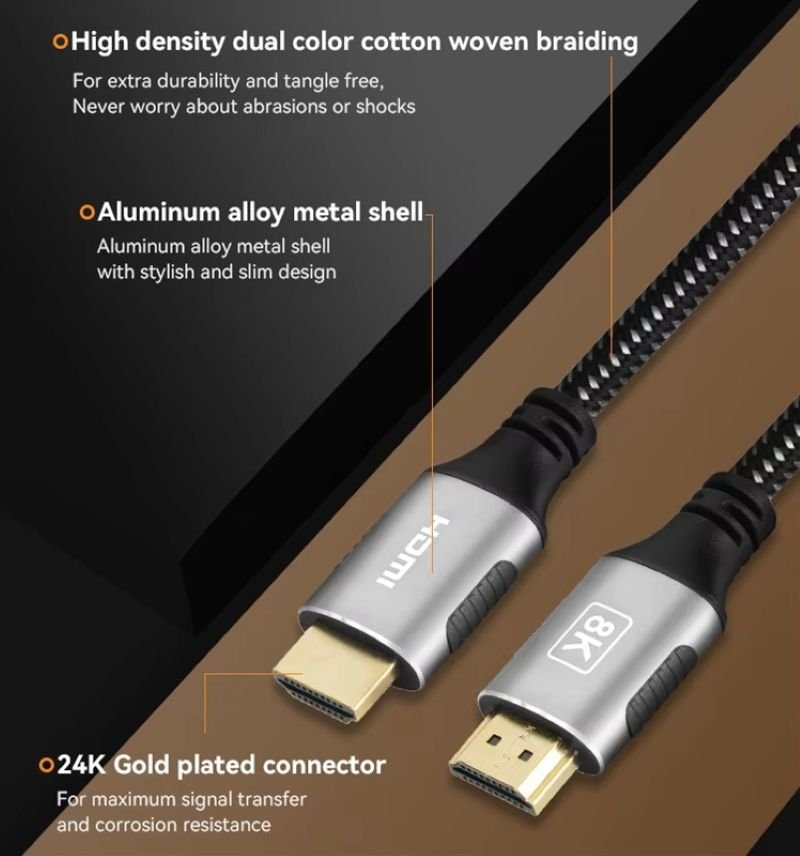
At HDMI 2.1 speeds, connectors are no longer “just metal ends.”
Small imperfections cause:
- reflections
- insertion loss
- unstable links at high refresh rates
When inspecting a cable, look closely at:
Connector shell symmetry
Uneven or poorly aligned shells often indicate weak termination control.
Overmold strain relief
Should be firm, centered, and not excessively soft.
Cable exit angle
A sharp bend immediately after the connector increases stress and signal distortion.
Common real-world failure:
Cable works at 4K@60Hz, but loses signal or flickers at 4K@120Hz — connector transition is the weak point.
3. Jacket Feel and Consistency: Clues About Internal Control
While the jacket material itself does not define HDMI 2.1 capability, jacket quality often reflects overall manufacturing discipline.
Warning signs:
- inconsistent softness along the length
- overly rubbery or sticky feel
- visible deformation after slight bending
Positive signs:
- uniform stiffness
- smooth surface without ripples
- predictable bending behavior
These clues don’t confirm performance, but they help identify low-control production, which is risky at 48Gbps.
Can Cable Markings Help?
Sometimes HDMI cables have text printed directly on the jacket.
Possible markings include:
- “Ultra High Speed HDMI Cable”
- wire gauge references
- internal manufacturer codes
What matters:
- Consistency between jacket marking, packaging, and datasheet
- Clear speed category wording
What does not matter:
- “8K” printed alone
- decorative fonts or logos
- gold-plated claims
Many HDMI 2.1-capable OEM cables have no jacket text at all, especially in industrial or embedded applications.
Can You Judge an HDMI 2.1 Cable from Photos Alone?
This is extremely common in B2B sourcing.
Reality:
You cannot confirm HDMI 2.1 performance from photos, but you can reject obvious mismatches.
What Photos Can Help You Eliminate
- Extremely thin cables claiming long 48Gbps runs
- Poor connector molding
- Inconsistent cable OD
- Consumer-style “soft” jackets used for industrial environments
What Photos Cannot Prove
- 48Gbps eye margin
- impedance uniformity
- EMI leakage
- stability under VRR or mode switching
That’s why professional manufacturers treat photos as starting points, not approval criteria.
At Sino-Conn, HDMI 2.1 cable approval always follows the same internal sequence: label screening → structural specification review → controlled-length testing under target modes (4K@120Hz, VRR, or 8K) → thermal and repeatability checks.
A cable is never approved based on appearance or marketing claims alone. If it cannot survive sustained FRL operation at the required length, it is rejected — even if it “works” during a short demo.
Why Length Changes Everything (And Why Looks Become Misleading)
One of the biggest mistakes is assuming:
“If it works at 1m, it should work at 3m.”
At HDMI 2.1 speeds, that assumption is wrong.
Approximate reality for passive cables:
- 1.0–1.5m: relatively forgiving
- 2.0m: tight design window
- 3.0m+: many passive designs fail without active equalization
Two cables that look identical can behave very differently at longer lengths.
That’s why:
- short demo tests are misleading
- real validation requires full-length testing
What Experienced Buyers Actually Do
Professionals don’t rely on appearance alone. They combine:
- Label screening
- Visual quality check
- Specification review
- Functional testing under load
- Length-specific validation
Visual inspection only serves step 2 — useful, but limited.
Practical Checklist: Visual Inspection for HDMI 2.1 Risk
Use this checklist to reduce risk quickly:
- Is the cable unusually thin for its claimed length?
- Are the connector shells symmetrical and solid?
- Is strain relief firm and centered?
- Does the jacket feel consistent along the length?
- Does the build quality match the claimed performance level?
If multiple answers are “no,” treat the HDMI 2.1 claim with caution.
This guide is written based on real HDMI cable validation work at Sino-Conn, a custom cable assembly manufacturer supporting consumer electronics, industrial systems, and OEM platforms.
Our role is not to sell a generic “HDMI 2.1 cable,” but to ensure that a specific cable structure can reliably meet the target resolution, refresh rate, length, and environment — without relying on trial-and-error after deployment.

If you are evaluating HDMI 2.1 performance for a product, installation, or custom application, the principles above are the same ones we use internally to avoid unstable links, repeated returns, and field failures.
Related Keywords :HDMI 2.1 cable, how to tell HDMI 2.1 cable, Ultra High Speed HDMI cable, 48Gbps HDMI cable, HDMI cable certification, HDMI 2.1 vs 2.0, HDMI 4K 120Hz cable, HDMI 8K cable, FRL HDMI cable, HDMI cable labeling, HDMI cable QR code, HDMI cable test, HDMI cable bandwidth, HDMI cable shielding, HDMI cable length limits, HDMI eARC cable, HDMI VRR cable, custom HDMI cable, HDMI cable spec sheet, HDMI cable manufacturer

With over 18 years of OEM/ODM cable assemblies industry experience, I would be happy to share with you the valuable knowledge related to cable assemblies products from the perspective of a leading supplier in China.
manufacturer catalogue
Get A Sample Now From Factory→
Get a quote quickly
Here, developing your OEM/ODM custom cable assemblies collection is no longer a challenge—it’s an excellent opportunity to bring your creative vision to life.



