 Skip to content
DP Cable vs HDMI: What’s the Difference and Which Is Better?
- andy
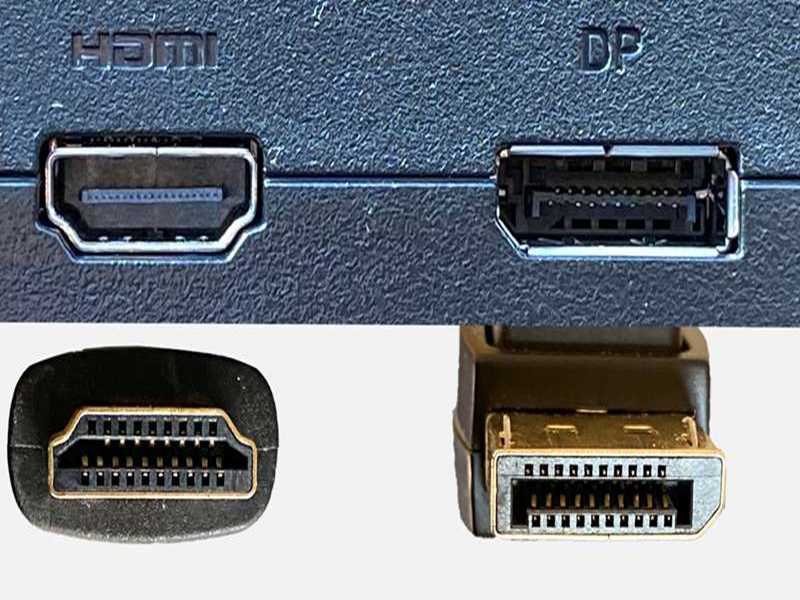
Choosing between DP (DisplayPort) and HDMI seems simple—until you try to connect a gaming monitor, a 4K TV, a laptop docking station, or a workstation GPU. In real use, the two cables behave very differently depending on the device, the resolution, the refresh rate, and even the cable generation you’re using. That’s why this question has become one of the most common debates among PC builders, gamers, IT professionals, and everyday consumers:
Which cable actually gives you better performance?
Is DisplayPort always better for PC monitors? Does HDMI 2.1 outperform DP 1.4? Will your monitor lose features if you use the wrong cable? And perhaps the most common question of all:
Do you really need DisplayPort if you already have HDMI?
These aren’t trivial concerns—many users unknowingly limit their monitor performance by choosing the wrong cable.
DisplayPort and HDMI are not the same. DisplayPort generally supports higher bandwidth, higher refresh rates, and PC-focused features like daisy-chaining, while HDMI is optimized for TVs, home entertainment, and consumer electronics. The “better” cable depends entirely on your display type, GPU capability, resolution, and refresh-rate requirements.
We once had a customer at Sino-Conn who bought a premium 4K 144Hz gaming monitor but couldn’t push beyond 60Hz. After troubleshooting, we learned he was using an old HDMI 1.4 cable he found in a drawer. Switching to a proper DP 1.4 cable immediately unlocked the monitor’s full potential. Mistakes like this are extremely common—your display is only as good as the cable connecting it.
What Are DP and HDMI?
DisplayPort (DP) and HDMI are digital interfaces for transmitting video and audio between devices such as PCs, GPUs, laptops, TVs, projectors, and monitors. Although both transfer high-quality video and audio, they were invented for different purposes and therefore excel in different environments.
DisplayPort
- Designed for computers and professional displays
- Popular in gaming monitors
- Supports high refresh rates and multiple monitors
- Found on GPUs, docking stations, and workstation laptops

HDMI
- Designed for TVs and home entertainment
- Standard on game consoles and household devices
- Supports ARC/eARC for soundbars
- Common in living rooms, meeting rooms, and TVs
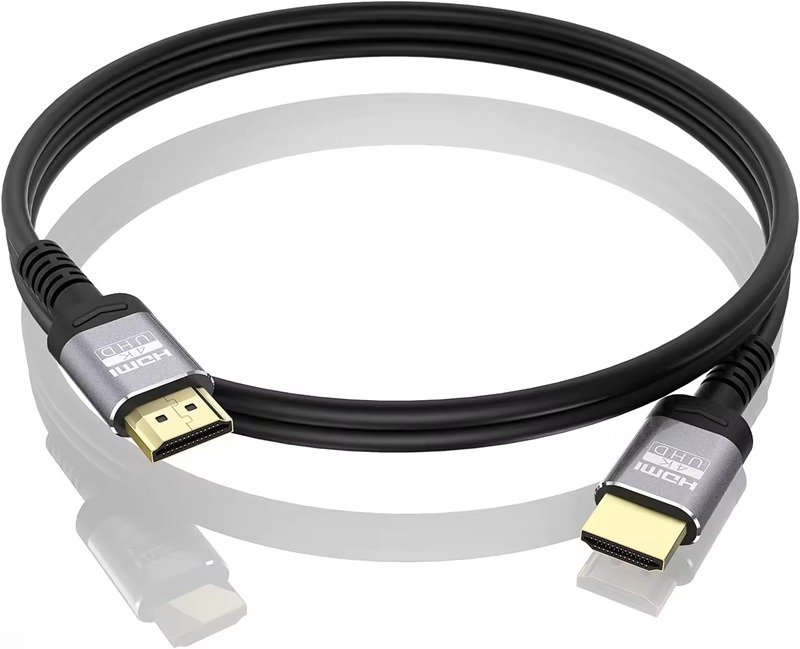
Is DP the Same as HDMI? (Quick Answer)
No. They may look similar, but their bandwidth, performance, features, and targeted applications are different. The ports are not interchangeable without converters, and using the wrong cable can limit or disable monitor capabilities.
What Are the Key Differences Between DP and HDMI?
The biggest differences between DP and HDMI are bandwidth capacity, maximum refresh rate, maximum resolution, device compatibility, and supported features.
DisplayPort is usually ahead in raw performance and monitor-focused features, while HDMI focuses on consumer device ecosystems.
Table : Technical Comparison of DP vs HDMI
| Feature | DisplayPort 1.4 | DisplayPort 2.0/2.1 | HDMI 2.0 | HDMI 2.1 |
|---|---|---|---|---|
| Max Bandwidth | 32.4 Gbps | 80 Gbps | 18 Gbps | 48 Gbps |
| Max Resolution | 8K30 | 16K60 | 4K60 | 8K60 |
| Max Refresh Rate | 4K144Hz | 4K240Hz | 4K60Hz | 4K120Hz |
| Variable Refresh Rate | Yes (Adaptive Sync) | Yes | Yes | Yes |
| Daisy-Chaining | Yes (MST) | Yes | No | No |
| ARC/eARC | No | No | Yes | Yes |
| Typical Devices | Monitors, GPUs | High-end monitors | TVs, consoles | TVs, consoles, monitors |
What this means in real use:
- DisplayPort offers the highest refresh rates for PC monitors.
- HDMI 2.1 is excellent for TVs and modern consoles.
- DP 2.1 is currently the highest-bandwidth consumer interface available.
Which Cable Offers Better Performance?
For PC monitors, DisplayPort typically offers better performance due to higher bandwidth, better multi-monitor support, and higher refresh rate capability. HDMI performs better in home-theater environments because it’s designed for TVs, console gaming, and audio systems.
Now let’s break it down.
High Refresh Rates for Gaming (DP Wins)
If you’re using a 144Hz or 240Hz monitor, especially at 1440p or 4K, DisplayPort is almost always the best option.
Why?
- DP has higher bandwidth headroom
- Most manufacturers optimize high-refresh monitors for DP
- HDMI sometimes limits refresh rate depending on the version
Even HDMI 2.1, though powerful, is still outperformed by DP 2.0/2.1 in raw data throughput.
TV & Console Compatibility (HDMI Wins)
For televisions and game consoles, HDMI is unbeatable.
Why?
- Every console uses HDMI
- All TVs use HDMI
- ARC/eARC allows audio to be sent backward to soundbars/receivers
If you’re connecting anything to a TV, use HDMI.
Multi-Monitor Productivity (DP Wins)
DisplayPort supports MST (Multi-Stream Transport), which allows:
- Daisy-chaining monitors from one port
- Running multiple high-resolution monitors from one cable
This is extremely useful in office setups, financial trading, and engineering environments.
Long Cable Runs (HDMI Slightly Wins)
HDMI is more stable for longer cable distances (5–10 meters).
DP generally requires:
- Certified high-quality cables
- Or fiber optic DP cables for very long runs
Do You Need DisplayPort If You Already Have HDMI?
You only need DP if your monitor or GPU requires features that HDMI cannot provide—usually high refresh rates, PC gaming features, or multi-monitor daisy chaining.
If you’re using a standard 60Hz 1080p monitor or a TV, HDMI is usually enough.
Here’s a quick decision table:
| Your Situation | Do You Need DP? | Why |
|---|---|---|
| 1080p 60Hz monitor | ❌ No | HDMI is fully sufficient |
| 144Hz gaming monitor | ✔ Yes | DP supports higher refresh rates |
| Multi-monitor daisy chain | ✔ Yes | Only DP supports MST |
| 4K TV | ❌ No | TVs rely on HDMI |
| PS5 / Xbox Series X | ❌ No | Consoles output only HDMI |
General rule:
- If you’re using a PC monitor, choose DP
- If you’re using a TV, choose HDMI
Which Cable Should You Choose for Your Device?
Choosing the right cable depends on where and how the cable will be used. Below is a simple but comprehensive guide.
Table : Recommended Cable by Application
| Application | Recommended Cable | Reason |
|---|---|---|
| PC gaming monitor | DisplayPort | Maximizes refresh rates & responsiveness |
| Office dual monitors | DisplayPort | MST + stable multi-display support |
| 4K TV | HDMI 2.1 | Designed for TVs & audio systems |
| Home projector | HDMI | Better long-run stability |
| Laptop docking station | USB-C → DP | Supports multi-monitor output |
| PS5 / Xbox Series X | HDMI 2.1 | Required by consoles |
| Video editing & color grading | DisplayPort | Better monitor support & color accuracy |
These recommendations reflect real-world behavior—not just specs.
How Do DP and HDMI Handle Advanced Features?
1. Variable Refresh Rate (VRR)
Both HDMI and DP support VRR, but DP generally integrates better with:
- FreeSync
- G-Sync Compatible
- Adaptive Sync monitors
For smooth gaming performance with minimal tearing, DP remains the top choice.
2. Audio Return Channel (ARC/eARC)
Only HDMI supports:
- ARC → for basic audio return
- eARC → for high-resolution Dolby Atmos/DTS:X
If your audio setup depends on a soundbar, HDMI wins.
3. Daisy-Chaining Monitors
DisplayPort’s MST allows:
- Multiple monitors through a single port
- Cleaner cable management
- More efficient GPU output
HDMI cannot do this.
4. Compression Technology
DP supports DSC (Display Stream Compression), allowing lossless-looking:
- 4K240Hz
- 8K60Hz
This is a major advantage for high-end monitors.
When Do Custom DP/HDMI Cables Make Sense?
Standard cables work for most consumer setups.
But OEM factories, hardware startups, industrial devices, charging stations, kiosks, and embedded systems often require customized video cable assemblies, such as:
- Exact cable lengths for device enclosures
- Custom TV/monitor cables for integrated systems
- LSZH or TPE jackets for safety or flexibility
- Reinforced overmolding for durability
- EMI shielding for high-noise industrial environments
- Special connectors (angled, panel-mount, locking)
- Tight OD tolerance to fit through routing paths
- Unique pinouts for docking stations or mini-PCs
This is where Sino-Conn’s engineering support is valuable—not as marketing, but because custom video cable assemblies often require:
- Drawings
- Testing requirements
- Environmental suitability
- Connector sourcing
- Electrical parameters
- High-quality crimping and shielding
These factors directly determine the performance of DP/HDMI signals, especially at high bandwidths.

Conclusion
DisplayPort and HDMI are both excellent—but designed for different use cases.
- If you’re using a PC monitor, DisplayPort usually gives the best performance, the highest refresh rates, and more monitor-oriented features.
- If you’re connecting to a TV or console, HDMI is the correct and most compatible choice.
- For workstations and productivity, DisplayPort wins thanks to daisy-chaining and higher bandwidth.
- For home entertainment, HDMI is unmatched due to ARC/eARC and TV ecosystem support.
If you need custom DP or HDMI cable assemblies with specific lengths, materials, overmolded connectors, or industrial-grade performance, Sino-Conn can assist with drawings, engineering review, and reliable manufacturing.
Send your drawing, model number, requirements—or even just a photo—and Sino-Conn can help you build the right DP or HDMI cable assembly for your application.
Related Keywords :medical cables, cable manufacturer, medical devices, custom cables, medical cable supplier, patient safety, electronics cables, OEM cables, signal integrity, biocompatible cables

With over 18 years of OEM/ODM cable assemblies industry experience, I would be happy to share with you the valuable knowledge related to cable assemblies products from the perspective of a leading supplier in China.
manufacturer catalogue
Get A Sample Now From Factory→
Get a quote quickly
Here, developing your OEM/ODM custom cable assemblies collection is no longer a challenge—it’s an excellent opportunity to bring your creative vision to life.



