 Skip to content
VGA Cable vs DVI: What’s the Difference and Which Is Better?
- andy

Choosing between VGA and DVI cables seems simple—until you’re faced with blurry text on a new monitor, mismatched connectors on an industrial controller, or the limitations of mixing analog and digital signals. Many users still work with older systems that rely on VGA, while newer devices transition to DVI for clearer images and better stability. Somewhere in between appears the common question: Can a VGA-to-DVI cable actually improve image quality, or does it just change the connector shape?
The main difference between VGA and DVI is that VGA transmits analog signals, while DVI can transmit digital, analog, or both depending on the type. DVI generally offers sharper images, higher resolutions, and more stable performance. However, switching from VGA to DVI does not improve image quality unless the source itself outputs a digital signal. Your choice should depend on your device’s ports, resolution requirements, and actual display quality needs.
At Sino-Conn, we regularly receive emails with just a photo of a connector and a short question: “Can you make this?” or “Will a DVI cable make this screen sharper?” This guide will help you understand the real differences between VGA and DVI—and when a custom cable from Sino-Conn actually makes a measurable difference.
What Is VGA and Where Is It Still Used?
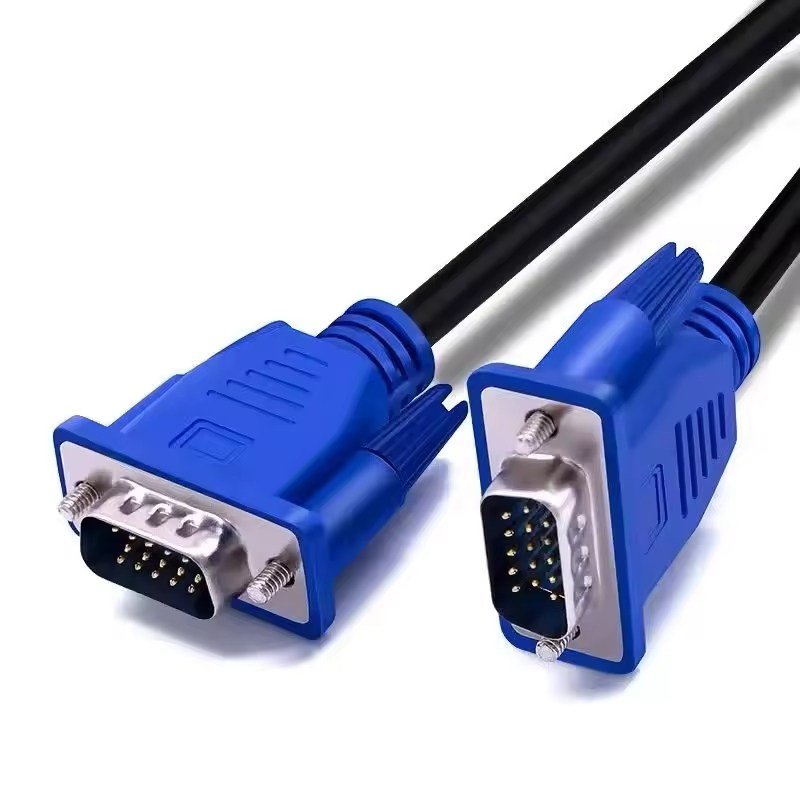
VGA is an analog video interface introduced in 1987 that transmits RGB signals through a 15-pin DE-15 connector. It can support resolutions up to 1080p, but image clarity depends heavily on cable quality, shielding, and cable length. VGA is still common in legacy PCs, industrial machines, older projectors, and embedded systems where compatibility and low cost are more important than maximum sharpness.
VGA as an Analog Legacy Interface
VGA (Video Graphics Array) is one of the oldest display standards still in service. It was designed in the CRT era, and it sends video as continuous analog voltages instead of digital data. This means:
- Any electrical noise can disturb the signal
- Image quality degrades over distance
- High resolutions are possible on paper, but often unstable in real environments
A VGA device might “support” 1080p, but if the cable is long, poorly shielded, or running near motors and power lines, the image can look soft, fuzzy, or ghosted.
Typical VGA Applications
VGA is still widely used where systems are old but reliable, and replacing the whole device is too costly:
- CNC machines and automation controllers
- Industrial HMI panels
- Older medical imaging and lab equipment
- School / office projectors
- Legacy PCs and servers
In many of these cases, VGA is not optional—it’s the only available video interface.
VGA Customization at Sino-Conn
Because VGA is analog, cable construction strongly impacts image quality. Sino-Conn often supplies:
- Custom lengths from 10 cm to 30 m
- Enhanced shielding (foil, braid, or combination)
- Heat-, oil-, UV-resistant or halogen-free jackets
- Custom pinouts and panel-mount connectors
- Original or alternative-brand VGA connectors
- Sample lead time as fast as 2–3 days
- Drawings (CAD→PDF) in 30 minutes to 3 days for approval
For industrial and OEM customers, the “same VGA” connector can hide very different internal constructions. This is where a professional cable assembly partner matters.
What Is DVI and Why Is It Clearer?
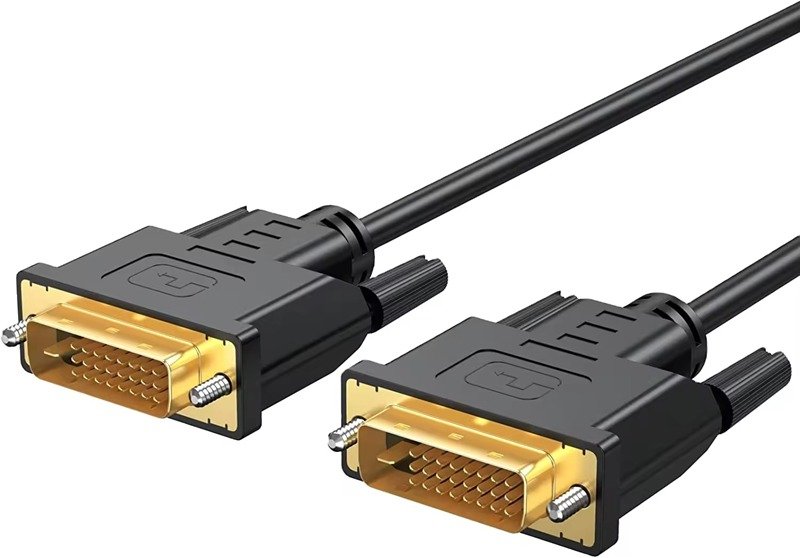
DVI (Digital Visual Interface) is a video standard that supports digital, analog, or both, depending on the type—DVI-D, DVI-A, or DVI-I. In digital mode, it provides sharper images, better color accuracy, and higher stable resolutions than VGA. Dual-link DVI can support up to 2560×1600, making it suitable for modern monitors, professional graphics, and high-resolution industrial displays.
DVI Types: DVI-D, DVI-A, DVI-I
DVI comes in three main versions:
- DVI-D (Digital): The most common; used for modern monitors and GPUs.
- DVI-A (Analog): Carries analog signals similar to VGA; rarely used.
- DVI-I (Integrated): Supports both digital and analog signals on one connector.
This is important for adapters:
- DVI-I can be passively adapted to VGA.
- DVI-D cannot output VGA without an active converter.
Resolution and Use Cases
DVI’s digital mode is where it really shines:
- DVI-A: Up to 1080p (but still analog)
- DVI-D Single-Link: Up to 1920×1200
- DVI-D Dual-Link: Up to 2560×1600
You’ll still find DVI in:
- Desktop PCs and workstations
- Industrial PCs and control systems
- Medical displays and imaging devices
- KVM switches and server racks
- Older 1080p/144Hz gaming monitors (dual-link DVI)
Sino-Conn DVI Capabilities
Sino-Conn supports:
- DVI-D / DVI-I, single-link and dual-link cables
- Thick-gauge, EMI-shielded constructions for industrial sites
- Heat-resistant, halogen-free, or UV-resistant jackets
- Custom overmolds, strain reliefs, and angles
- Drawings within 30 minutes–3 days and samples in 2–3 days
- Production lead time for volume orders around 2 weeks
Whether you need a single prototype or OEM mass production, we can build DVI cables that match your mechanical and electrical requirements.
VGA vs DVI: The Key Differences That Actually Matter
VGA uses analog signals that are more sensitive to cable quality and interference, while DVI can use digital signals that remain clear and stable over distance. DVI typically offers sharper images and higher resolutions. VGA to DVI adapters do not improve quality if the source signal is already analog; they simply change the connector form.
Image Quality and Stability
VGA:
- Analog RGB waveforms
- Quality varies with cable, length, and environment
- More susceptible to blur, ghosting, and color shifts
DVI (digital):
- Transmits digital data (0s and 1s)
- Either the pixel is correct or not—no “almost”
- Sharper text and better detail, especially at high resolutions
For modern LCD/LED monitors, DVI usually produces a visibly cleaner picture than VGA.
Resolution, Bandwidth and Modern Compatibility
A quick comparison:
| Interface | Max Practical Resolution | Signal Type | Stability |
|---|---|---|---|
| VGA | ~1080p (quality varies) | Analog | Medium–Low |
| DVI-D Single-Link | 1920×1200 | Digital | High |
| DVI-D Dual-Link | 2560×1600 | Digital | Very High |
Modern displays are digital devices. When they receive VGA, they must convert it to digital internally, which can slightly reduce clarity. With DVI-D, there is no conversion—the panel receives digital data directly.
Does VGA to DVI Increase Quality?
This is the question many users ask.
No—VGA to DVI does not increase image quality.
If your device outputs VGA (analog), passing it through a VGA-to-DVI adapter does not magically turn it into a digital signal. The image quality is limited by the analog source, not the connector shape.
You only gain quality when:
- The source outputs digital video
- The cable carries digital video
- The monitor receives digital video
In other words: analog → adapter → digital does not improve clarity; digital → digital does.
How to Choose the Right Cable for Your Device
To choose between VGA and DVI, first confirm whether your device outputs analog, digital, or both. Use DVI if you want sharper images and higher resolutions on modern monitors. Use VGA only when the source or display is strictly analog or in legacy/industrial environments. Then consider cable length, shielding, jacket material, and whether adapters are needed.
Step 1: Check Ports and Signal Type
Look at both your source and your display:
- VGA port only → you must use VGA or an active converter
- DVI-D port → digital only; cannot drive VGA without converter
- DVI-I port → can support both DVI and VGA (with passive adapter)
If your monitor is high-resolution (e.g., 1440p, 4K), VGA is not recommended.
Step 2: Consider Resolution, Length, and Environment
Ask yourself:
- What resolution do I really need?
- How long is the cable run?
- Is the environment noisy (motors, inverters, power lines)?
- Do I need oil-resistant, high-temp, or UV-resistant jackets?
Sino-Conn can adjust:
- Conductor size and shielding (foil + braid)
- Outer diameter for durability or flexibility
- Jacket material for temperature, oil, or UV resistance
For long runs in harsh environments, construction matters as much as the interface type.
Step 3: Be Careful With Adapters
Passive adapters are only safe when the port already supports the other signal:
- DVI-I → VGA: OK (analog pins present)
- VGA → DVI-A/DVI-I: OK (analog path)
- DVI-D → VGA: NOT OK without an active converter
Sino-Conn regularly helps customers correct issues caused by incorrect assumptions about adapters.
When Do You Need a Custom VGA or DVI Cable?
You need a custom VGA or DVI cable when your application requires non-standard length, special pinout, ruggedized connectors, enhanced EMI performance, or specific environmental ratings (temperature, oil, UV, halogen-free). Custom designs ensure safe, reliable integration with legacy equipment and industrial or medical systems.
Typical Custom Scenarios
Sino-Conn frequently designs custom assemblies for:
- Non-standard lengths (very short or very long cables)
- High-flex or robotic applications
- Panel-mount or angled connectors for tight spaces
- Proprietary pinouts on industrial or medical devices
Often, customers only send photos and a rough description. Our engineers then create drawings for confirmation before production.
What Sino-Conn Provides
Working with Sino-Conn, you can expect:
- CAD-to-PDF drawings in about 30 minutes to 3 days
- 2–3 day sample production for urgent projects
- Around 2-week lead time for mass orders
- No MOQ (we can start from 1 piece)
- UL, ISO, RoHS, REACH, PFAS and related certifications
- 100% inspection: in-process, final, and pre-shipment checks
Final Summary – Talk to Sino-Conn About Your VGA or DVI Project

- Use VGA when you must support legacy or analog-only devices, especially in industrial, medical, or OEM systems that still run perfectly and are too costly to replace.
- Use DVI when you need sharper images, higher resolutions, and more stable performance on modern displays—especially for office work, design, and gaming.
- Use custom cables when off-the-shelf products cannot meet your mechanical, electrical, or environmental requirements.
If you’re unsure what you need—maybe you only have a photo of a port or partial model number—just share it with Sino-Conn.
Tell us your device, environment, and cable length requirements, and we’ll recommend or design the right VGA or DVI cable for you, complete with drawings, samples, and a clear quotation.
Related Keywords :medical cables, cable manufacturer, medical devices, custom cables, medical cable supplier, patient safety, electronics cables, OEM cables, signal integrity, biocompatible cables

With over 18 years of OEM/ODM cable assemblies industry experience, I would be happy to share with you the valuable knowledge related to cable assemblies products from the perspective of a leading supplier in China.
manufacturer catalogue
Get A Sample Now From Factory→
Get a quote quickly
Here, developing your OEM/ODM custom cable assemblies collection is no longer a challenge—it’s an excellent opportunity to bring your creative vision to life.



