 Skip to content
Which Computer Monitor Cable Is Best? A Complete Guide
- andy
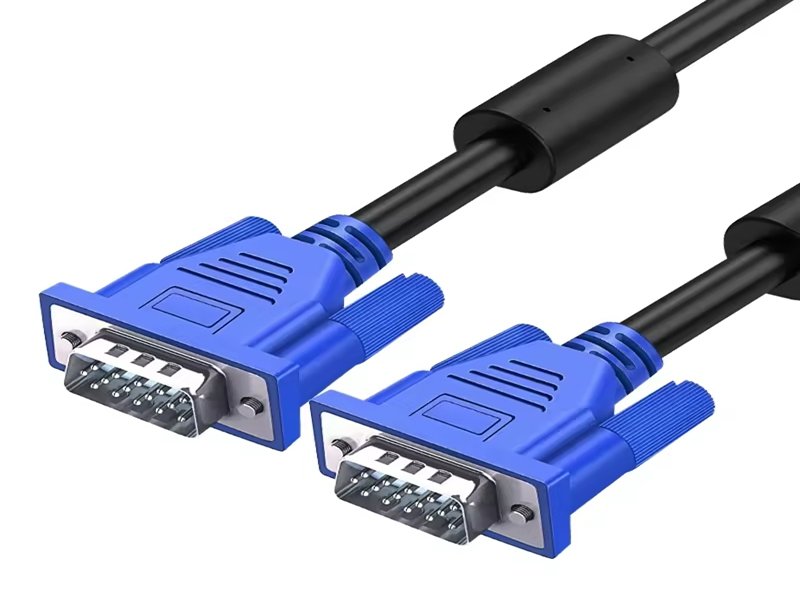
Choosing the right computer monitor cable seems simple—until you discover the sheer number of formats, standards, and electrical differences behind them. Whether you’re setting up a gaming rig, configuring multi-monitor workstations, or sourcing display cables for industrial and commercial equipment, the type of cable you choose has a direct effect on resolution, refresh rate, color accuracy, EMI resistance, and overall system stability.
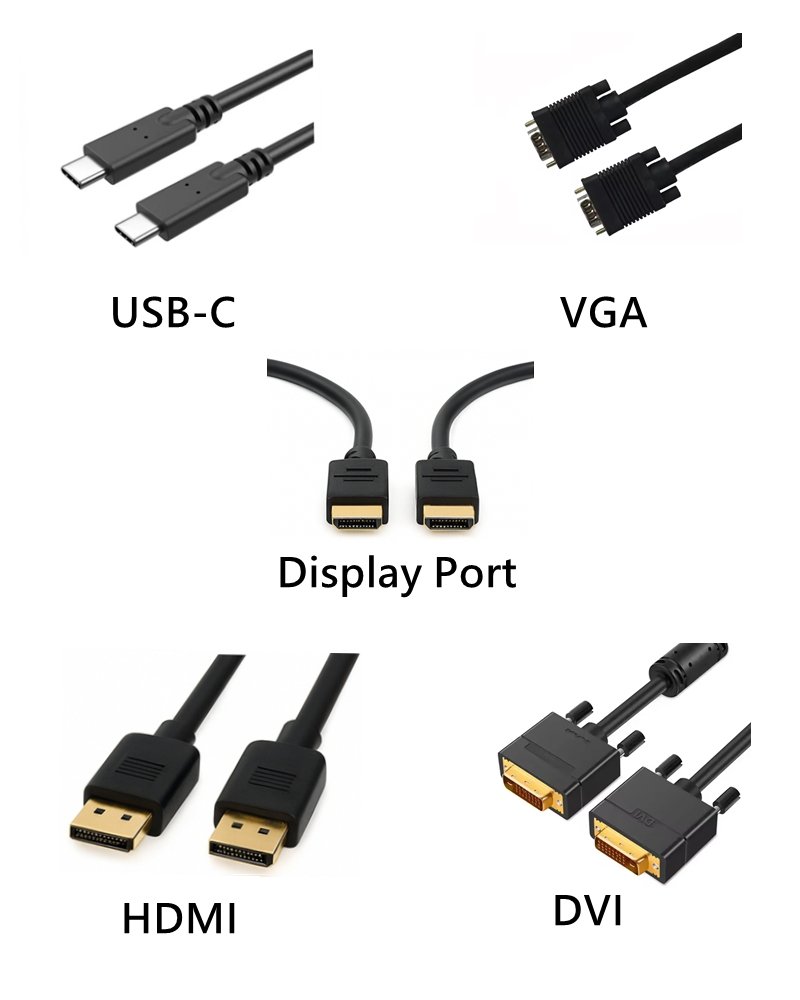
In short, computer monitor cables are the physical interfaces that carry video, audio, and control signals between a computer and a display. The five most common external cable types are HDMI, DisplayPort, USB-C DisplayPort Alt Mode, DVI, and VGA, while internal cables inside monitors use LVDS, eDP, or V-by-One. Choosing the best cable depends on the monitor’s resolution, refresh rate, device compatibility, and application environment.
At Sino-Conn, we often receive messages from buyers, OEM engineers, and trading companies who attach a single blurry photo and ask: “Which cable is this, and can you make it?” Many don’t know the exact model, only that their monitor flickers or fails after replacing a cable. Our engineers reverse-engineer samples, identify connectors, rebuild pinouts, design shielding layers, and produce drawings—often within 30 minutes. This guide will help you clearly understand every type of monitor cable, how they compare, and how to choose the most suitable one.
What Are Computer Monitor Cables?
Computer monitor cables are signal transmission lines that connect a PC, laptop, docking station, or embedded system to a display. They carry digital or analog video signals—and sometimes audio, power, and USB data—depending on the interface standard. Modern monitors use HDMI, DisplayPort, or USB-C, while internal displays use LVDS, eDP, or V-by-One cables.
Monitor cables differ from common low-frequency wires. They use:
- controlled-impedance differential pairs
- strict twist ratios
- foil/braid/combination EMI shielding
- highly engineered connectors
- tight tolerances for skew, insertion loss, and crosstalk
Even a small deviation in geometry can collapse the signal eye-diagram and cause screen flickering or total loss of image.
What Type of Cable Does a Computer Monitor Use?
Modern monitors most commonly use:
- HDMI (mainstream consumer monitors)
- DisplayPort (PC and gaming monitors)
- USB-C DisplayPort Alt Mode (laptops, tablets, docking stations)
Older monitors still use:
- DVI
- VGA
Professional/embedded monitors use LVDS, eDP, or V-by-One internally.
Different systems require different signal integrity and EMI performance—no single cable fits all use cases.
What Signals Do Monitor Cables Carry?
Monitor cables may carry:
- digital video
- analog video (VGA only)
- audio (HDMI, DP)
- USB data (USB-C)
- EDID/DPCD control signals
- power delivery (USB-C up to 100W)
Digital interfaces like HDMI and DP use high-speed differential pairs (TMDS or Main Link lanes), making them far more sensitive to cable quality than older analog formats.
Analog vs Digital Monitor Cables
Analog (VGA)
- Susceptible to noise
- Image sharpness depends on cable quality
- Practically obsolete except in legacy machinery
Digital (HDMI / DP / USB-C / DVI)
- Noise-resistant
- Supports high resolution & refresh rates
- Clean, sharp image regardless of cable length (within spec)
Digital cables dominate today’s market because they support modern display technologies like HDR, 4K/8K resolution, and high refresh gaming.
Internal vs External Display Cables
This is a crucial distinction most buyers overlook.
External monitor cables:
- HDMI
- DisplayPort
- USB-C
- VGA / DVI
Internal monitor cables (inside the display housing):
- LVDS — used in older or industrial LCDs
- eDP — used in laptops & modern PC monitors
- V-by-One HS — used in high-resolution 4K/8K panels
Sino-Conn manufactures both external and internal display cables, including I-PEX/JAE small-pitch assemblies for panel interface connections.
Which Computer Monitor Cable Types Are Most Common Today?
The five most common monitor cables are HDMI, DisplayPort, USB-C DisplayPort Alt Mode, DVI, and VGA. HDMI and DisplayPort dominate modern systems, USB-C is growing quickly, and DVI/VGA remain in legacy or industrial equipment.
Consumers typically encounter HDMI and DP in retail monitors.
Engineers, however, also deal with eDP, LVDS, and V-by-One inside professional or embedded displays.
What Are the 5 Different Types of Computer Monitor Cable?
| Cable Type | Signal | Max Resolution | Typical Use |
|---|---|---|---|
| HDMI | Digital | 8K60 / 4K120 | Most consumer monitors |
| DisplayPort | Digital | 8K30 / 4K120 | PC, workstation, gaming monitors |
| USB-C (DP Alt Mode) | Digital | 4K60 / 8K30 | Laptops, tablets, docking stations |
| DVI | Digital | 1080p / 1440p | Older PCs, industrial systems |
| VGA | Analog | 1080p (lossy) | Legacy equipment |
HDMI and DisplayPort offer the best modern performance.
USB-C offers the best convenience and portability.
VGA/DVI remain in service for cost-sensitive OEM machinery.
HDMI (1.4 / 2.0 / 2.1)
HDMI is the most widely used monitor cable today.
- HDMI 1.4 → 1080p
- HDMI 2.0 → 4K60
- HDMI 2.1 → 8K60 / 4K120
Pros:
- Universal compatibility
- Supports audio
- Widely available
Cons:
- No daisy chain
- Cable length sensitive at 4K+
Sino-Conn provides HDMI cables with high-quality shielding and gold-plated contacts for stable high-frequency performance.
DisplayPort & Mini DP
DisplayPort is designed specifically for PC monitors and graphics cards.
Key features:
- Higher refresh rates (144Hz, 165Hz, 240Hz)
- Daisy-chain via MST
- Locking connectors on many cables
- Better suited for multimonitor setups
Mini DP is common on older laptops and compact devices.
Many engineering and workstation users prefer DP over HDMI.
USB-C DisplayPort Alt Mode
USB-C is becoming the “one port for everything”: power, data, and video.
Advantages:
- Supports video + USB data + charging
- Enables single-cable docking
- Works on tablets, laptops, smartphones
Requires micro-coaxial internal conductors for high-frequency lanes—an area where Sino-Conn provides professional custom assemblies.
VGA & DVI (Legacy Interfaces)
Although outdated, these are still widely used in:
- industrial equipment
- machinery control displays
- projectors
- legacy computers
VGA is analog, prone to interference, and limited in clarity.
DVI is digital but capped in bandwidth.
Many OEMs still request custom VGA/DVI cables due to equipment lifespan exceeding 10+ years.
How Do Internal Monitor Cables Work? (LVDS, eDP, V-by-One)
Internal monitor cables—LVDS, eDP, and V-by-One—are high-speed differential cable assemblies that connect the motherboard/TCON to the LCD panel inside a display. They use micro-pitch connectors, controlled impedance, and shielded twisted pairs to deliver stable video signals within tight mechanical spaces.
While HDMI and DisplayPort dominate external connections, every LCD monitor, laptop, and industrial panel relies on an internal cable. These internal interfaces work at high speeds and are extremely sensitive to signal integrity, shielding quality, connector tolerances, and cable bending cycles—especially inside hinges or slim bezels.
Sino-Conn manufactures thousands of internal display cables yearly, supporting I-PEX, JAE, Amphenol, and compatible equivalents. Many customers simply send us a photo or damaged sample; our engineers reverse-engineer the connector pitch, lane count, pinout, shielding layers, and OD to reproduce or upgrade the cable.
What Is LVDS and Why Is It Still Used?
LVDS (Low Voltage Differential Signaling) is one of the most widely used internal display interfaces for industrial equipment, automotive displays, and older monitors.
Key traits:
- Supports 720p–1080p displays
- Low EMI, stable signal
- Long-time proven reliability
- Works over twisted-pair shielded cables
- Compatible with 20–60 pin connectors (I-PEX, JAE, Hirose)
LVDS remains popular in factories, POS terminals, kiosks, and dashboards because it’s robust, affordable, and resistant to harsh environments such as vibration, static discharge, or electromagnetic noise.
Sino-Conn regularly produces custom LVDS assemblies with foil + braid shielding, halogen-free jackets, and model-specific pinouts.
What Is eDP in Modern Monitors?
eDP (Embedded DisplayPort) is the modern successor to LVDS. It is widely used in:
- laptops
- all-in-one PCs
- modern computer monitors
- tablets
Advantages:
- Higher bandwidth
- Supports 1080p → 4K panels
- Fewer pins than LVDS
- Lower power consumption
- Smaller, lighter cable assemblies
eDP usually uses I-PEX or JAE micro-connectors such as:
- I-PEX 20455
- I-PEX 20879
- JAE FI-RE series
Because eDP is used inside thin devices, cables must be highly flexible and withstand repeated hinge cycles. Sino-Conn manufactures ultra-flex eDP micro-coaxial cables for laptop and industrial panel use.
What Is V-by-One HS for 4K/8K Panels?
V-by-One HS is a high-speed SerDes interface designed for UHD displays.
Used in:
- 4K monitors
- 8K TVs
- commercial digital signage
- broadcast monitors
- medical imaging displays
Features:
- 3.75 Gbps per lane
- Easily scalable to 4K/8K by adding lanes
- Lower EMI than HDMI/DP
- Works reliably over shielded twisted pairs
- Typically uses 30–60 pin I-PEX/JAE connectors
V-by-One allows simpler cable structures and fewer lanes compared to LVDS, making it ideal for high-resolution professional displays. Sino-Conn supports both original and compatible connectors for V-by-One cable assemblies.
Internal Connector Families (I-PEX, JAE, Amphenol)
Internal display cables require highly precise micro-pitch connectors.
Common series:
- I-PEX: 20453 / 20455 / 20879 / 20708
- JAE: FI-RE / FI-SE / FI-X series
- Amphenol equivalents
Engineers often request:
- Verification of pin pitch
- Equivalent connector replacements
- Sourcing when OEM connectors are out of stock
- Help identifying connectors from photos
Sino-Conn provides both original and cost-effective compatible connectors, depending on budget, lead time, and volume.
How Do These Monitor Cable Types Compare?
Monitor cable types differ in bandwidth, resolution support, EMI performance, shielding structure, connector complexity, and mechanical durability. HDMI and DisplayPort dominate external connections, USB-C is growing rapidly, and LVDS/eDP/V-by-One handle internal connections in consumer and industrial equipment.
Choosing the best monitor cable depends on more than just connector shape—factors like signal quality, EM noise, cable length, bending requirements, and resolution all matter. This section compares these cables from a technical engineering perspective.
Resolution & Refresh Rate Differences
Below is a simplified comparison:
| Interface | Bandwidth | Max Resolution |
|---|---|---|
| HDMI 2.1 | 48 Gbps | 8K60 |
| DisplayPort 1.4 | 32.4 Gbps | 8K30 / 4K120 |
| USB-C DP Alt Mode | 10–40 Gbps | 4K60–8K30 |
| V-by-One HS | 3.75 Gbps/lane | 4K/8K (via lane scaling) |
| LVDS | <1 Gbps | 720p–1080p |
| VGA | Analog | 1080p (lossy) |
Key observations:
- HDMI/DP dominate high-end consumer use
- USB-C is the most portable and integrated
- V-by-One is a top choice for professional UHD panels
- LVDS is sufficient for industrial 720p–1080p applications
Bandwidth & Signal Integrity
Higher bandwidth means stronger sensitivity to design flaws.
Factors affecting signal integrity:
- impedance mismatch
- skew between differential pairs
- poor shielding
- excessive bending
- low-grade dielectric materials
Digital signals (TMDS, Main Link, SerDes) operate at multi-GHz frequencies, where even a 0.1 mm difference in geometry can introduce crosstalk or jitter.
Sino-Conn engineers design cables with controlled 85Ω/100Ω impedance, micro-coaxial conductors, and multi-layer shields to preserve signal clarity.
EMI Shielding Structures
Shielding determines how well a cable resists external noise.
Shield Types:
- Foil shield (100% coverage) – best for high-frequency noise
- Braid shield (70–95%) – durable, suitable for industrial vibration
- Spiral serve – excellent flexibility for hinges and moving parts
- Combination shield (foil + braid) – best overall EMI performance
- Hybrid multi-layer – used for medical, automotive, and precision displays
Engineers in noisy environments (factories, vehicles) often choose combination shielding.
Connector Pin Counts & Complexity
Different standards use different pin counts:
- HDMI → 19 pins
- DisplayPort → 20 pins
- USB-C → 24 pins
- DVI → 24 pins
- LVDS/eDP → 20–60 pins
- V-by-One → often 30–60 pins
More pins = more signal lanes = higher bandwidth and more sensitive routing.
Sino-Conn supports I-PEX/JAE/Amphenol and compatible alternatives with fast lead time.
Mechanical Durability (OD, Flexibility, Temperature)
Mechanical design affects:
- cable life
- hinge performance
- ease of installation
- heat resistance
Key variables:
- OD (outer diameter)
- bending radius
- jacket hardness
- temperature rating (60°C–105°C+)
- abrasion resistance
Industrial environments may require thicker jackets, while laptops require ultra-flex assemblies.
What Specifications Do Engineers and Buyers Usually Ask For?
Engineers and buyers usually ask for electrical, mechanical, and environmental specifications to ensure the monitor cable meets performance, safety, and durability standards. These include impedance, skew, shielding structure, OD, jacket material, bending life, certifications (UL, RoHS, REACH), and detailed drawings for approval.
When developing or sourcing monitor cables—whether external HDMI/DP or internal LVDS/eDP—engineers must ensure that each parameter supports the device’s architecture. Even small deviations in impedance, shielding, or pin mapping can cause display flicker, noise, or total signal failure.
This is why Sino-Conn provides complete specification sheets, drawings (CAD → PDF), and pre-production confirmation for every order.
Electrical Specs (Impedance, Skew, Crosstalk)
Electrical characteristics are crucial for high-speed video transmission.
Key parameters include:
- Impedance:
- 100Ω for HDMI, DP, USB-C
- 85Ω for LVDS, eDP, V-by-One
- Skew:
- Differences in propagation time between lane pairs
- Excessive skew causes image jitter or link failure
- Crosstalk:
- Interference between adjacent differential pairs
- Controlled by twist rate and dielectric materials
- Insertion loss:
- Loss of signal amplitude at high frequencies
- Critical for long cables or 4K/8K resolutions
Sino-Conn engineers tune cable geometry, pair twist, and shielding to maintain reliable eye diagrams.
Mechanical Specs (Outer Diameter, Flex Rating, Jacket Materials)
Mechanical specs determine whether the cable fits into the device and survives daily movement.
Important variables:
- Outer Diameter (OD):
- Slim designs for laptops or small monitors
- Thicker designs for industrial durability
- Flexing Requirements:
- Hinge cables may require 10,000–50,000 bending cycles
- Spiral-serve shielding for flexibility
- Jacket Material:
- PVC (general use)
- TPE/TPU (flexibility, abrasion resistance)
- LSZH (public environments)
- FEP (high-temperature or low-loss dielectric)
Sino-Conn customizes OD and jacket options depending on application needs.
Environmental Specs (Heat, UV, Oil, Halogen-Free, PFAS-Free)
Different industries require different environmental protections.
Common requirements:
- Heat resistance: 60°C–105°C+
- UV resistance: outdoor displays, signage
- Oil resistance: factory equipment
- Halogen-free materials: mandatory in public spaces
- PFAS-Free: increasingly required in Europe
- Chemical & corrosion resistance: automotive, medical equipment
Sino-Conn selects materials based on device environment and compliance needs.
Required Documents & Certifications (UL, ISO, RoHS, REACH)
Many buyers require documentation for compliance and import/export:
- UL (safety standards)
- ISO 9001/14001 (quality & environmental management)
- RoHS (hazard substance restriction)
- REACH (chemical compliance)
- PFAS Statement (EU requirement)
- COC/COO for customs clearance
Sino-Conn provides certificates and full traceability for every batch.
Do Monitor Cables Support Customization?
Yes. Monitor cables can be fully customized—including length, shielding, pinout mapping, OD, jacket materials, connector brand, and environmental rating. Sino-Conn supports custom drawings, fast samples (2–14 days), original or equivalent connectors, and no MOQ.
Most customers do not buy “standard” display cables. They have specific mechanical constraints, signal requirements, or environmental demands. Sometimes they only have a picture or broken cable. Sino-Conn reverse-engineers and redesigns the cable to meet exact system needs.

Custom Length, Materials & Shielding
Common customizable elements:
- Cable length (short internal 5cm → 10m external)
- Shielding structure: foil, braid, spiral, hybrid
- OD & dielectric thickness
- Jacket material: PVC, TPU, LSZH, FEP
- Conductor type: standard or micro-coax
Length affects insertion loss; shielding affects EMI; jacket affects durability.
Custom Pinout Mapping
Many people assume “HDMI to HDMI” or “LVDS to LVDS” uses identical pinouts—not true.
Customizations often include:
- lane ordering
- signal-to-ground mapping
- EDID/I²C lines
- backlight power
- shield termination strategy
Sino-Conn engineers reconstruct pinouts from samples or drawings.
Original vs Equivalent Connectors
Customers often ask:
“Should we use original I-PEX/JAE, or cost-effective equivalents?”
Original connectors
- Best quality
- Longer lead time
- Higher cost
- Preferred by high-volume OEMs
Equivalent connectors
- Fully functional alternatives
- Fast delivery
- Lower price
- Ideal for prototypes or mid-volume orders
Sino-Conn supports both.
Drawing Support and Sample Delivery
You provide:
- photo
- drawing
- model number
- or even a damaged cable
Sino-Conn provides:
- CAD drawings within 30 minutes–3 days
- Samples in 2–14 days
- Mass production in 2–4 weeks
- No MOQ—1pc acceptable
This dramatically shortens development cycles.
How Do You Choose the Right Monitor Cable?
Choose your monitor cable based on resolution, refresh rate, device type, environment, and budget. HDMI works for most users, DisplayPort is best for PCs and gaming, USB-C is ideal for laptops, while LVDS/eDP/V-by-One are required for internal or industrial displays.
Here’s how to make a correct choice.
Choosing by Resolution (1080p / 1440p / 4K / 8K)
- 1080p: HDMI 1.4 / DP / DVI
- 1440p: HDMI 2.0 / DP
- 4K60: HDMI 2.0 / DP 1.4 / USB-C
- 4K120 / 8K: HDMI 2.1 / DP
For internal displays:
- 1080p: LVDS / eDP
- 4K/8K: V-by-One or high-lane-count eDP
Choosing by Device Type
- Office PC: HDMI or DP
- Gaming PC: DisplayPort (highest refresh rates)
- Laptop: USB-C DP Alt Mode
- Industrial display: LVDS
- Medical / commercial display: V-by-One
Different applications require different electrical robustness and shielding.
Choosing by Environment (Heat, Flexibility, Vibration)
- High vibration → locking DP / industrial LVDS connectors
- High temperature → TPU or FEP jackets
- Tight hinge → micro-coax eDP cable
- Outdoor signage → UV-resistant jackets
Environmental conditions dramatically affect cable lifetime.
Choosing by Budget & Certification Requirements
Factors affecting cost:
- region (US/EU > JP > KR > India/SEA)
- industry (medical/military > commercial > consumer)
- original vs alternative connectors
- cable structure complexity
Sino-Conn offers flexible pricing based on volume and region.
Why Choose Sino-Conn for Monitor Cable Manufacturing?
Sino-Conn is not just a cable supplier—we are an engineering partner trusted by global OEMs, R&D teams, and trading companies.
Engineering Support & Reverse-Engineering
We help customers who:
- don’t know the model
- only have a photo
- only have a broken sample
- need a non-standard cable
- need to modify pinouts
- need alternative connectors
We identify connectors, measure AWG, reverse pinouts, and rebuild full specifications.
No MOQ, Fast Lead Time (2–14 Days Samples)
- Samples: 2–14 days
- Mass production: 2–4 weeks
- Drawings: 30 minutes–3 days
- MOQ: 1 piece
Perfect for OEM prototypes, fast development, and urgent projects.
100% Inspection: Process + Final + Pre-Shipment
We perform:
- process inspection
- final inspection
- pre-shipment inspection
Every cable goes through three layers of QC, ensuring stable, reliable performance.
Competitive Global Pricing (US/EU/JP/KR/SEA)
We provide pricing strategies based on region:
- US & EU – higher certification requirements
- Japan – prefers original connectors
- Korea – mid-range
- India / SEA – cost-sensitive
We offer both premium and cost-effective solutions.
FAQs
1. What are the 5 different types of computer monitor cable?
HDMI, DisplayPort, USB-C DP Alt Mode, DVI, and VGA.
2. What type of cable does a computer monitor use?
Most modern monitors use HDMI, DisplayPort, or USB-C.
Industrial and internal displays use LVDS, eDP, or V-by-One.
3. Is HDMI or DisplayPort better?
DisplayPort is better for PCs and gaming due to higher refresh rates and daisy-chaining.
4. Can USB-C output video?
Yes—if the cable supports DisplayPort Alt Mode.
Conclusion
Choosing the best computer monitor cable depends on device compatibility, resolution, refresh rate, and environment. HDMI, DisplayPort, and USB-C dominate external monitor connections, while LVDS, eDP, and V-by-One power internal displays across consumer, commercial, automotive, and industrial devices.

Sino-Conn supports customers with:
- fast engineering evaluation
- reverse-engineering of samples
- custom length, pinout, shielding, OD, and materials
- original or equivalent connectors
- low MOQ (1pc)
- fast samples (2–14 days)
- full certifications and 100% inspection
If you need a reliable partner to manufacture custom monitor cables—even if you only have a photo or broken cable—Sino-Conn can help.
Contact Sino-Conn today to start your project.
Related Keywords :OFC cable types, optical fiber cable guide, single-mode vs multimode fiber, fiber cable specifications, armored optical cable, custom fiber assemblies, fiber optic construction, indoor outdoor OFC cables, Sino-Conn fiber solutions, optical cable customization

With over 18 years of OEM/ODM cable assemblies industry experience, I would be happy to share with you the valuable knowledge related to cable assemblies products from the perspective of a leading supplier in China.
manufacturer catalogue
Get A Sample Now From Factory→
Get a quote quickly
Here, developing your OEM/ODM custom cable assemblies collection is no longer a challenge—it’s an excellent opportunity to bring your creative vision to life.



