Skip to content
Which Ribbon Cable Types Work Best for Modern Computers
- andy

In the fast-moving world of computer hardware, the smallest parts often make the biggest impact. One such unsung hero is the humble ribbon cable. At first glance, it looks like a flat piece of plastic with wires neatly lined up—but in reality, ribbon cables are essential to everything from laptops and desktops to servers and industrial computers. Without them, data transfer, display connections, and system reliability could collapse.
The best ribbon cable types for computers include IDC ribbon cables for motherboards and drives, FFC cables for laptops, shielded ribbon cables for high-speed or low-noise applications, and color-coded cables for easy installation. Each type is chosen based on space constraints, signal integrity, and durability requirements. Selecting the right ribbon cable improves computer performance, prevents data errors, and ensures long-term reliability.
Imagine this: a laptop won’t boot because of a tiny cable inside. It’s not the processor or RAM—it’s a faulty ribbon cable. This scenario shows how these slim connectors quietly keep our computers running smoothly. By understanding which ribbon cables work best, you’ll not only improve system design but also avoid costly downtime.
What are ribbon cables and how do they work?
A ribbon cable is a flat, flexible cable with multiple conductors running parallel, designed to transmit data or power inside computers. Its shape allows efficient use of space while keeping wiring organized, making it ideal for compact devices such as laptops, desktops, and printers.
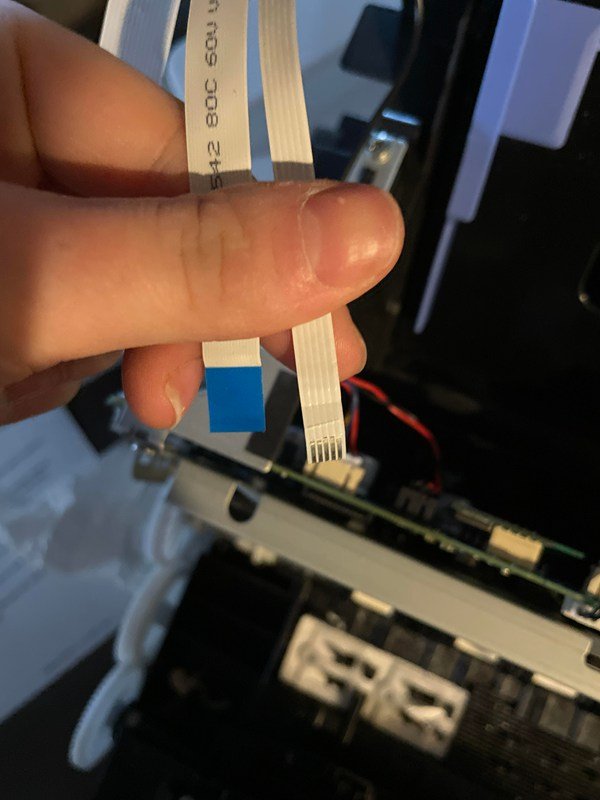
Ribbon cables work on a simple yet effective principle: multiple copper conductors are arranged side by side, insulated with PVC or Teflon, and laminated into a flat strip. This structure allows signals to travel in parallel, reducing wiring complexity.
- Space-saving: Compared to round cables, ribbon cables fit easily inside tight enclosures.
- Efficiency: A single ribbon cable can replace dozens of individual wires.
- Performance: When shielded, they minimize electromagnetic interference (EMI), critical for high-speed computing.
In practice, engineers select ribbon cables not just for convenience, but also for their reliability in applications where consistent data transfer is vital—like hard drive connections, display panels, and industrial computer systems.
| Parameter | Typical Value/Material | Notes / Benefits |
|---|---|---|
| Conductor Material | Copper (tinned / oxygen-free) | High conductivity, corrosion resistance |
| Insulation | PVC, PE, Teflon | Flexible, heat resistant, durable |
| Temperature Range | PVC: -20°C to +105°C | Teflon: up to +200°C |
| Electrical Rating | 30V–300V, 0.5–2A (typical) | Safe for signal and low-power circuits |
| Flexibility | Standard / High-flex (FFC) | Supports repeated bending in laptops |
| Shielding | None / Foil / Braided | EMI protection for high-speed computing |
| Certifications | UL, RoHS, ISO, REACH | Meets global compliance standards |
What is a ribbon cable used for?
Ribbon cables are used in computers for internal data and power connections, including linking motherboards to hard drives, optical drives, printers, and displays. Their flat design saves space while supporting stable, multi-channel signal transfer.
From desktop towers to slim ultrabooks, ribbon cables enable multiple key functions:
- Motherboard-to-drive connections (IDE/SATA legacy systems).
- Laptop screen to motherboard links (using FFC cables).

- Printer head and sensor connections.
- Industrial controllers and embedded PCs requiring compact wiring.
Which ribbon cable types are commonly used in computers?
The ribbon cable types most commonly used in computers are IDC ribbon cables for drives and motherboards, color-coded cables for easy assembly, FFC cables for laptops and compact devices, and shielded ribbon cables for high-speed or EMI-sensitive environments. Each type is chosen based on space limitations, performance requirements, and durability.
When it comes to computers, not all ribbon cables are created equal. Different systems and applications demand different cable structures, insulation, and connector types. Here’s a closer look at the main categories:
1. IDC Ribbon Cables (Insulation Displacement Connectors)
- Use Case: IDE hard drives, floppy drives, legacy motherboard connections.
- Advantages: Easy mass termination, durable press-fit IDC connectors.
- Pitch Sizes: Typically 2.54mm spacing, with 10–64 conductors.
- Why It Matters: Even in modern computing, IDC cables are still used for modular test equipment, internal diagnostic systems, and retrofitted computers.
2. Color-Coded Ribbon Cables
- Use Case: Assembly lines, OEM factories, quick identification needs.
- Advantages: Multicolor coding (rainbow pattern) makes it easy to spot pin #1, reducing wiring mistakes.
- Why It Matters: Reduces human error during production; crucial in large-scale manufacturing.
3. FFC Cables (Flexible Flat Cables)
- Use Case: Laptops, tablets, smartphones, cameras.
- Advantages: Ultra-thin, bendable, lightweight; can fit inside tight enclosures.
- Pitch Sizes: 0.3mm, 0.5mm, 1mm.
- Why It Matters: Without FFC cables, compact devices like ultrabooks would not be possible. They enable slim, modern designs by replacing bulky round cables.
4. Shielded Ribbon Cables
- Use Case: Gaming PCs, servers, industrial computers, and EMI-sensitive systems.
- Advantages: Aluminum foil or braided shielding reduces electromagnetic interference (EMI).
- Performance Boost: Tests show shielded ribbon cables can reduce data error rates by up to 35% compared to unshielded versions in high-frequency applications.
- Why It Matters: Critical for servers and data centers where even a tiny error can compromise performance.
Comparison Table for Quick Reference
| Cable Type | Typical Applications | Pitch Size | Key Advantage |
|---|---|---|---|
| IDC Ribbon Cable | Drives, legacy motherboards | 2.54mm | Reliable, easy mass termination |
| Color-Coded Ribbon | OEM production, assembly lines | 1.27–2.54mm | Easy identification, reduces errors |
| FFC (Flat Flexible) | Laptops, compact devices | 0.3–1.0mm | Ultra-thin, bendable, space-saving |
| Shielded Ribbon Cable | Servers, gaming PCs, industry | 0.5–2.54mm | EMI protection, high-speed stability |
In short, choosing the right ribbon cable type depends on the device design, space constraints, and performance requirements. For desktop and industrial PCs, IDC and shielded cables remain essential. For laptops and compact devices, FFC cables are the backbone of modern slim designs.
How do you identify ribbon cables?
You can identify ribbon cables by their flat shape, parallel conductors, pitch size (distance between wires), and connector type. Color coding or printed labels also help distinguish pin numbers and cable orientation.
Engineers typically check:
- Pitch sizes: 0.5mm, 1mm, or 2.54mm.
- Connector ends: IDC press-fit or custom FFC connectors.
- Color coding: First wire often marked red for orientation.
- Markings: Some cables carry printed specifications for quick reference.
How do ribbon cables improve computer performance and reliability?
Ribbon cables improve performance by saving space, reducing clutter, and ensuring stable parallel signal transmission. Shielded versions enhance reliability by minimizing crosstalk and interference.
Reliability in computers is all about clean, stable connections. Ribbon cables provide:
- Consistent signal flow for data-heavy tasks.
- Reduced crosstalk thanks to fixed conductor spacing.
- Durability in bending applications, especially with FFCs in laptops.
In industrial computers, shielded ribbon cables can improve system uptime by up to 20% compared to unshielded alternatives, reducing costly downtime.
| Performance Metric | Unshielded Ribbon Cable | Shielded Ribbon Cable |
|---|---|---|
| EMI Protection | Low, minimal shielding | High, up to 95% reduction |
| Signal Integrity | Prone to crosstalk | Stable at high frequencies |
| Data Error Rate | Higher vs. baseline | Reduced by up to 35% |
| Reliability (Uptime) | Standard | Improved by 15–20% |
| Typical Applications | Basic desktops, office printers | Recommended for gaming PCs, servers, industrial systems |
| Cost | Lower, budget-friendly | Moderate to higher, depends on shielding type |
How to tell if a ribbon cable is bad?
A bad ribbon cable shows signs like system errors, flickering displays, drives not detected, or visible wear (cracks, bent pins, broken insulation). Testing with a multimeter can confirm continuity issues.

Technicians often look for:
- Boot failures in desktops.
- Flickering laptop screens.
- Damaged insulation or burned marks.
- Loose IDC connections.
Preventive replacement of aging cables is a low-cost strategy to avoid major computer failures.
Do ribbon cables vary by connector type and application?
Yes, ribbon cables vary by connector type (IDC, FFC, custom) and application. They differ in pin counts, pitch sizes, and compatibility with drives, motherboards, or displays.
Ribbon cables are highly adaptable:
- IDC connectors dominate desktop PCs.
- FFC connectors serve portable electronics.
- Custom connectors allow design flexibility in OEM systems.
| Connector Type | Common Use Case | Typical Pitch |
|---|---|---|
| IDC | Hard drives, legacy motherboards | 2.54mm |
| FFC | Laptops, LCDs | 0.5–1.0mm |
| Shielded IDC | Servers, EMI-sensitive areas | 2.54mm |
How to connect two ribbon cables together?
Two ribbon cables can be connected using extension connectors, IDC couplers, or by soldering with heat-shrink tubing. The method depends on pitch size and application.
While possible, engineers usually recommend custom-length replacements to avoid signal loss. Sino-conn often provides bespoke solutions with faster lead times (2–3 days for samples, 2 weeks for volume orders).
Are custom ribbon cables worth it for computer projects?
Custom ribbon cables are worthwhile for unique computer projects requiring specific lengths, pin-outs, or shielding. They ensure compatibility, reduce clutter, and improve reliability, especially in professional or industrial setups.
Custom cables matter when:
- Space is extremely limited.
- EMI performance must be guaranteed.
- Specialized connectors are required.
Sino-conn provides no MOQ orders, fast prototyping (3 days), and certified compliance (UL, RoHS, ISO, REACH)—making it easier for engineers, OEMs, and traders to secure tailored solutions.
Conclusion:
The right ribbon cable isn’t just a piece of plastic and copper—it’s a safeguard for your computer’s performance and reliability. From IDC to FFC and shielded options, every type plays a unique role in ensuring smooth data transfer and stable power connections.
If you’re looking for customized ribbon cables with fast lead times, global certifications, and flexible pricing, Sino-conn is here to help. Contact us today to discuss your project and request a tailored quote.
Related Keywords :ribbon cables, computer cables, FFC cables, IDC ribbon cable, shielded ribbon cable, cable assemblies, custom cables, flat cable types, cable connectors, Sino-conn

With over 18 years of OEM/ODM cable assemblies industry experience, I would be happy to share with you the valuable knowledge related to leather products from the perspective of a leading supplier in China.
manufacturer catalogue
Custom Micro Coaxial Cable →
Custom RF Coaxial Cable Assembly →
Custom FFC(Flat Flexible Cable) →
Custom Patch Cable →
Custom Circular Connector Cables →
Custom D-Sub Analog Cable →
Custom Power Cord →
Custom Fiber Optical Transceiver →
Custom Receptacle Connectors →
Get A Sample Now From Factory→
Latest blogs


Here, developing your OEM/ODM custom cable assemblies collection is no longer a challenge—it’s an excellent opportunity to bring your creative vision to life.