 Skip to content
Which LVDS Connector Type Works Best for Modern Laptops
- andy
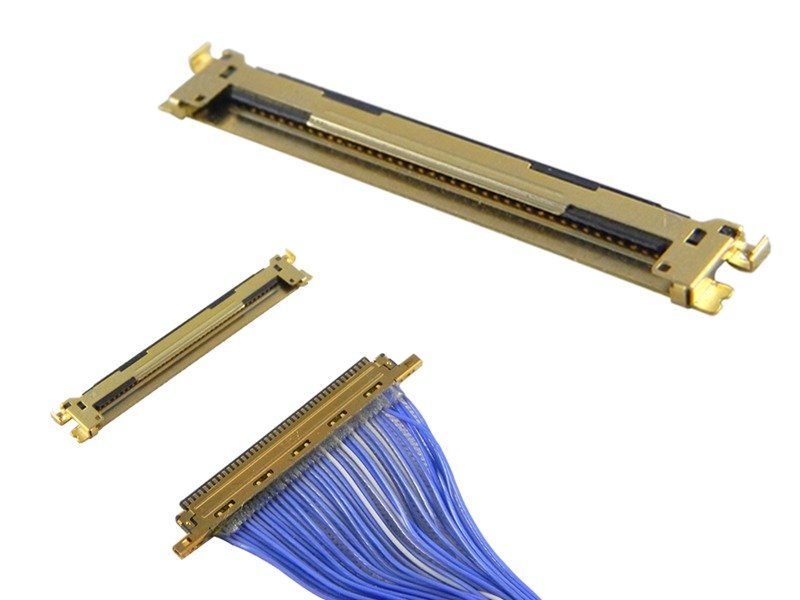
In today’s laptop market, performance isn’t only measured by CPU speeds or battery life—it’s also shaped by the smallest, unseen components that drive everyday experiences. One of these hidden heroes is the LVDS connector, the compact yet powerful interface that links a laptop’s motherboard to its display. Without it, your favorite video streams, crisp presentations, and immersive visuals simply wouldn’t exist.
The best LVDS connector type for laptops is usually a 30-pin or 40-pin connector, depending on the screen resolution and size. A 30-pin LVDS is common for standard HD displays (1366×768), while a 40-pin LVDS supports higher resolutions like Full HD (1920×1080) and larger panels. These connectors balance compact design, low power, and stable high-speed transmission.
Imagine opening your laptop on a busy morning: your video conference launches instantly, colors are sharp, and there’s no flicker in the display. That seamless experience is made possible by the right LVDS connector type, chosen carefully by engineers who know how much is at stake. In this article, we’ll break down the details, compare options, and help you understand which LVDS connector type works best for laptops—and why Sino-conn is the partner to trust for custom solutions.
What Is an LVDS Connector and How Does It Work?
An LVDS connector is a compact interface that transmits high-speed video signals from a laptop’s motherboard to its LCD screen using low-voltage differential signaling, minimizing interference and saving power.
LVDS, or Low-Voltage Differential Signaling, works by sending data across paired copper wires at very low voltages—usually under 350mV. This design keeps signal noise low while allowing fast transmission of video data, making it perfect for laptops where space is limited and efficiency is critical.
The connector itself is the “bridge” between the flexible flat cable (FFC) or harness and the display. Inside, finely crafted copper alloy pins ensure conductivity, while insulating plastics like PBT or LCP protect against heat and wear. Some models include shielding layers (foil or braided copper) to further suppress electromagnetic interference (EMI).

Compared to older parallel interfaces, LVDS connectors use fewer wires, take up less board space, and consume less energy. That’s why they became the laptop industry’s go-to solution over the past two decades.
Which LVDS Connector Types Are Commonly Used in Laptops?
The most common LVDS connector types in laptops are 20-pin, 30-pin, and 40-pin connectors, with 30-pin used for standard HD displays and 40-pin for Full HD or larger panels.
Laptop manufacturers usually select the LVDS connector type based on the screen’s size and resolution.
| Connector Type | Typical Display Use | Pitch | Notes |
|---|---|---|---|
| 20-pin LVDS | Small LCD screens (<12”) | 0.5mm | Entry-level or compact devices |
| 30-pin LVDS | 13–15” HD displays (1366×768) | 0.5mm | Most widely used in mid-range laptops |
| 40-pin LVDS | 15.6”+ Full HD (1920×1080) or higher | 0.3–0.5mm | Supports higher data rates and resolution |
- 20-pin connectors are rare today, found mostly in older models or small industrial displays.
- 30-pin connectors dominate mainstream laptops, striking a balance between size and performance.
- 40-pin connectors are essential for larger or higher-resolution screens, where more data lanes are needed.
Engineers also choose between straight vs right-angle connectors, ZIF (zero insertion force) vs non-ZIF, and with/without EMI shielding. Each decision affects assembly, durability, and cost.
How Do You Choose the Right LVDS Connector for a Laptop Display?
To choose the right LVDS connector for a laptop, match the screen’s resolution, size, and electrical requirements with connector specs such as pin count (20, 30, 40), pitch (0.3mm–0.5mm), voltage, current, shielding, and durability. A 30-pin suits HD panels, while a 40-pin supports Full HD and larger displays.
Selecting an LVDS connector is not as simple as picking a pin number off the shelf. Engineers and buyers need to balance performance, reliability, cost, and customization flexibility. Here’s a detailed breakdown of the key decision factors:
1. Screen Resolution & Size
- 30-pin LVDS: Best for 13–15” laptops with HD (1366×768) resolution.
- 40-pin LVDS: Required for 15.6”+ panels and Full HD (1920×1080) or higher.
- 20-pin LVDS: Rare, only for older or compact sub-12” designs.
The rule is simple: the higher the resolution, the more pins you need to carry additional data channels.
2. Voltage & Current Ratings
Connector pins are usually made of copper alloy plated with gold or tin. Gold plating ensures stable conductivity under repeated insertions and prevents oxidation. For laptops, current demands are modest, but stable low-voltage transmission is critical to avoid flickering or color distortion.

3. Pitch (Pin Spacing)
- 0.5mm pitch: Most common, balances compactness and durability.
- 0.3mm pitch: Used in ultra-thin laptops or tablets where board space is extremely limited.
- 1.0mm pitch: Found in older, larger designs but becoming obsolete.
4. Material Quality
- Insulators (PBT, LCP): Provide flame resistance and high-temperature stability.
- Shielding (aluminum foil, copper braid): Essential in laptops exposed to industrial or automotive EMI.
- Cable Jacket: Options like PVC, TPU, or halogen-free materials depend on safety and environmental requirements.
5. Shielding & EMI Performance
LVDS is inherently noise-resistant, but in high-density laptop motherboards, EMI can still cause artifacts or flicker. Shielded connectors or cables ensure compliance with strict EMC regulations in Europe and North America.
6. Flexibility & Durability

Laptop hinges put LVDS cables under constant stress. Sino-conn designs with:
- Tight bending radius support
- Reinforced strain relief
- Tested flex cycles exceeding 10,000 bends
This ensures connectors don’t fail after a few months of opening/closing the lid.
Comparison Table: Choosing the Right LVDS Connector
| Factor | 30-pin LVDS | 40-pin LVDS |
|---|---|---|
| Screen Size | 13–15” | 15.6”+ |
| Resolution | Up to HD (1366×768) | Full HD (1920×1080) or higher |
| Pitch | 0.5mm | 0.3–0.5mm |
| Typical Use | Mid-range laptops | High-end or large laptops |
| Cost | Lower | Higher |
| Availability | Very high | High but limited in some markets |
Why Sino-conn Makes the Difference
Sino-conn goes beyond standard catalog parts. We help clients:
- Analyze technical drawings and recommend optimal pinouts.
- Offer rapid prototypes (2–3 days) for urgent development.
- Provide CAD-to-PDF drawings for every order before production.
- Customize length, shielding, and materials based on environment (e.g., fireproof for medical, oil-resistant for industrial).
This means clients can minimize risks, accelerate product launches, and ensure their laptops deliver the seamless experience end-users expect.
Are LVDS Connectors Still Reliable Compared to Newer Interfaces?
Yes, LVDS connectors remain reliable for laptops, though newer standards like eDP and HDMI are increasingly common in high-end devices. LVDS is still favored for its cost-effectiveness, wide availability, and stability.
The debate often centers on LVDS vs eDP (Embedded DisplayPort). While eDP supports higher bandwidth and 4K resolutions, LVDS remains dominant in budget and mid-tier laptops. Why?
- Cost: LVDS connectors and cables are cheaper to produce.
- Availability: Large inventories of standard 30-pin/40-pin LVDS parts exist.
- Stability: Proven technology with fewer compatibility issues.
- Customization: Easier to adapt for non-standard designs.
Display Interface Comparison Table
| Interface Type | Typical Use Case | Resolution Support | Cost Level | Flexibility | Laptop Adoption |
|---|---|---|---|---|---|
| LVDS | Internal laptop displays (budget & mid-tier) | Up to Full HD (1920×1080) | Low | High (custom pinouts, shielding) | Still widely used |
| eDP | Premium laptops & ultrabooks | Up to 4K+ | Medium–High | Medium (standardized) | Increasing rapidly |
| HDMI | External monitors & TVs | 4K and beyond | Medium | Low (fixed spec) | Rarely used internally |
| MIPI DSI | Tablets, smartphones, some ultrathins | 2K–4K | Low–Medium | High (mobile focus) | Limited in laptop |
HDMI and MIPI interfaces are also alternatives, but they’re usually for external monitors or mobile devices. For internal laptop displays, LVDS still offers a balance of performance and value.
For businesses sourcing parts, this means LVDS connectors will continue to be a safe and scalable option for years—especially when paired with Sino-conn’s flexible design and manufacturing support.
Do Manufacturers Offer Custom LVDS Connector Solutions?
Yes, leading suppliers like Sino-conn provide customized LVDS connectors, including tailored cable lengths, pinouts, shielding, and material options—supported by certifications like UL, ISO, RoHS, and REACH.
Not every laptop design fits a standard connector. That’s why customization matters:
- Flexible Engineering: Adjust cable length, routing, and connector orientation.
- Pinout Customization: Match unique display or motherboard designs.
- Material Selection: Fire-resistant, oil-resistant, UV-resistant, or halogen-free options.
- Documentation: CAD drawings and samples within 2–3 days for fast development.
- Certification Support: UL, ISO, RoHS, REACH, and more to meet global compliance.
Lead Times (Typical):
- Samples: 2 weeks (as fast as 2–3 days for urgent orders)
- Mass Production: 3–4 weeks (2 weeks for priority orders)
Sino-conn also offers both original and replacement connectors. While original parts are popular in large-volume orders, replacement parts are flexible, cost-efficient, and readily available from stock—ideal for OEMs, repair centers, and smaller runs.
Conclusion
Choosing the right LVDS connector for laptops isn’t just about pin counts—it’s about balancing performance, cost, and customization. For standard HD laptops, a 30-pin LVDS is usually best, while larger or higher-resolution laptops rely on 40-pin LVDS connectors. With Sino-conn, clients gain more than just components—they gain a partner who delivers fast response times, no MOQ, full customization, and strict quality checks.
If you’re looking to upgrade, source, or customize LVDS connectors for your laptop projects, reach out to Sino-conn today. Our team can provide detailed drawings, accurate quotes, and tailored solutions that fit your timeline and budget.
Contact Sino-conn now to request a quote or start your custom LVDS connector project.
Related Keywords :lvds connector, laptop display connector, 30 pin lvds, 40 pin lvds, lvds vs edp, lcd cable connector, laptop screen cable, ffc lvds cable, display signal connector, sino-conn

With over 18 years of OEM/ODM cable assemblies industry experience, I would be happy to share with you the valuable knowledge related to leather products from the perspective of a leading supplier in China.
manufacturer catalogue
Custom Micro Coaxial Cable →
Custom RF Coaxial Cable Assembly →
Custom FFC(Flat Flexible Cable) →
Custom Patch Cable →
Custom Circular Connector Cables →
Custom D-Sub Analog Cable →
Custom Power Cord →
Custom Fiber Optical Transceiver →
Custom Receptacle Connectors →
Get A Sample Now From Factory→
Latest blogs


Here, developing your OEM/ODM custom cable assemblies collection is no longer a challenge—it’s an excellent opportunity to bring your creative vision to life.

