Skip to content
Which LAN Cable Connector Type Is Best for Networking
- andy

In today’s connected world, the smallest hardware decisions can make the biggest impact. You may not think about it often, but the type of LAN cable connector you choose can determine whether your network runs smoothly—or drives you crazy with downtime, slow speeds, or unstable signals. For homeowners streaming Netflix or IT managers building a 10G data center, the right connector is the unsung hero that keeps everything flowing.
The best LAN cable connector type depends on your application. For home and office networks, unshielded RJ45 plugs work well. In industrial or data center environments, shielded RJ45 connectors prevent interference. Keystone jacks are ideal for structured cabling, while tool-less and field termination plugs are designed for flexibility and fast installation. The “best” connector is the one that balances performance, durability, and compatibility with your LAN cables.
Now, imagine a scenario: a company’s entire video conferencing system crashes mid-meeting—not because of the software, but due to a low-quality connector failing. That one small detail disrupted business, wasted time, and cost money. This is why choosing the right LAN cable connector isn’t just technical—it’s strategic. Let’s dive into the types, differences, and factors that help you choose the right one.
What Is a LAN Cable Connector and How Does It Work
A LAN cable connector, usually an RJ45 plug, is the interface that connects Ethernet cables to devices like routers, PCs, or switches. It uses an 8P8C design—eight positions, eight contacts—that align with the twisted pairs inside the cable. By ensuring precise contact between wires and pins, LAN connectors enable stable high-speed data transmission across networks.
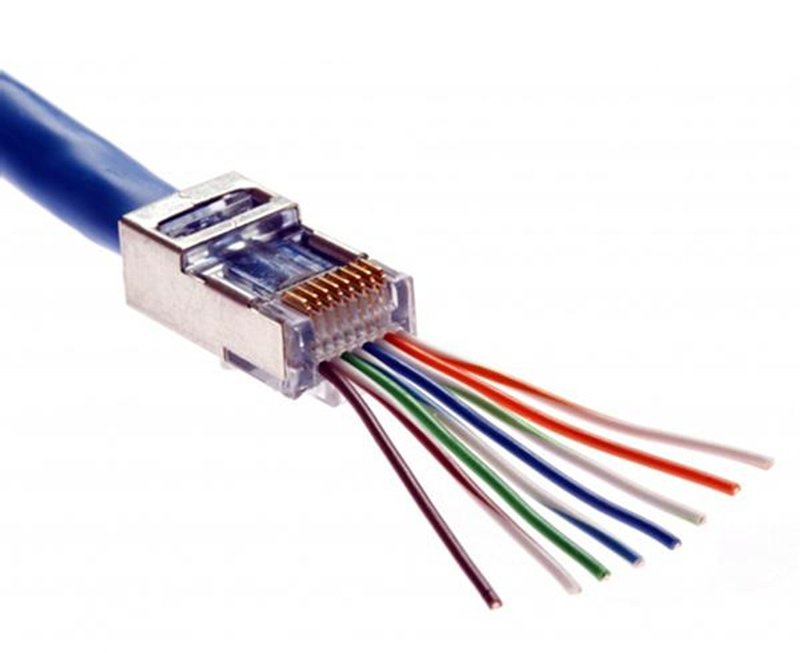
At its simplest, a LAN cable connector is like a translator between your device and your network cable. Inside every Ethernet cable, there are eight tiny wires twisted into four pairs. These wires need an organized way to meet the electronics of your laptop, router, or switch. That’s where the connector steps in.
The RJ45 standard, with eight pins, ensures each wire is perfectly aligned. These pins touch the device’s network port contacts, allowing electricity—and data packets—to flow smoothly. Without this tiny piece, your gigabit-capable Cat6 cable would just be a useless strand of copper.
There’s also a fascinating aspect of wiring: T568A and T568B standards. They define the color coding and sequence of the wires inside the connector. Get them wrong, and your network won’t work. That’s why precision in crimping and quality in the connector are non-negotiable.
In industrial networks or sensitive data centers, even the tiniest signal loss matters. That’s why shielded connectors (STP) exist—they include metal shielding around the connector to block electromagnetic interference (EMI). Imagine a factory full of heavy machines: without shielding, network traffic would be corrupted constantly.
So, whether you’re wiring your living room or managing thousands of ports in a server farm, the LAN connector is the unsung hero.
Which LAN Cable Connector Types Are Available
LAN cable connectors come in several types: unshielded RJ45 plugs for everyday use, shielded RJ45 connectors for high-interference environments, keystone jacks for structured cabling, tool-less connectors for quick installations, and field termination plugs for on-site custom builds. High-performance versions support Cat6A, Cat7, and Cat8 standards for 10G and higher speeds.
The world of LAN cable connectors is more diverse than most people realize. While the RJ45 plug dominates the market, it’s not the only player:
- Unshielded RJ45 (UTP) – These are the go-to choice for most homes and offices. Affordable, easy to use, and compatible with Cat5e–Cat6 cables.
- Shielded RJ45 (STP/FTP) – Ideal for noisy environments like data centers, hospitals, or manufacturing facilities. Their metal casing blocks interference.
- Keystone Jacks – Female connectors installed in wall plates or patch panels. Perfect for structured cabling in professional setups.
- Tool-less Connectors – Designed for speed. You don’t need a crimping tool—just push the wires in. Great for field work.
- Field Termination Plugs – Flexible solutions for on-site custom cables. Engineers love these because they reduce downtime.
- High-Speed Variants (Cat6A–Cat8) – Built to handle 10Gbps and beyond, making them essential for next-generation networks.
| Connector Type | Typical Use Case | Advantage | Limitation |
|---|---|---|---|
| UTP RJ45 | Home & Office LAN | Cost-effective | Less EMI protection |
| STP RJ45 | Data centers, factories | EMI resistance | Higher cost |
| Keystone Jack | Structured cabling systems | Professional look | Fixed installation |
| Tool-less Connector | On-site repairs, quick jobs | Easy installation | Less durable |
| Field Plug | Custom builds, OEM projects | Flexible, re-usable | Higher skill needed |
The variety ensures that every industry—whether it’s IT, industrial automation, or consumer electronics—has the right connector for its needs.
How to Choose the Best LAN Cable Connector
To choose the best LAN cable connector, you need to balance environment, performance, and cost. Unshielded RJ45 is enough for home and office networks, while shielded connectors suit industrial or EMI-heavy environments. High-speed Cat6A–Cat8 plugs are essential for 10G or higher bandwidth. Check for certifications (UL, ISO, RoHS), gold-plated contacts for durability, and whether customization is possible. The “best” connector is the one optimized for your exact application.
Here’s a quick decision matrix to match connector types with common requirements, before we dive deeper into the details
| Requirement / Constraint | Recommended Connector | Why It’s Best | Notes for Procurement (Sino-conn) |
|---|---|---|---|
| Light office LAN, ≤1 Gbps | UTP RJ45 (Cat5e/Cat6) | Cost-effective, easy termination | 3–6µ gold pins sufficient |
| High bandwidth 10 Gbps | Cat6A/Cat7/Cat8-rated plug | Maintains full channel performance | Verify plug–cable category match |
| Heavy EMI (factory, hospital) | Shielded RJ45 (STP/FTP) | Superior noise immunity | Specify drain wire/360° shield clamp |
| Modular walls & patch panels | Keystone Jack | Clean structured cabling | Match jack rating to cable category |
| Fast field install/retrofit | Tool-less / Field Termination | No crimp tool, fewer re-terminations | Great for OEM service teams |
| Custom pin-out / enclosure | Field Plug (custom) | Tailored wiring and housing | Sino-conn CAD drawing approval first |
| Compliance-critical export | Any, with UL/ISO/RoHS | Documentation ready for audits | Request COC/COO with shipment |
Choosing the right LAN cable connector is not about chasing the “most advanced” option, but about making a fit-for-purpose decision. Different customers—from engineers to OEM factories—care about different aspects. Let’s break it down:
1. Environment & Application
- Home & Office: A simple UTP RJ45 plug is cost-effective and reliable. For most Cat5e or Cat6 setups, this is sufficient.
- Industrial Plants & Data Centers: Machines, servers, and medical equipment generate electromagnetic interference (EMI). Here, STP RJ45 or FTP connectors with metal shielding are mandatory to keep signals clean.

- Professional Structured Cabling: Keystone jacks provide a neat, modular setup. Ideal when running dozens or hundreds of cables through walls and patch panels.
2. Cable Compatibility
Every connector is designed for certain cable categories:
Cat5e/Cat6 → standard RJ45 works.
Cat6A/Cat7/Cat8 → use high-speed rated connectors to ensure 10G+ performance.
If you mismatch (e.g., Cat8 cable with Cat5 connector), you bottleneck your network speed.
3. Materials & Build Quality
- Contacts: Look for gold plating on the pins. 3μ gold is budget-level, 6μ is mid-range, and 50μ gold offers maximum durability (10,000+ insertions).
- Housing: Polycarbonate or nylon plastic is standard; metal housings are used in shielded models for EMI resistance.
- Strain Relief: Prevents cable bending at the connector head, extending cable life.
4. Certifications & Standards
A connector that isn’t certified may cause compliance issues, especially for export markets. Look for:
- UL & ISO – Quality and safety standards.
- RoHS & REACH – Environmental compliance (important in EU).
- COC / COO – Certificate of conformity/origin, often required by customs or clients.
5. Customization & Flexibility
Clients often need adjustments:
- Length changes
- Pin-out reconfiguration
- Dual-head connectors
- Non-standard housings for special equipment
At Sino-conn, customization is our specialty. We can provide CAD drawings within 30 minutes to 3 days, depending on complexity, and production only starts after client approval. This ensures your connector is truly tailored to your needs.
6. Cost vs. Value
- Original branded connectors → Higher cost, longer lead time, less flexible. Preferred for big OEM projects with strict standards.
- Compatible connectors → Lower cost, faster delivery, and customizable. Performance is similar in most cases, making them the smarter choice for urgent or price-sensitive projects.
Comparison Table:
| Factor | Home/Office | Data Center/Factory | OEM/Custom Projects |
|---|---|---|---|
| Best Connector | UTP RJ45 | Shielded RJ45 (STP) | Field Plug / Tool-less |
| Key Advantage | Affordable | EMI protection | Flexible, customizable |
| Certification Need | Low | High (UL, ISO, RoHS) | High (ISO, CAD approval) |
| Typical Lead Time | 1 week | 2–4 weeks | 2–3 weeks (custom) |
Do LAN Cable Connectors Affect Network Speed and Stability
Yes, LAN cable connectors affect speed and stability. Poor-quality connectors increase resistance and signal loss, leading to slower data rates, dropped connections, and more interference. High-quality connectors with proper shielding and gold-plated contacts maintain reliable, high-speed transmission.
It’s easy to underestimate how much connectors matter. But ask any network engineer: the weakest link defines the system.
- Speed: A Cat6A cable rated for 10Gbps won’t deliver full performance if paired with a low-grade connector.
- Stability: Cheap connectors can loosen after a few insertions, causing intermittent outages.
- Durability: Professional connectors can handle 10,000+ insertions; cheap ones might fail after 500.
- Shielding: EMI can wreak havoc on data. Shielded connectors reduce packet loss and latency.
Real-world test results show that poor-quality connectors can reduce throughput by up to 30%. Imagine paying for gigabit internet and only getting 700 Mbps because of a connector—that’s money wasted.
Are All LAN Cable Connectors the Same
No, LAN cable connectors are not all the same. Genuine connectors from original brands ensure reliability but cost more. Alternatives or compatible versions are cheaper and faster to ship, with similar performance in many cases. The best choice depends on your budget, application, and whether customization is required.
This is where cost meets reality. Many customers ask: “Should I buy original or compatible?”
- Original connectors: More expensive, longer lead times, limited customization. Ideal for large projects needing brand certification.
- Compatible connectors: Cheaper, faster delivery, flexible customization, and often nearly identical performance.
At Sino-conn, both options are available. For urgent projects, compatible connectors are the practical solution. For long-term, brand-sensitive projects, originals may be required.
What Is the Difference Between a LAN Cable and Ethernet Cable
A LAN cable and Ethernet cable are often used interchangeably. Technically, Ethernet is the networking standard, while LAN (Local Area Network) describes the network itself. An Ethernet cable is the physical medium used to build a LAN.
The confusion is common. In practice, “LAN cable” usually means “Ethernet cable.” However, understanding the distinction helps when sourcing parts internationally.
- LAN: The overall system of devices connected together.
- Ethernet: The specific technology standard (IEEE 802.3).
- Ethernet Cable: The physical wiring, typically Cat5e–Cat8.
So when customers ask Sino-conn for a “LAN cable,” they usually mean Ethernet cable assemblies.
How to Connect Two LAN Cables Together
Two LAN cables can be connected using a coupler, keystone jack, or patch panel. The safest option is an RJ45 coupler, which maintains signal integrity while extending cable length.
Sometimes your cable just isn’t long enough. Rather than buying a whole new one, you can connect two cables.
- RJ45 Coupler: Quick and easy, just plug both cables in.
- Keystone Jack + Wall Plate: More professional and permanent.
- Patch Panel: Best for structured cabling in offices or data centers.
What Is the Difference Between RJ11 and RJ45
RJ11 connectors are 6P2C or 6P4C and used for telephones, while RJ45 connectors are 8P8C and used for Ethernet. RJ45 supports high-speed data; RJ11 is limited to voice.
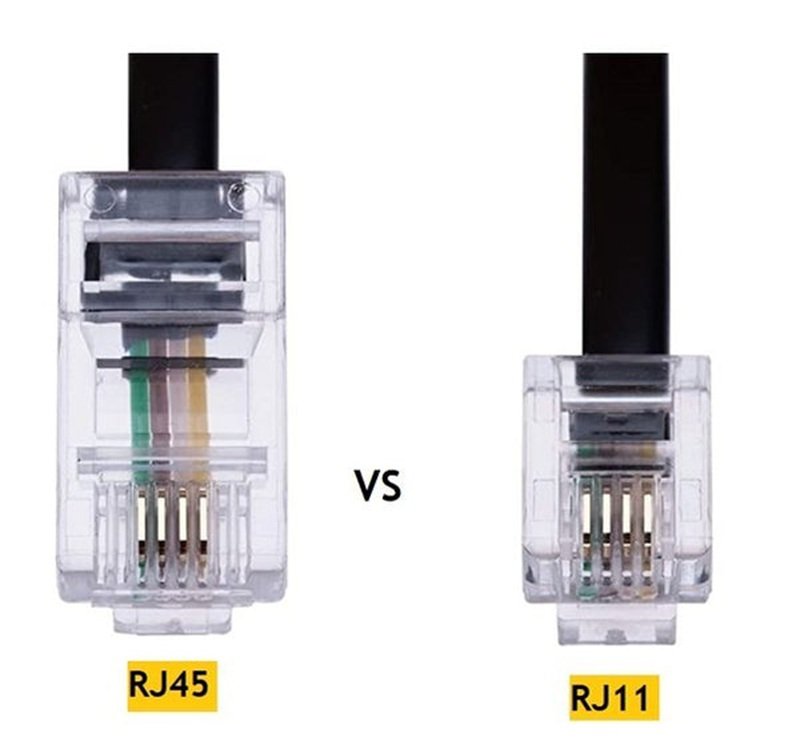
The similarity in appearance causes confusion, but they are not interchangeable. RJ11 is narrower and carries fewer wires. Plugging an RJ11 into an RJ45 port may physically fit but can damage the device. For networking, RJ45 is always the correct choice.
Choosing the best LAN cable connector isn’t about picking a single winner—it’s about finding the right match for your project. Whether you need shielded connectors for a factory, keystone jacks for structured cabling, or custom field plugs for OEM builds, the key is reliability, compatibility, and speed.
At Sino-conn, we specialize in tailored solutions—whether you need one prototype in three days or a bulk order in two weeks. No MOQ, fast response, accurate drawings, and full certifications are our promise.
Ready to upgrade your network reliability? Contact Sino-conn today to request a custom quote or technical consultation.
Related Keywords :LAN cable connector, RJ45 connector, keystone jack, shielded RJ45, Ethernet plug types, RJ11 vs RJ45, LAN vs Ethernet cable, how to connect LAN cables, best connector for Cat6, Sino-conn cable assemblies

With over 18 years of OEM/ODM cable assemblies industry experience, I would be happy to share with you the valuable knowledge related to leather products from the perspective of a leading supplier in China.
manufacturer catalogue
Custom Micro Coaxial Cable →
Custom RF Coaxial Cable Assembly →
Custom FFC(Flat Flexible Cable) →
Custom Patch Cable →
Custom Circular Connector Cables →
Custom D-Sub Analog Cable →
Custom Power Cord →
Custom Fiber Optical Transceiver →
Custom Receptacle Connectors →
Get A Sample Now From Factory→
Latest blogs


Here, developing your OEM/ODM custom cable assemblies collection is no longer a challenge—it’s an excellent opportunity to bring your creative vision to life.