 Skip to content
USB-C vs USB-A Cables: Differences & How to Choose
- andy

When you plug in your phone, laptop, or embedded device, you probably don’t think much about what’s happening inside the cable. Yet behind that simple click of connection lies decades of innovation — and two distinct standards that define modern connectivity: USB-C and USB-A.
These two connector types have become the foundation of digital power and data transmission — bridging billions of devices, from industrial controllers to smartphones.
In short, USB-C and USB-A link cables differ mainly in shape, data speed, and power capacity. USB-C supports higher data rates, faster charging (up to 240W), and reversible design, while USB-A remains essential for legacy systems and broad compatibility.
Understanding these differences isn’t just academic — it’s practical. Engineers designing industrial automation systems, or OEMs integrating USB ports into machinery, must choose cables that match performance demands, certification standards, and operating environments.
At Sino-conn, we’ve seen customers stuck mid-project due to overlooked cable specs — only to resolve it with a correctly shielded, custom-defined USB-C assembly. So, let’s dive deep into how these two connector types compare, and how you can make the right choice for your next design.
What Is a USB-C Link Cable and How Does It Work?
A USB-C link cable is a reversible 24-pin connector capable of transmitting high-speed data, power, and even video signals in a single compact form. It supports advanced standards such as USB 3.2, USB4, and Thunderbolt, allowing for up to 40 Gbps data transfer and 240W power delivery.
Definition and Function of USB-C
USB-C, or USB Type-C, was introduced to unify data, power, and video transmission across all devices. It’s compact, reversible, and can handle up to 20 volts and 5 amps, enabling powerful charging for laptops and high-current industrial devices.
Reversible Design and 24-Pin Architecture
Unlike USB-A, USB-C’s symmetrical 24-pin design means users can plug it in either way — no more flipping to find the “right” side. The connector supports multiple protocols through Alternate Mode, making it compatible with DisplayPort, HDMI, and PCIe data transmission.
Data Transfer and Power Delivery
USB-C supports USB 2.0 through USB4 standards. Depending on the version, data transfer speeds can range from 480 Mbps to 40 Gbps, and charging capacity from 15W to 240W. These specs make it ideal for industrial laptops, medical imaging systems, and embedded control devices.
Applications
You’ll find USB-C in modern smartphones, laptops, docking stations, and embedded boards. Its compact footprint also makes it perfect for OEM applications where space, efficiency, and reliability are critical — such as drones, automotive systems, and sensors.
What Is a USB-A Cable and Why Is It Still Common?
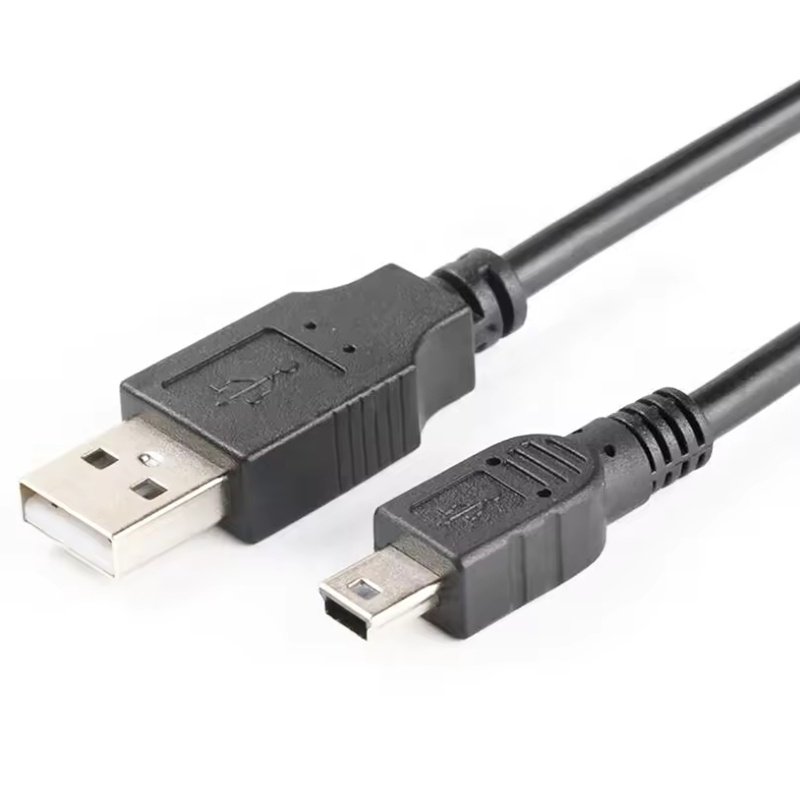
USB-A cables use the traditional rectangular connector, originally designed for USB 1.0 and 2.0 interfaces, and remain in use due to widespread legacy compatibility. They support power delivery up to 2.5W (USB 2.0) or 4.5W (USB 3.0) and data speeds up to 5 Gbps.
Overview of USB-A Structure and Function
USB-A connectors are flat and polarized — they only fit one way. Despite their age, they remain the standard interface for computers, power banks, and embedded controllers. Their simplicity and mechanical durability make them reliable for industrial-grade devices.
Compatibility with USB 2.0 / 3.0 / 3.2 Standards
Over time, USB-A evolved through several generations:
USB 2.0: 480 Mbps
USB 3.0: 5 Gbps
USB 3.1 / 3.2: Up to 10 Gbps
Even with new USB-C adoption, USB-A ports remain common in industrial and commercial environments where older peripherals must stay compatible.
Role in Legacy Systems
USB-A is vital in factories, labs, and OEM test stations where long-established hardware systems depend on traditional connections. Engineers often request custom USB-A assemblies with enhanced EMI shielding to integrate old and new technologies.
Limitations Compared to USB-C
While USB-A remains durable, it lacks reversibility, has lower power capacity, and doesn’t support modern protocols like DisplayPort Alt Mode or high-wattage PD charging.
What Are the Key Differences Between USB-C and USB-A Cables?

USB-C and USB-A cables differ in connector design, data transfer speed, power delivery, and overall system adaptability.
USB-C was created as a universal solution capable of handling higher power, faster data rates, and more flexible applications. USB-A, while older, remains widely used for its simplicity and compatibility with existing hardware.
Understanding the distinctions between these two standards helps engineers and OEM designers make informed decisions about interface selection, backward compatibility, and long-term product planning.
1. Connector Design and Form Factor
The most visible difference is physical. USB-A uses a large, rectangular plug that only fits in one orientation. It’s familiar, but mechanically limited — the connector measures around 12.0 × 4.5 mm and was designed when devices had plenty of port space.
USB-C, by contrast, features a reversible 24-pin design that measures just 8.4 × 2.6 mm.
This symmetry allows users to insert it either way, reducing wear on ports and improving user experience.
From an engineering perspective, its smaller footprint makes USB-C suitable for compact electronics, embedded systems, and industrial controllers where PCB space is at a premium.
2. Power Delivery and Electrical Capacity
Power handling is one of the most significant differences between USB-A and USB-C.
| Feature | USB-A 2.0 | USB-A 3.0 / 3.2 | USB-C (PD 3.1) |
|---|---|---|---|
| Voltage | 5V | 5V | 5V–48V |
| Current | 0.5A–0.9A | 0.9A–1.5A | Up to 5A |
| Max Power | 2.5–7.5W | 4.5–7.5W | Up to 240W |
| Charging Protocol | BC1.2 | QC 2.0–3.0 | USB Power Delivery (PD) |
USB-C supports USB Power Delivery (PD), which enables intelligent communication between the device and charger to negotiate voltage and current levels. This dynamic control allows a single cable to safely charge anything from a smartphone to a 240W workstation.
USB-A cables, on the other hand, are limited to 5V output and cannot support higher voltages.
This makes them ideal for small peripherals — but not for high-power applications like industrial displays, laptops, or embedded PCs.
3. Data Transfer Speed
Data transfer capability has evolved with each USB generation, but the physical interface still affects real-world performance.
| USB Version | Connector Type | Max Speed | Typical Use |
|---|---|---|---|
| USB 2.0 | USB-A | 480 Mbps | Basic peripherals, keyboards, mice |
| USB 3.0 / 3.2 Gen 1 | USB-A / USB-C | 5 Gbps | External drives, industrial sensors |
| USB 3.2 Gen 2 | USB-A / USB-C | 10 Gbps | HD cameras, data acquisition |
| USB4 / Thunderbolt 4 | USB-C only | 40 Gbps | Docking stations, 8K video, high-speed computing |
While USB-A can technically reach up to 10 Gbps (USB 3.2 Gen 2), the USB-C interface unlocks the full potential of USB4 and Thunderbolt, enabling multiple lanes of simultaneous data, video, and power transmission.
This makes USB-C especially valuable for data-heavy industrial equipment, AI systems, or medical imaging where large files must transfer without latency or interference.
4. Signal Integrity and EMI Protection
In modern high-speed applications, electromagnetic interference (EMI) becomes a major design challenge.
USB-C cables are typically better shielded and built with twisted-pair differential lines to reduce crosstalk and maintain clean signal transmission at gigabit speeds.
USB-A cables, depending on design, may lack these advanced shielding layers, especially in older or low-cost variants.
For industrial use, multi-layer shielding (foil + braid + drain wire) and controlled impedance (~90Ω differential) are essential to ensure data stability — regardless of connector type.
In environments with high EMI (e.g., automation lines or automotive systems), engineers should prioritize custom USB assemblies that specify cable geometry, shield coverage, and connector grounding to maintain signal integrity.
5. Compatibility and System Integration
USB-A has the advantage of legacy ubiquity — countless existing PCs, control units, and peripheral devices rely on it. For long-term industrial support, it remains irreplaceable.
USB-C, however, supports backward compatibility through adapters while offering forward scalability for new generations of equipment.
It can replace multiple ports by handling power, data, and video simultaneously — simplifying designs and reducing total connector count.
From an integration perspective:
- USB-A is best for mature products or where certification and testing have already locked the design.
- USB-C suits new product lines, modular systems, or any project requiring compact, high-efficiency interfaces.
6. Durability and Mechanical Reliability
Connector durability is critical in OEM and field-use environments.
- USB-A: Typically rated for around 5,000 insertion cycles.
- USB-C: Rated for 10,000 cycles or more, due to improved pin design and balanced contact geometry.
In industrial or medical applications where cables are frequently reconnected, this difference translates directly into lower maintenance costs and fewer mechanical failures over time.
USB-C’s compact pin layout also distributes stress more evenly, reducing contact wear.
7. Which One Is Better – USB-A or USB-C?
The answer depends entirely on application, environment, and lifecycle goals.
- Choose USB-C when:
- Devices require high-speed data or high-wattage charging.
- Compact design, reversible plug, or multi-function capability (video + power) are priorities.
- You’re designing next-generation OEM equipment or industrial PCs.
- Choose USB-A when:
- You need compatibility with existing systems or test equipment.
- The product is cost-sensitive and doesn’t require PD or USB4 speeds.
- You value mechanical simplicity over compactness.
In short, USB-C leads the future of connectivity, but USB-A remains the stable bridge for today’s mixed-generation hardware.
A balanced approach — supporting both — is often the most practical for OEMs transitioning their product lines.
8. Engineering Insight: Practical Design Considerations
From an OEM engineering standpoint, the transition to USB-C also means reconsidering cable impedance control, connector footprint, and pinout customization.
Designers must evaluate:
- Differential pair routing for USB4 speeds
- Ground return paths to minimize EMI
- Thermal considerations at high PD loads
- Material selection (e.g., LSZH jackets for flame resistance)
These design choices influence long-term reliability as much as connector type itself.
For instance, upgrading from a standard USB-A to a fully shielded USB-C assembly might reduce signal errors by 30–50% in high-EMI environments — without changing the core electronics.
In engineering terms:
- USB-C = higher data, higher power, smaller form factor, future-ready
- USB-A = stable, simple, highly compatible, legacy-friendly
Both remain relevant — the key is matching the interface to your device’s technical and operational needs.
Choosing correctly can prevent field failures, improve efficiency, and ensure your product meets modern performance standards.
How Do You Choose Between USB-C and USB-A Link Cables?
Choosing between USB-C and USB-A depends on your device requirements, data speed, charging needs, and the environment in which the cable will operate.
Which One Do You Need for Your Device?
If you’re developing a new product, check device ports and voltage requirements. USB-C is ideal for USB 3.1+ applications; USB-A suits devices with traditional host connections.
Environmental Factors
Industrial systems may face vibration, oil, or temperature extremes. Sino-conn’s engineers recommend TPE or LSZH jackets with added EMI shielding to maintain stable performance in such conditions.
Cable Length, OD, and Material
Longer cables introduce voltage drop. USB-C PD cables under 2m maintain optimal 100W charging. Custom assemblies can be built with adjusted conductor gauge and multi-layer shielding to balance flexibility and performance.
Safety and Shielding
Certified cables (UL, ISO, RoHS) prevent overheating and ensure safety compliance in regulated industries. Non-certified cables often cause data loss or short circuits during high-current operation.
When to Transition to USB-C
For new-generation OEM designs, especially where devices support USB4 or Thunderbolt 4, transitioning to USB-C ensures forward compatibility and longer lifecycle support.
Do USB-C and USB-A Cables Support the Same Charging and Data Protocols?
No, USB-C supports newer, higher-power delivery and faster data standards, while USB-A is limited by its legacy electrical design.
Power Delivery and Charging
USB-C supports USB PD (Power Delivery) with dynamic voltage negotiation (5V–20V, up to 5A). USB-A relies on fixed 5V output, suitable for smaller peripherals.
Backward Compatibility
Adapters can bridge USB-A and USB-C, but data and charging speeds default to the lowest supported protocol. OEMs must test mixed setups to ensure signal integrity.
Data and Power Combined
USB-C enables simultaneous video, data, and power through Alternate Mode, supporting interfaces like DisplayPort and HDMI. USB-A cannot transmit video signals.
Certification Standards
High-quality cables undergo testing under UL, ISO, RoHS, and REACH. Sino-conn ensures 100% inspection, verifying continuity, insulation, and shielding performance.
Risks of Low-Quality Cables
Cheap cables may use undersized conductors, leading to overheating, EMI interference, or unstable current delivery — especially critical in industrial environments.
How Does Sino-conn Customize USB-C and USB-A Link Cable Assemblies?
Sino-conn designs and manufactures custom USB-C and USB-A cable assemblies for OEM, industrial, and medical applications — offering complete flexibility in design, length, material, and certification.
Customization Capabilities
Customers can define length, pin assignment, shielding layers, and connector combination. Sino-conn supports both standard and hybrid cables (e.g., USB-C to USB-A).
Engineering Support
We provide CAD/PDF drawings within 3 days — often within 30 minutes for standard designs. Production begins only after client approval, ensuring accuracy.
Material and Certification
Cables can be built with PVC, TPE, LSZH, or halogen-free jackets. All assemblies comply with UL, ISO, RoHS, REACH, and PFAS.
Lead Time
Samples: 2–3 days for urgent orders
Mass production: 2–4 weeks
Rapid prototyping helps engineers validate performance before scaling up.
Original vs. Replacement Connectors
We offer both brand-name (original) and replacement connectors, balancing performance and cost flexibility for different market needs.
Quality Assurance
Every assembly undergoes three inspections — in-process, final, and pre-shipment — ensuring 100% functionality, consistency, and reliability.
Frequently Asked Questions About USB-C vs USB-A Cables
Are USB-C cables backward compatible with USB-A ports?
Yes, through adapters, but speeds and charging rates depend on the lowest device standard.
Do USB-C cables charge faster than USB-A?
Yes, due to USB Power Delivery (PD) up to 240W, compared to USB-A’s maximum 4.5W (USB 3.0).
Can I use the same cable for data and power?
With USB-C, yes — it supports simultaneous transmission; USB-A is limited.
What’s the lifespan difference?
USB-C typically endures 10,000 plug cycles; USB-A about 5,000.
Does Sino-conn make hybrid USB-C to USB-A cables?
Yes. Custom hybrid cables are a popular OEM request, offering compatibility between old and new equipment.
Conclusion:
The evolution from USB-A to USB-C represents the natural progression toward faster, smaller, and more versatile connectivity. But for many engineers and OEMs, legacy equipment still anchors the present — meaning both connectors play vital roles.
At Sino-conn, we help clients bridge this gap. Whether you need ruggedized USB-A assemblies for industrial control panels or high-speed USB-C harnesses for next-gen devices, our engineering team provides fast drawings, flexible customization, and full certification.

Ready to design your own custom USB-C or USB-A cable?
contact Sino-conn today for a free consultation, quick drawing turnaround, and tailored manufacturing solution.
Your design. Our precision. Connectivity engineered to perform.
Related Keywords :USB-C vs USB-A, USB link cable, USB Type-C cable, USB-A connector, custom USB cable assembly, OEM USB cable, industrial USB cable, USB-C power delivery, USB-A data cable, Sino-conn cable manufacturer

With over 18 years of OEM/ODM cable assemblies industry experience, I would be happy to share with you the valuable knowledge related to leather products from the perspective of a leading supplier in China.
manufacturer catalogue
Custom Micro Coaxial Cable →
Custom RF Coaxial Cable Assembly →
Custom FFC(Flat Flexible Cable) →
Custom Patch Cable →
Custom Circular Connector Cables →
Custom D-Sub Analog Cable →
Custom Power Cord →
Custom Fiber Optical Transceiver →
Custom Receptacle Connectors →
Get A Sample Now From Factory→
Latest blogs


Here, developing your OEM/ODM custom cable assemblies collection is no longer a challenge—it’s an excellent opportunity to bring your creative vision to life.

