 Skip to content
What Are USB Cable Types and How to Choose
- andy
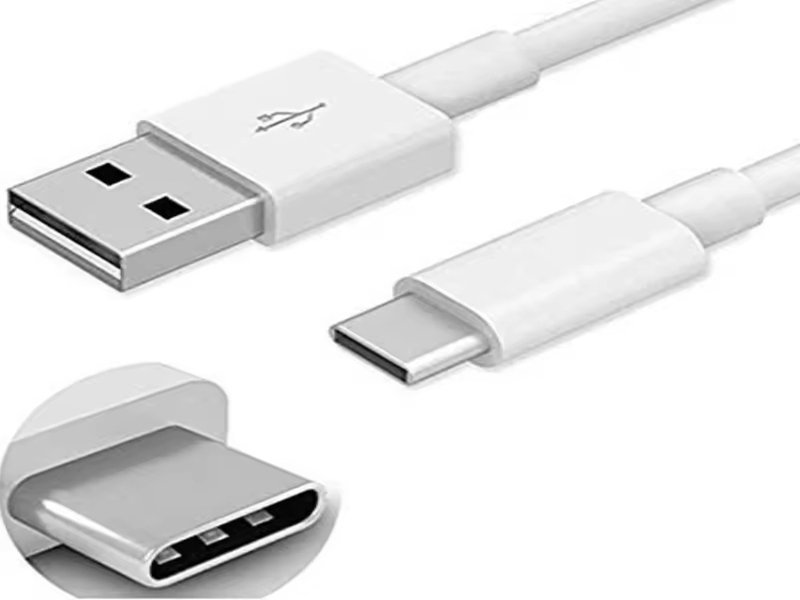
In today’s world, nearly every electronic device depends on USB cables. Whether you’re charging your smartphone, transferring files from a camera, or plugging in an external hard drive, USB cables are the invisible lifelines of modern technology. Yet most people don’t really know the difference between USB-A, USB-B, Micro USB, or USB-C—until they buy the wrong one. The result? Slow charging, failed data transfers, and a whole lot of wasted time.
USB cable types refer to the different shapes, sizes, and specifications of Universal Serial Bus cables, such as USB-A, USB-B, Micro USB, and USB-C. They are used for powering devices, transferring data, and enabling multi-function connectivity. Each type differs in connector design, data speed, and power delivery, which is why choosing the right USB cable matters for performance, compatibility, and durability.
The global USB cable market is valued at billions of dollars, and with USB-C becoming the universal standard, choosing the right type has never been more important. Imagine plugging in a new device only to realize the cable doesn’t fit—or worse, it charges five times slower than expected. This article will guide you through everything you need to know about USB cable types, from materials and construction to differences in usage. Stick with us to avoid common mistakes and learn how Sino-conn helps businesses and engineers customize cables to exact specifications.
What Are USB Cable Types?
USB cable types are the variations of Universal Serial Bus connectors, including USB-A, USB-B, Micro USB, Mini USB, and USB-C. They enable power delivery, data transfer, and device connectivity. Each type has unique physical designs and technical standards that determine compatibility and performance.
USB cable types define how devices communicate and charge. At their core, USB cables are made up of conductors, insulation, shielding, and connectors. The “type” refers to both the connector shape (A, B, Micro, C) and the standard (USB 2.0, 3.0, 3.1, etc.).
For example:
- USB-A is the rectangular connector found on most PCs.
- USB-B is often used in printers and industrial equipment.
- Micro USB was the standard for older Android phones and power banks.
- USB-C is the new reversible connector used in laptops, tablets, and modern smartphones.
These cables not only provide physical connectivity but also dictate speed (480 Mbps in USB 2.0 vs up to 40 Gbps in USB4) and power delivery (5V/1A vs USB-C PD supporting up to 100W).
Quick Comparison of USB Cable Types
| USB Type | Connector Shape | Common Devices | Max Data Speed | Power Delivery |
|---|---|---|---|---|
| USB-A | Rectangular, flat | PCs, chargers, accessories | 480 Mbps – 10 Gbps | Up to 5V/3A |
| USB-B | Square, bulky | Printers, scanners, industrial | 480 Mbps | Up to 5V/500mA |
| Micro USB | Small, flat tapered | Older phones, cameras, power banks | 480 Mbps | Up to 5V/2A |
| USB-C | Slim, oval, reversible | Modern laptops, tablets, smartphones | Up to 40 Gbps | Up to 100W (USB-C PD) |
From a consumer’s perspective, the “type” determines whether a device works seamlessly or struggles. From a manufacturer’s perspective, such as Sino-conn, the type dictates how the cable should be engineered for durability, safety, and certification. Many industries rely on custom-made USB cables—medical, automotive, industrial, and consumer electronics all require precise configurations that standard off-the-shelf cables can’t deliver.
Which Materials Are Used in USB Cables?
USB cables use copper conductors, PVC or TPE insulation, aluminum foil or braided shielding, and protective outer jackets. Higher-end cables may include silver-plated conductors, silicone insulation, or nylon-braided jackets for added flexibility and durability.

The performance of a USB cable depends heavily on its materials. For conductors, copper remains the gold standard due to its excellent conductivity. Some cables use tinned copper to resist oxidation, while premium versions use silver-plated copper for reduced resistance.
Insulation matters as well. PVC is cost-effective and widely used, while TPE/TPU are more eco-friendly and flexible. For applications requiring extreme durability, silicone insulation withstands heat and stress. Shielding is crucial for minimizing electromagnetic interference (EMI). Most USB cables combine aluminum foil with braided copper shielding to ensure data integrity in noisy environments.
Outer jackets range from soft PVC to braided nylon, which offers abrasion resistance and style. Industrial and medical clients often request flame-retardant, halogen-free, or UV-resistant materials to meet strict safety standards.
Sino-conn offers clients flexibility in materials, ensuring cables are not just functional but aligned with certifications like UL, ISO, RoHS, and REACH.
How Many USB Cable Types Exist Today?
There are several USB cable types, including USB-A, USB-B, Mini USB, Micro USB, and USB-C. Each comes in versions like USB 2.0, 3.0, 3.1, and USB4, which differ in speed and power delivery. Specialty cables also exist, such as USB-to-HDMI or USB-to-Lightning.
When users ask, “What are the different types of USB cables?” the answer spans connector designs and protocol generations. The main families are:
| Type | Common Use | Data Speed | Power Delivery |
|---|---|---|---|
| USB-A | PCs, chargers | 480 Mbps–10 Gbps | Up to 5V/3A |
| USB-B | Printers, scanners | 480 Mbps | 5V/500mA |
| Micro USB | Phones, cameras | 480 Mbps | 5V/2A |
| USB-C | Modern devices | Up to 40 Gbps | Up to 100W |
USB-C has emerged as the universal connector. Its reversible design, combined with Power Delivery and DisplayPort capabilities, makes it essential in smartphones, laptops, and industrial equipment. However, USB-A and Micro USB still dominate legacy systems, meaning businesses must often stock multiple types.
Sino-conn supports all these variations, including specialty custom cables like USB-C to HDMI and USB-A to Lightning, meeting both consumer and industrial needs.
Do Different USB Cable Types Solve Different Problems?
Yes. Different USB cable types are designed to solve specific problems—from legacy device compatibility to delivering ultra-fast data transfer and high-power charging. USB-A, USB-B, Micro USB, and USB-C each serve different generations of devices and user needs, which is why businesses and end-users still encounter all of them in the market today.
What is the difference between USB-A, USB-B, and USB-C cables?
- USB-A: The most common, flat, rectangular port you see on computers and chargers. It’s durable and reliable but limited in power delivery and only supports one orientation. Perfect for legacy devices and basic charging.
- USB-B: Typically square-shaped and used in printers, scanners, and some industrial equipment. While it’s not as common for consumers, many factories and labs still rely on USB-B for heavy-duty connectivity.

- USB-C: The new industry standard. It’s small, oval, reversible, and capable of supporting lightning-fast data speeds up to 40Gbps, video output (DisplayPort/HDMI Alt Mode), and high-power charging up to 100W. USB-C is now found in laptops, smartphones, medical devices, and even EV chargers.
Quick Comparison: USB-A vs USB-B vs USB-C
| Feature | USB-A | USB-B | USB-C |
|---|---|---|---|
| Shape | Flat, rectangular | Square, bulky | Slim, oval, reversible |
| Common Devices | PCs, chargers, accessories | Printers, scanners, lab devices | Smartphones, laptops, tablets, EVs |
| Max Data Speed | Up to 10 Gbps (USB 3.1) | 480 Mbps | Up to 40 Gbps (USB4) |
| Power Delivery | Up to 5V/3A | Up to 5V/500mA | Up to 100W with USB-C PD |
| Main Advantage | Widely compatible, durable | Strong for industrial equipment | Fast, future-proof, supports data+video |
How do I know if my USB is A or C?
It’s easy to tell them apart visually:
- USB-A: Rectangular, larger, only plugs in one way.
- USB-C: Slim, oval-shaped, and reversible—you can plug it in either direction.
If you’re unsure, just check your device’s charging port: older laptops and power banks usually use USB-A, while newer models, especially Apple MacBooks, iPads, and flagship Android phones, use USB-C.
Do I want USB-A or USB-C?
The answer depends on your devices:
- Choose USB-C if you want future-proof speed, faster charging, and multi-function support. It’s ideal for new devices and businesses developing next-gen products.
- Stick with USB-A if your setup includes older devices, printers, or peripherals that don’t support USB-C yet.
Beyond Consumer Use: Industry Applications
For businesses, the choice is not just about compatibility but about application scenarios:
- OEM factories: USB-C for laptops, phones, and modern electronics; USB-A for backward compatibility.
- Medical equipment manufacturers: Prefer USB-C for its data stability and higher power delivery, often combined with biocompatible, halogen-free insulation.
- Industrial clients: Still rely on USB-B for robaustness in printers and CNC machinery but increasingly shift to USB-C for automation systems.
Sino-conn’s Role
At Sino-conn, we don’t just sell cables—we engineer custom solutions. Many clients come to us asking whether USB-A or USB-C is “better.” Our answer is always: it depends on your device and your industry. That’s why we design cables that:
- Combine multiple connector types (e.g., USB-A to USB-C, or USB-C to Micro USB).
- Adjust shielding and materials to withstand EMI in industrial or medical environments.
- Provide flexible options: genuine brand connectors for high-end projects, and cost-effective alternatives for volume production.
How to Select the Right USB Cable Type for Your Needs?
Choose USB cable types based on device compatibility, data transfer needs, charging speed, and durability requirements. For modern devices, USB-C is preferred; for legacy systems, USB-A or Micro USB may still be necessary.

Selecting a USB cable is not just about fit—it’s about performance. Engineers must consider EMI shielding, impedance, bending radius, and compliance with certifications. For OEM factories, Sino-conn customizes cables by adjusting length, pin-out, shielding, and connector materials.
For trade buyers, Sino-conn supplies detailed datasheets and drawings within 1–3 days, ensuring clients understand every detail before production. For engineers, Sino-conn offers prototype samples in as little as 3 days, accelerating project timelines.
In real-world applications:
- Gamers need low-latency, durable USB-C cables.
- Industrial clients require flame-retardant jackets.
- Medical clients need biocompatible, halogen-free materials.
Sino-conn balances price, lead time, and quality, offering both genuine and alternative connectors depending on budget and urgency.
Conclusion
USB cable types may look simple, but the right choice affects charging speed, device compatibility, and overall performance. From USB-A to USB-C, and from PVC to nylon-braided shielding, the details matter.
At Sino-conn, we specialize in custom USB cable assemblies that meet unique client demands—whether you’re a trade distributor, OEM factory, or an R&D engineer. With fast drawings, flexible customization, and certified quality, we help you reduce risks and gain a competitive edge.
Ready to upgrade your USB solutions? Contact Sino-conn today for a tailored quotation and custom cable design.
Related Keywords :usb cable types, usb-a vs usb-c, types of usb connectors, usb cable materials, usb-c fast charging, custom usb cables, usb 2.0 vs 3.0, sino-conn usb cables, usb cable uses, usb cable guide

With over 18 years of OEM/ODM cable assemblies industry experience, I would be happy to share with you the valuable knowledge related to leather products from the perspective of a leading supplier in China.
manufacturer catalogue
Custom Micro Coaxial Cable →
Custom RF Coaxial Cable Assembly →
Custom FFC(Flat Flexible Cable) →
Custom Patch Cable →
Custom Circular Connector Cables →
Custom D-Sub Analog Cable →
Custom Power Cord →
Custom Fiber Optical Transceiver →
Custom Receptacle Connectors →
Get A Sample Now From Factory→
Latest blogs


Here, developing your OEM/ODM custom cable assemblies collection is no longer a challenge—it’s an excellent opportunity to bring your creative vision to life.

